> ## Documentation Index
> Fetch the complete documentation index at: https://docs.rulebase.co/llms.txt
> Use this file to discover all available pages before exploring further.
# Changelog
> Product updates and announcements
## Submit and validate manual evaluations
[Manual evaluations](/guides/quality-assurance/perform-a-manual-evaluation) can now move through a validation loop. For team members who cannot provide model-training feedback, selecting **Submit for review** publishes their manual score immediately and creates a validation submission. Routing rules for **Evaluation approval is requested** can assign the conversation to a reviewer, queue, or role.
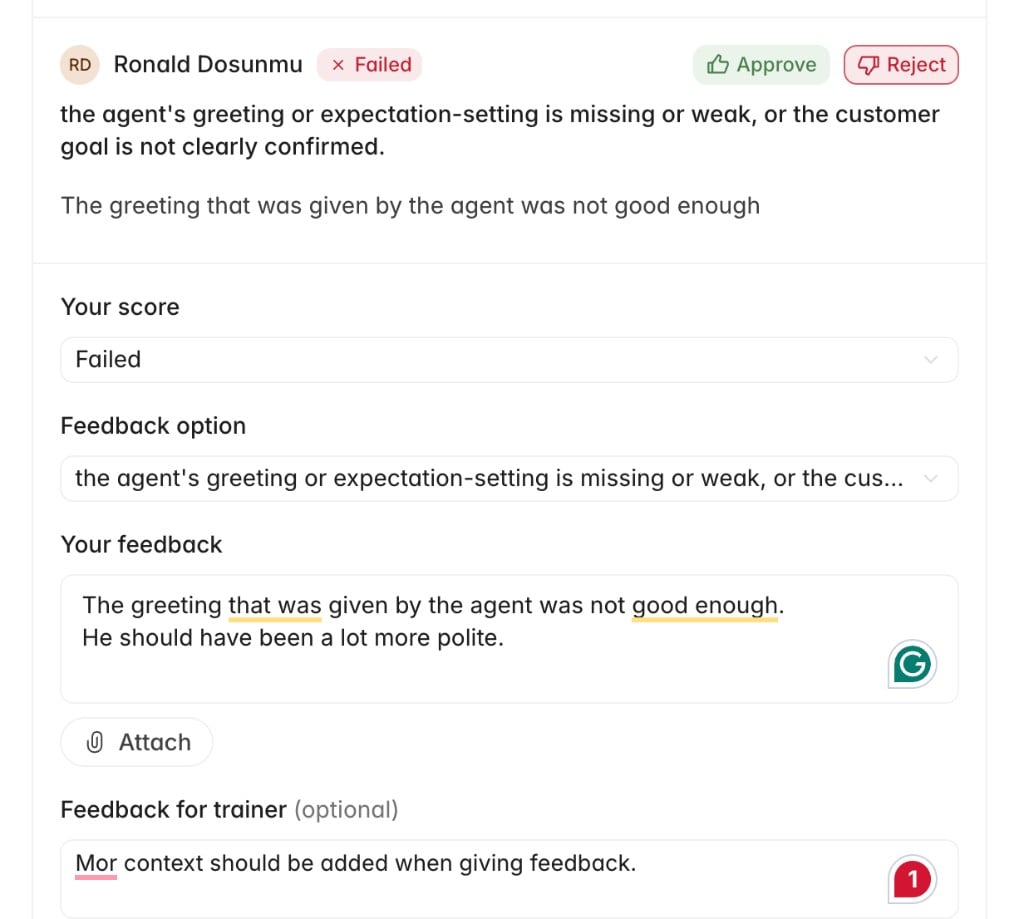
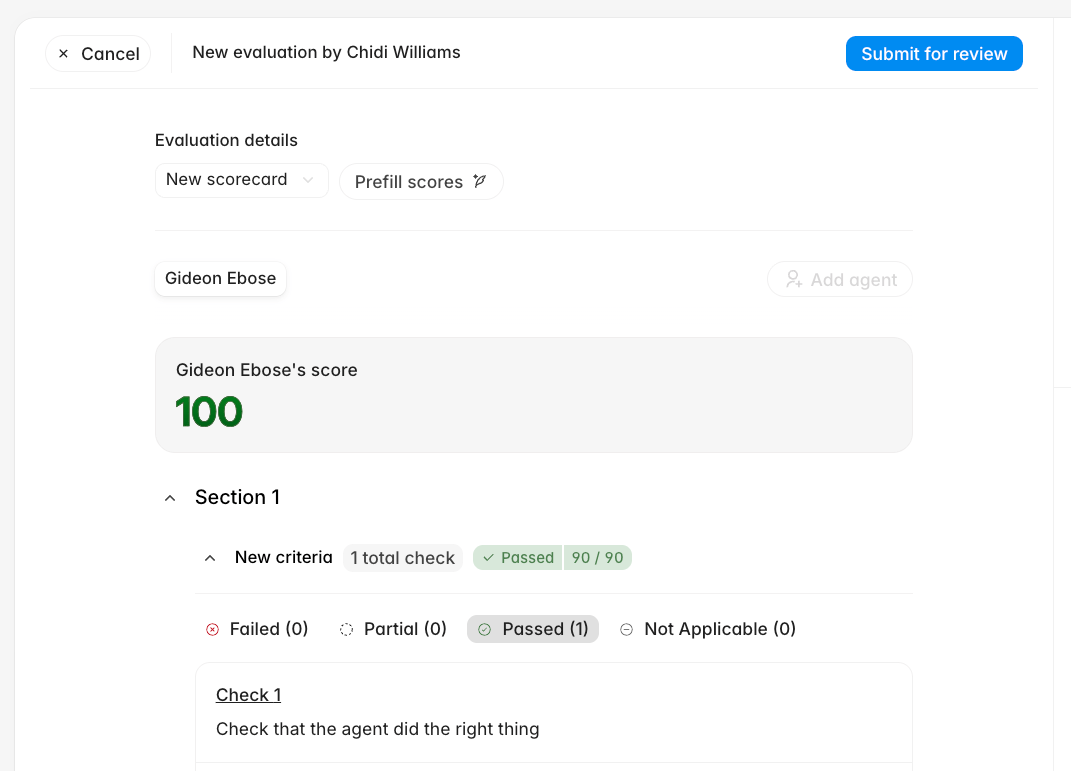 Reviewers can approve or reject individual checks, correct scores, leave check-level feedback, and **Publish** an overriding evaluation. After review, trainers can see who validated their evaluation, compare original and published results, and read feedback on corrected checks.
 ## Find reviewer feedback from Home
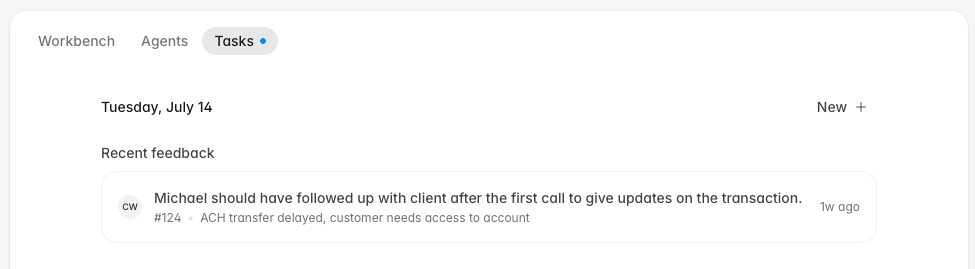
**Home -> Tasks** now surfaces recent feedback on your manual evaluations. Each item previews the feedback with its conversation and review time, then opens the related evaluation.
## Find reviewer feedback from Home
**Home -> Tasks** now surfaces recent feedback on your manual evaluations. Each item previews the feedback with its conversation and review time, then opens the related evaluation.
 ## Manage agent rosters and QA exports
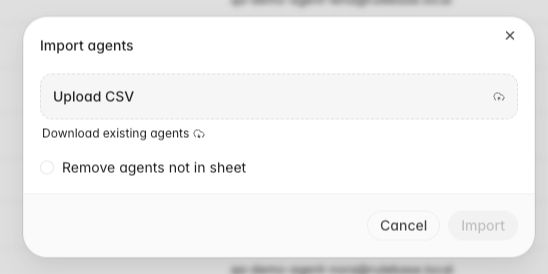
**Settings -> People -> Agents** now previews CSV changes before an import and lets you [download and manage the existing agent roster](/guides/quality-assurance/manage-agent-roster). Bulk actions can move selected agents to another team or remove them from the active evaluation roster without deleting their historical work.
## Manage agent rosters and QA exports
**Settings -> People -> Agents** now previews CSV changes before an import and lets you [download and manage the existing agent roster](/guides/quality-assurance/manage-agent-roster). Bulk actions can move selected agents to another team or remove them from the active evaluation roster without deleting their historical work.
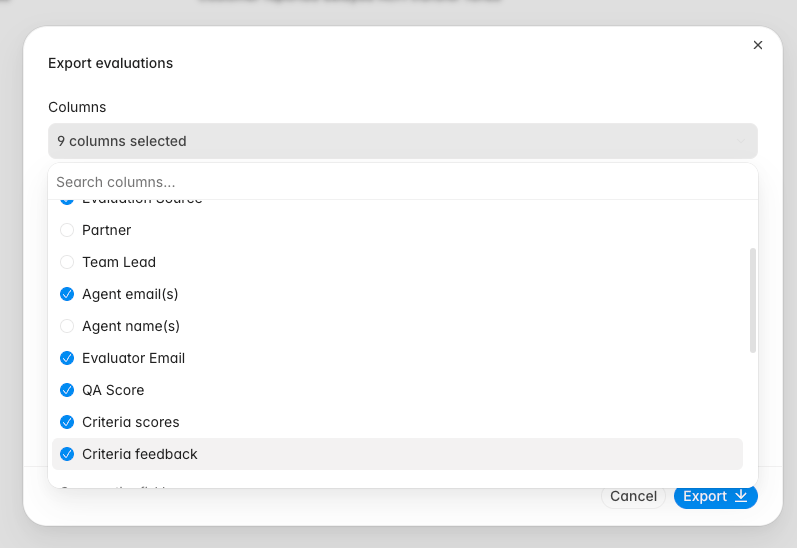
 [QA exports](/guides/quality-assurance/export-qa-evaluations) now provide separate **Criteria scores** and **Criteria feedback** options. Feedback appears in its own column for each criterion, with conversation and knowledge references converted into readable text.
 ## Populate compliance tests from sampled records
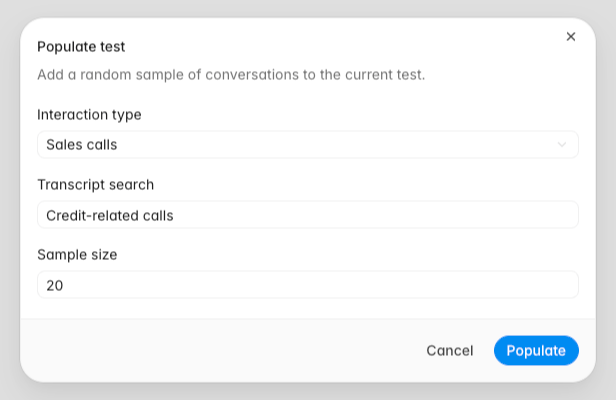
The [**Populate test** dialog](/guides/compliance/populate-tests) can now add random samples of conversations, disputes, compliance cases, or compliance alerts directly to the current test. For conversation samples, choose an **Interaction type** and describe relevant language in **Transcript search**. Repeated runs skip records already in the sheet. Processing and failure states show each generated cell's progress, and completed results include supporting policy or framework citations.
## Populate compliance tests from sampled records
The [**Populate test** dialog](/guides/compliance/populate-tests) can now add random samples of conversations, disputes, compliance cases, or compliance alerts directly to the current test. For conversation samples, choose an **Interaction type** and describe relevant language in **Transcript search**. Repeated runs skip records already in the sheet. Processing and failure states show each generated cell's progress, and completed results include supporting policy or framework citations.
 ## Duplicate, move, and filter dashboard charts
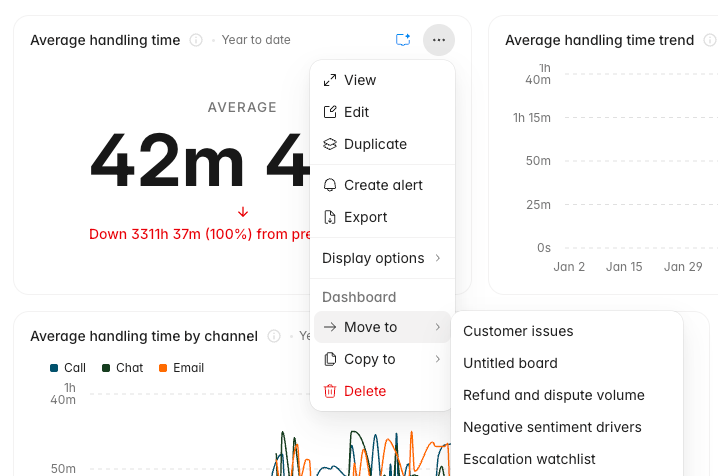
Custom dashboard [chart menus](/guides/insights/manage-dashboard-charts) now include **Duplicate**, **Move to**, and **Copy to**. The chart editor supports repeated **Brand**, **Partner**, and **Agent joined date** filters. Conversation drilldowns can export every matching row to CSV while respecting visible columns and local filters.
## Duplicate, move, and filter dashboard charts
Custom dashboard [chart menus](/guides/insights/manage-dashboard-charts) now include **Duplicate**, **Move to**, and **Copy to**. The chart editor supports repeated **Brand**, **Partner**, and **Agent joined date** filters. Conversation drilldowns can export every matching row to CSV while respecting visible columns and local filters.
 ## Fixes
* Fixed calendar-based dashboard comparisons so month-to-date, week-to-date, year-to-date, and today use matching previous periods.
* Preserved dashboard team and partner scope when opening expanded charts.
* Kept manual evaluation feedback and review state scoped to the correct agent on multi-agent conversations.
* Kept completed QA evaluations visible after an agent is removed from the active roster.
* Fixed feedback-driven re-evaluations so the correct evaluation reruns.
* Prevented a failure that could stop call transcripts from processing.
## Improvements
* Grouped **Settings -> Evaluations** controls under **Eligibility**, **Timing**, **Scoring**, and **Review**, with **Score bands** under Scoring.
* Added Linq under **Settings -> Integrations** so Instruct and managed agents can send iMessage, RCS, and SMS messages.
* Made the agent chat sidebar resizable.
* Added the approver's identity to completed human approval workflow steps.
* Added **Open in new tab** to the conversation right-click menu.
* Added an **AI evaluation date** filter and restored score-level grouping in evaluation lists.
* Added a **Team lead** column to the Teams table.
* Let Front-connected agents download image attachments for analysis.
## Coaching sessions track follow-up work
Coaching sessions now live on agent profiles with notes, linked evidence tickets, ticket-specific feedback, and a history timeline. You can add evaluated tickets to a session from conversation review, open feedback links directly into the related session, see upcoming coaching on Home, and let Instruct create sessions that default to next Monday when no date is provided.
## Agent workflows have clearer version history
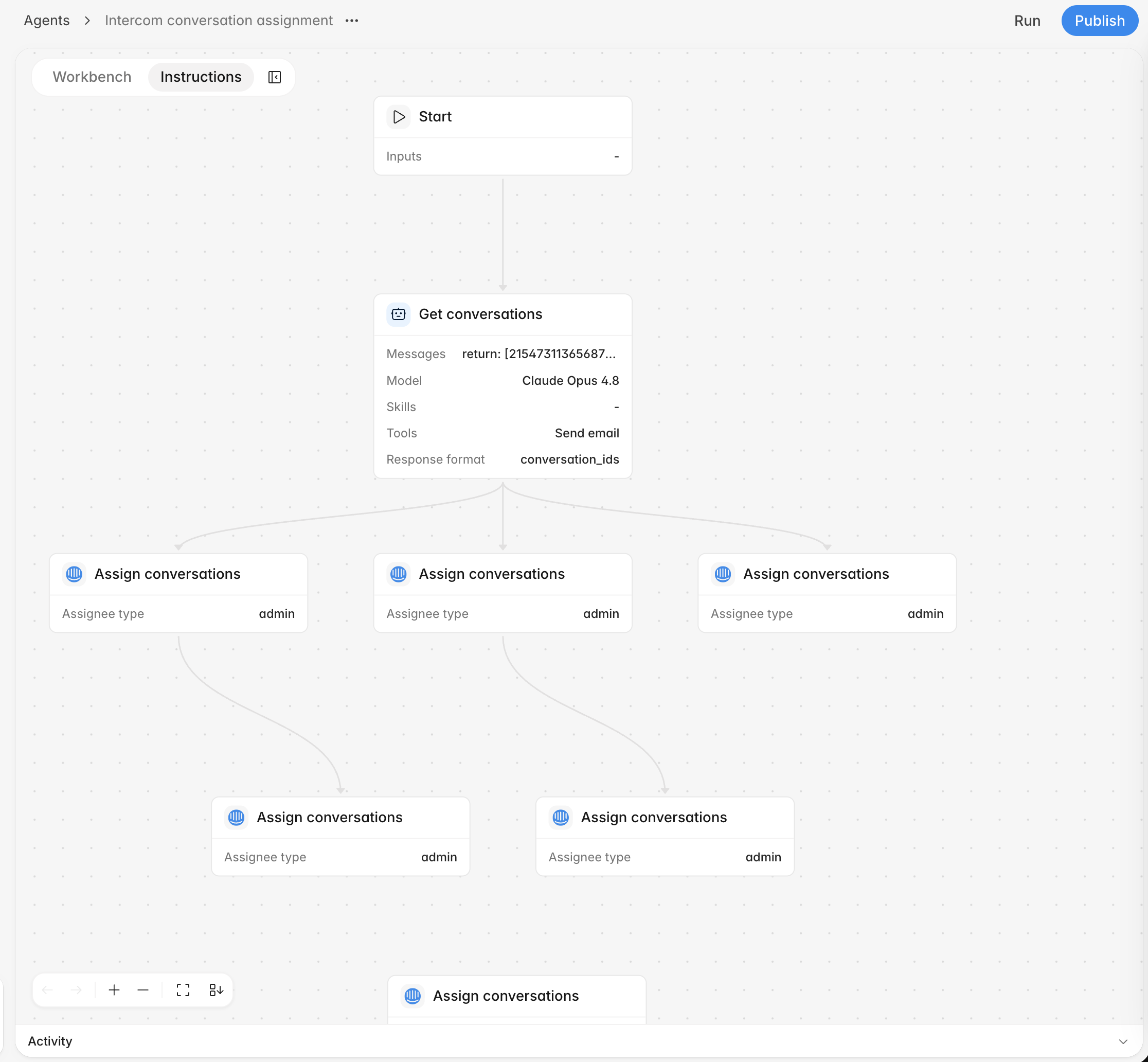
Managed agents now support workflow versions, restore summaries, publish validation, loop and note nodes, left-to-right graph layouts, node search, and clearer activity that shows tool calls and who started each run. Restored versions are summarized in the version dialog, and deleted agents no longer appear in active run, schedule, webhook, email, or chat workflows.
## Connected tools handle more support work
Agents can now search live Intercom conversations, tag Intercom conversations, pick Intercom assignees from searchable admin and team lists, send Slack DMs through directory tools, and match Zendesk tickets to Aircall call records. Slack and Intercom connections in Settings now use the newer connection flow where available.
## Fixes
* Fixed sidebar credits so they keep displaying when the agent-credits query fails.
* Fixed truncated status badges in the bulk review import table.
* Fixed human approval page and email titles to say "Awaiting your approval" instead of workflow node names.
* Guarded graph subflow connections to prevent invalid workflow links.
* Made scheduled runs and Slack-connected sessions more reliable.
* Rate-limited Aircall matching requests so call matching stays stable during Zendesk updates.
## Improvements
* Added configurable Home task widgets and an upcoming coaching module.
* Added canonical coaching session links, copy-link UI, and direct links from feedback to the related session.
* Added restore summaries, hover-only version actions, and version graph previews to managed-agent publishing.
* Added the run creator to agent activity so manual and delegated runs show who started them.
* Added live Intercom search, native Intercom tagging, and searchable Intercom assignment tools for managed-agent workflows.
* Added native Slack connection rows under Settings -> Integrations.
## Dashboards and reports get sharper
Insights can now create Average QA score and Evaluations boards from templates, with score-level trends, agent charts, AHT coverage, team or partner scope controls, and critical-error breakdowns by agent and failure reason. Report pages also have a cleaner reader, copy links, table-of-contents support, and better handoff into Instruct.
## Recurring exports move into Settings
Settings -> Export now lets you configure recurring exports for QA, evaluations, and all interactions, preview rows before saving, send an export now, and receive generated spreadsheets by email. Dashboard chart display settings are shared with everyone viewing the board, and expanded charts keep the same percent-of-total preferences as dashboard cards.
## Customers become company-backed records
The Customers area now uses company-backed records with list and detail views, saved tabs, grouping, company field filters, comments, clients, field-change activity, and agent tools for creating, updating, commenting on, and bulk-setting company attributes.
## Instruct and assistants carry more context
Instruct now understands stored views, dashboard statistics, selected reports, and page filters, so chat starts from the context you are looking at. Rulebase assistants can also work from Slack, Linear, Jira, and case threads with persisted tool context, Jira attachment analysis, case tools, and inline managed-agent delegation.
## Fixes
* Fixed expanded Instruct overlay layout and restored the shorter composer placeholder.
* Fixed weekly SLA outcome reporting and marked open weekly resolution outcomes correctly.
* Restored the QA Analysts analytics view on `/analytics`.
* Fixed team, partner, and site filtering in dashboard drilldowns.
* Prevented invalid generated React artifact sources from being saved.
* Restored email rendering for EU worker-sent exports and reports.
* Prevented Zendesk email comments and XCALLY dialer uploads from syncing with the wrong channel or customer direction.
## Improvements
* Added recurring export schedules, preview rows, background delivery, and manual Send now actions.
* Added copy links to dashboard sharing and shared chart display settings across dashboard cards and expanded views.
* Added dashboard team and partner scopes, rate-within-group metrics, agent heatmaps, and critical-error drilldowns.
* Added company-backed customer views with saved tabs, grouping, field filters, comments, people, field-change activity, and agent tools.
* Added Instruct view context, dashboard statistics access, drag-and-drop attachments, and role permissions for Chats and Instruct.
* Added Slack, Linear, Jira, and case assistant context persistence so follow-up turns keep tool results.
* Added holiday calendars, conditional work schedules, and frozen weekly SLA outcomes for schedule-aware reporting.
## Workbench brings agents and reviews together
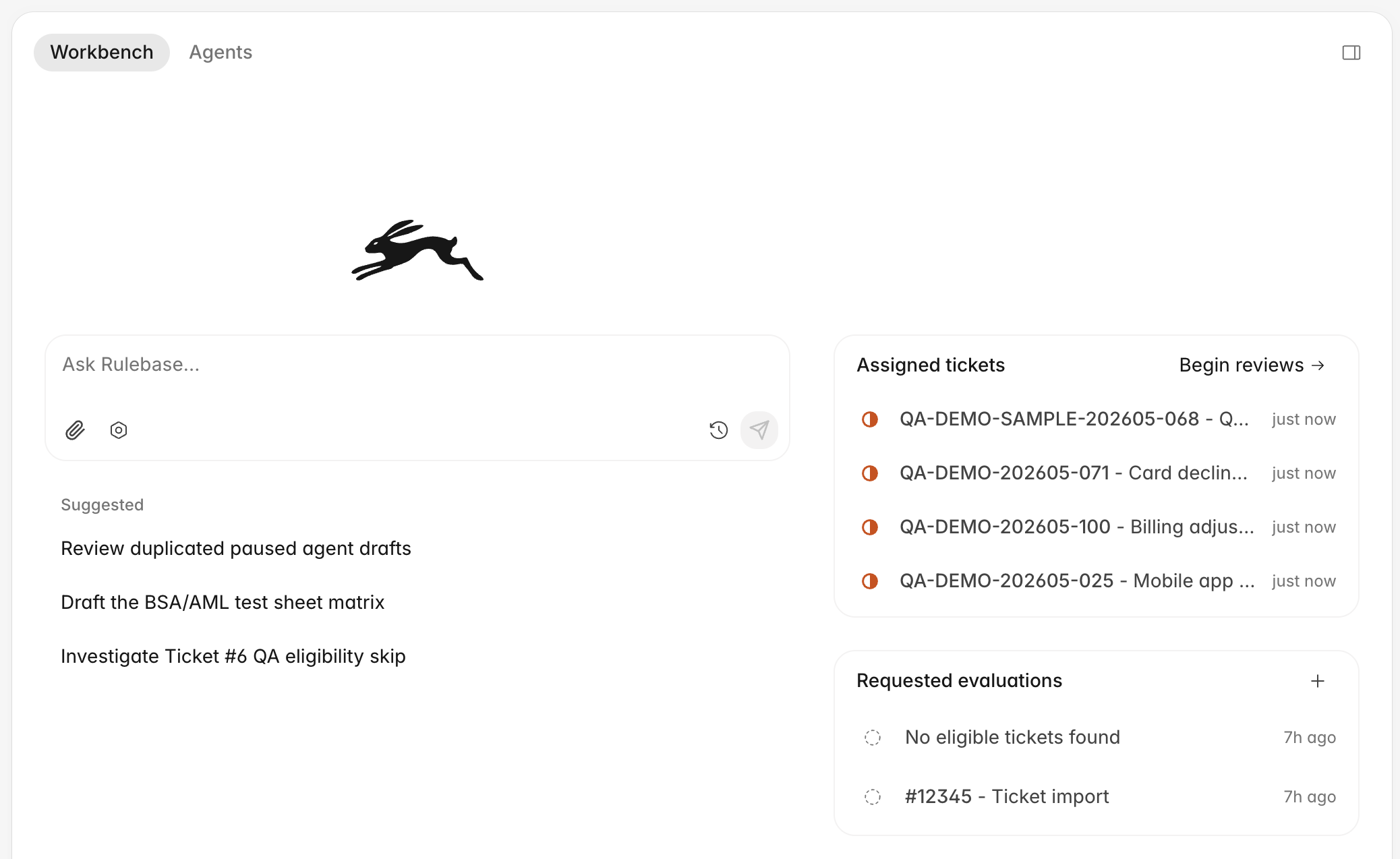
Workbench now brings agent work, recent chats, assigned reviews, calibrations, and requested evaluations into one place. You can search recent chats and skills from the composer, attach images or files to Workbench chats, and start review work from compact task sections that keep conversation navigation scoped to the list you opened.
## Agent workflows are easier to build
Agent instructions now include a graph workspace for editing workflow steps, tools, schedules, and branching behavior. Undo and redo controls, clearer validation errors, live run progress, stored step outputs, and lock controls make workflow editing easier to inspect and recover from.
## Custom fields work across more surfaces
You can now create Rulebase-owned custom fields from Settings -> Objects, see conversation field values in the conversation details panel, use more field types as dashboard breakdowns, and let managed agents update owned conversation fields during a workflow.
## Dashboards and SLA drilldowns get sharper
Dashboard charts can keep their own date ranges, use searchable View by controls, show heatmaps, sort heatmap columns, and break down QA and SLA metrics by custom conversation fields. SLA charts now open outcome drilldowns with ticket rows, pending-outcome filters, exports, and clearer links back to the conversations behind each result.
## Fixes
* Fixed deleted-from-Intercom conversations so the badge appears first and broken external links are disabled.
* Reconnected dropped Instruct chat streams in the background after transient failures.
* Fixed QA Documentation scoring to use current linked-ticket context.
* Fixed dashboard drilldowns to preserve matching custom field filters and card actions.
* Fixed long links and wide markdown tables in shared chats and workflow output.
* Fixed employee read results for connected MCP clients.
* Prevented XCALLY re-uploads from leaving stale call-part authors and phone-agent metadata.
## Improvements
* Added compact task sections for assigned tickets, calibrations, and requested evaluations, with filtered bulk review requests.
* Added undo and redo controls, graph locks, stored step outputs, and clearer run progress to workflow graphs.
* Let dashboard charts keep their own date ranges, use searchable View by controls, and start from an Average QA score template.
* Added pending-outcome filters and exports to SLA outcome drilldowns.
* Made Rulebase-owned custom fields available from Settings -> Objects, dashboard breakdowns, and agent workflows.
* Preserved stored view display options and cleared the modified state when options return to defaults.
* Moved report pages onto the newer reports route with cleaner cards and direct report deletion.
## More flexible custom dashboards
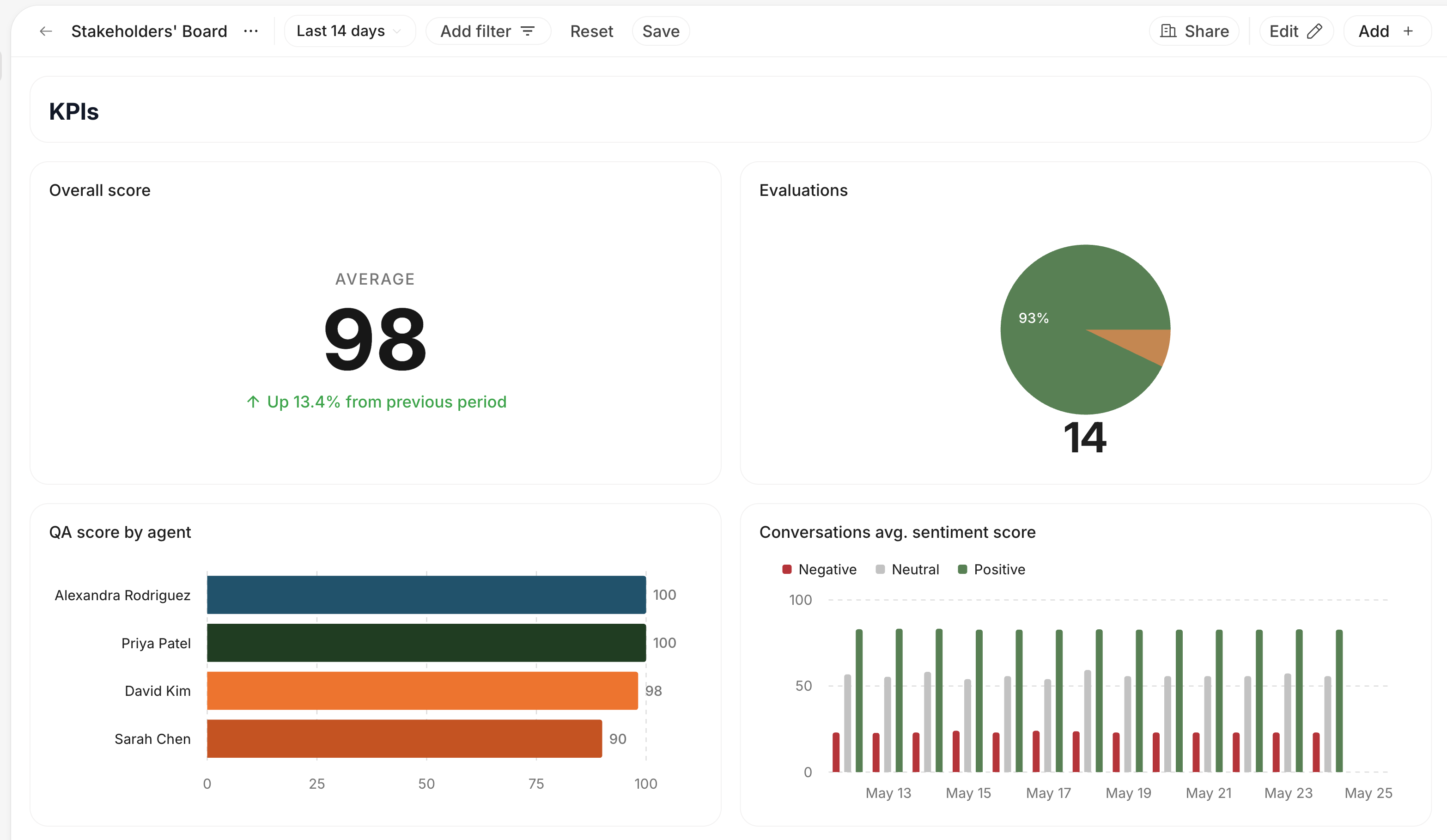
You can now make any custom dashboard your homepage, arrange and resize dashboard charts across screen sizes, and add rich text cards for notes or explanations alongside charts. Dashboard charts can also be reused across boards and edited once to update every board that uses them.
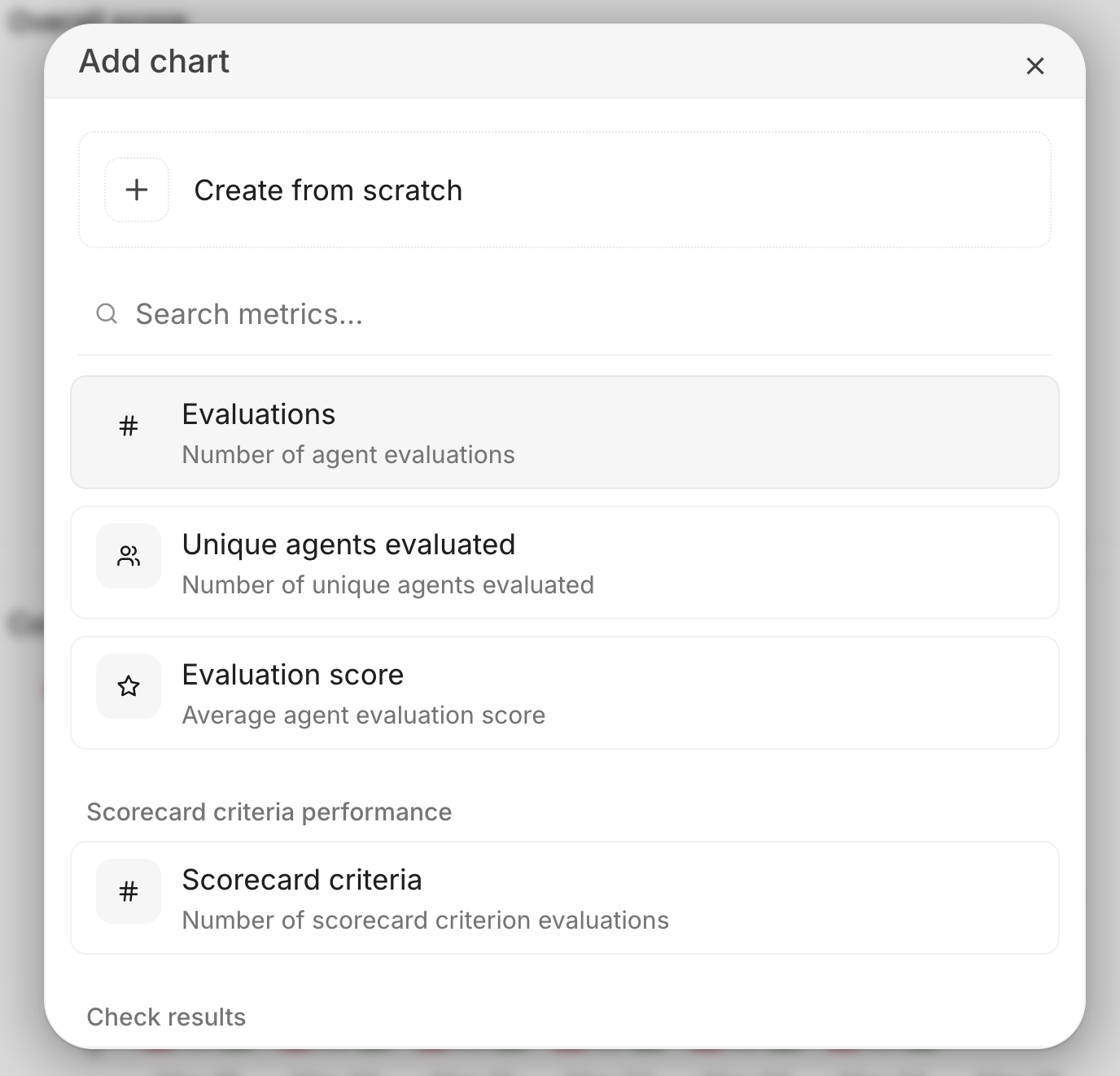
Chart setup now starts from searchable metric cards, so you can pick a common metric quickly or still create a chart from scratch. You can also toggle chart data labels per board and drill from Evaluated agents charts into a per-agent sheet for the selected date.
## Chat with your data
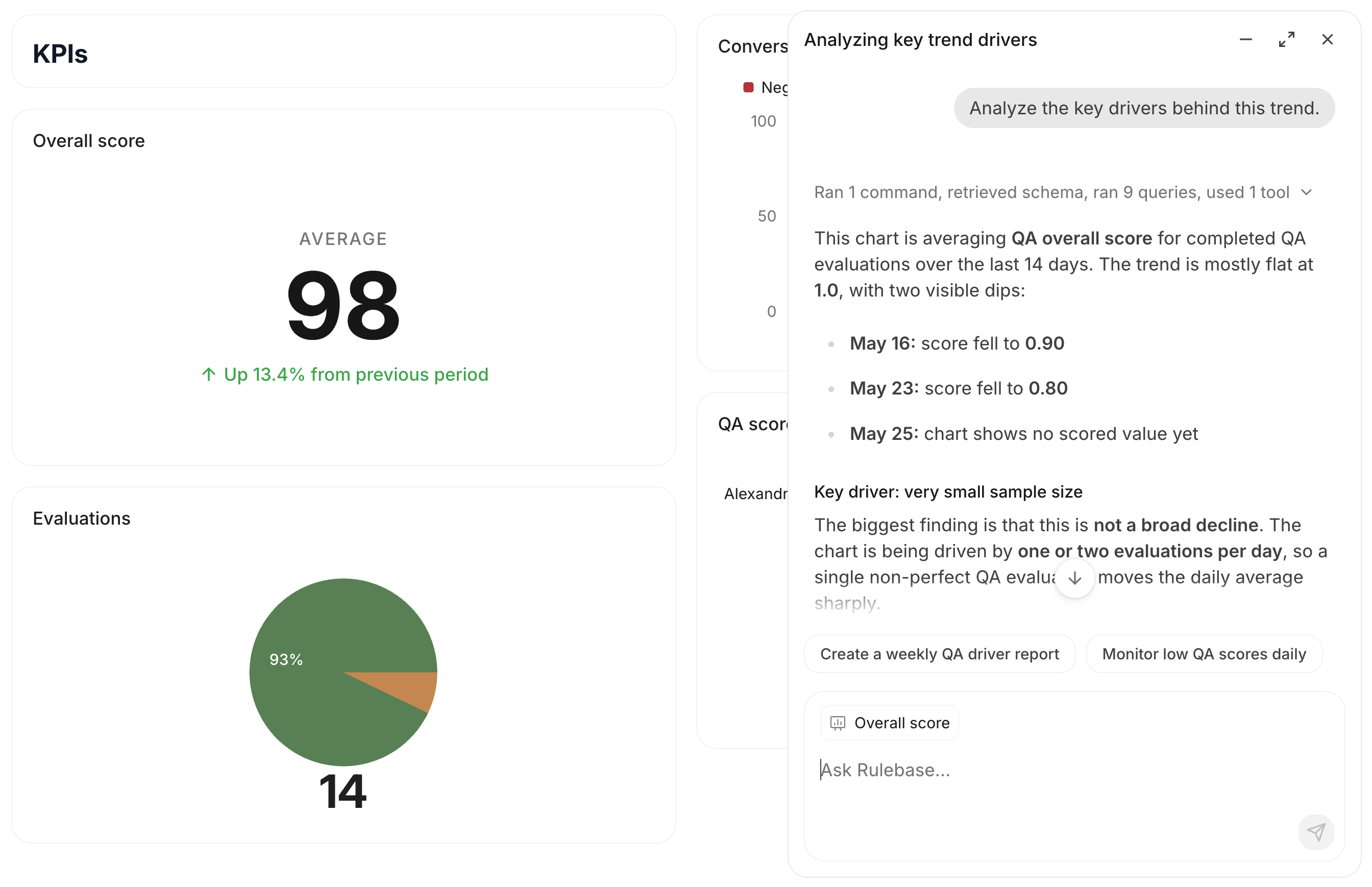
Instruct now understands the current ticket, agent, dashboard, and chart with visible attachment chips, so follow-up questions start with the page you are viewing. Open it from a dashboard chart to carry the selected chart's data and filters into the conversation.
Instruct can also create and edit dashboards, groups, and charts directly from chat.
## Connect Rulebase with MCP
Rulebase now has a remote MCP server for AI clients like Claude Code, Claude Desktop, and Cursor. MCP clients can read Rulebase data including employees, scorecards, and knowledge-base answers after you sign in with your Rulebase account.
See the [MCP docs](/guides/mcp) for the endpoint and setup steps.
## Performance now lives in Insights
Agent Performance has moved into **Insights**, alongside **Radar** and **Analytics**. Use Insights as the home for QA performance, coaching opportunities, and team progress.
## Organize and personalize Insights boards
Your custom dashboards now live on the **Insights** page alongside **Radar** and **Analytics**. You can pin important boards, browse boards by section, and keep the views your team uses most in one place.
You will also notice filters for **All boards**, **Created by you**, and **Shared with you**, plus board menus for sharing, renaming, duplicating, deleting, and moving boards between sections.
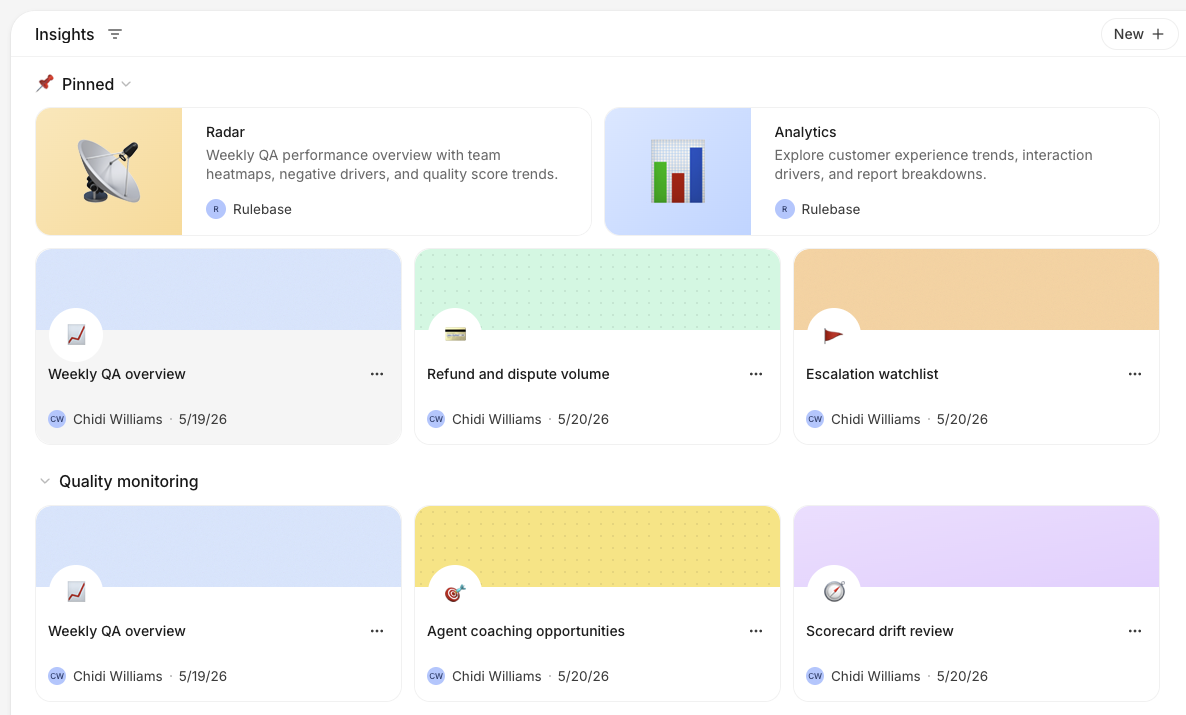
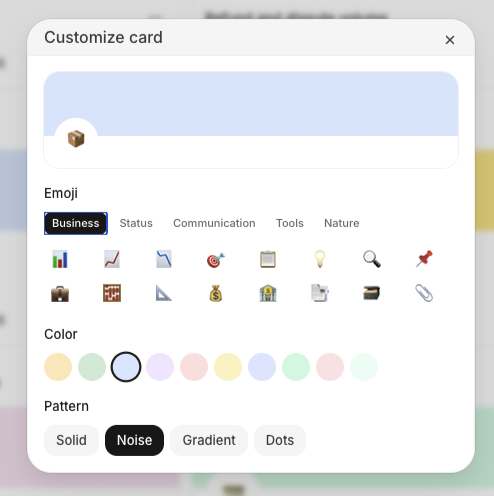
Board cards can now have their own emoji, header color, and header pattern. Use this to make important boards easier to spot, especially when your Insights page has several sections.
## Chat artifacts can be shared
Chat-generated reports and artifacts now have public share links with richer preview cards, so teams can send the output of a chat without copying the full conversation.
## Dashboard chat keeps the handoff
Dashboard chat now opens in an overlay and preserves the session handoff from the page you started on. That makes it easier to ask a follow-up, return to the dashboard, and keep exploring the same analysis.
## Streams can resume
Long-running chat streams can now resume instead of leaving the page in a broken state when a connection is interrupted.
## Tags land on conversations
Conversation tags now appear in ticket views and filters, with operator-created tags loaded into the same tag list. Agents can also apply tags from automated workflows, keeping manual triage and automation aligned.
## Quality review gets its own view
Insights now includes a Quality review page with live QA data, critical-failure summaries, and lowest-scoring signals. Drilldowns make it easier to move from a pattern to the conversations behind it.
## Skills join Knowledge
Knowledge now includes a Skills section with an AI editor, giving teams a more direct place to manage the reusable instructions agents depend on.
## What's new moves into the app
Release notes now have an in-app **What's New** surface, so shipped product updates can be read from Rulebase instead of only through the docs site.
## Faster QA administration
Admins can now test QA eligibility rules before they run, backfill evaluations from the admin console, and choose which columns appear in QA exports. Reviewers also get a quicker path to re-evaluate from the feedback dialog when a result needs another pass.
Scorecards can now opt into single-sided ticket evaluations, so teams that review outbound-only or agent-only work can measure those conversations without reshaping their programs.
## Agents are easier to launch
The new agent setup flow makes it clearer which tools an agent can use and what will happen when it runs. Chat-triggered agent runs now queue reliably, show clearer statuses, and can alert a teammate when a conversation needs follow-up.
## QA navigation is cleaner
The QA sidebar now separates the main workflows from saved views, so teams can get to evaluations, requests, exports, and workload review without scanning a long mixed list.
## Security gains an audit trail
Privacy settings are now grouped under **Security**, where admins can review audit logs for sensitive account and access-management changes. Audit events include richer target previews and filters, so it is easier to answer who changed what without digging through internal logs.
## QA eligibility gets more precise
QA programs can now include custom eligibility instructions and organization timezone context, helping scheduled evaluations pick the right conversations for each team. Evaluation views also added group, brand, partner, and channel filters, plus clearer skip reasons in daily evaluation reports.
## Analytics can drill into risk and score levels
Compliance and QA charts now support risk-level and score-level breakdowns with clearer labels, colors, and drilldowns. Critical-only views make it easier to focus on high-impact failures before expanding into the full distribution.
## Agents can use more workspace context
Rulebase agents can now work with workspace data, Slack context, and structured tools when they respond to a request. This makes agent runs more useful for operational work like finding the right data, preparing a response, or assigning a conversation to the right person.
## QA requests show their progress
Scheduled and user-requested QA evaluations now expose clearer progress while they run. Requesters receive completion emails, admins can run scheduled requests on demand, and long-running jobs can be cancelled instead of left in an ambiguous state.
## Complaints are easier to slice
Complaint views added workspace columns, filters, CSV export fields, partner filters, and drilldowns from analytics charts. Linked complaints can now resolve with their conversations, keeping complaint queues closer to the work your team already closed.
## Coaching sessions feel more live
Simulation setup can now be guided by an agent, while live practice sessions stream customer responses and suggested next steps more smoothly. Reports finish faster, show clearer evaluation status, and keep the customer persona and internal context close at hand during review.
Teams can also add pacing controls, follow-up guidance, passing scores, and reattempt rules to assignments, making coaching useful for repeatable team training rather than one-off demos.
## Workload review gets better filters
Workload mode now handles per-agent scorecards and score-level filters, so managers can review the right set of evaluations for each agent. Criterion-level progress also appears while evaluations are running, making large review batches easier to track.
## Sheets can be restored
Rulebase sheets now keep version history. You can review previous versions and restore a sheet when an experiment, bulk edit, or automation changes more than expected.
## Introducing agent coaching
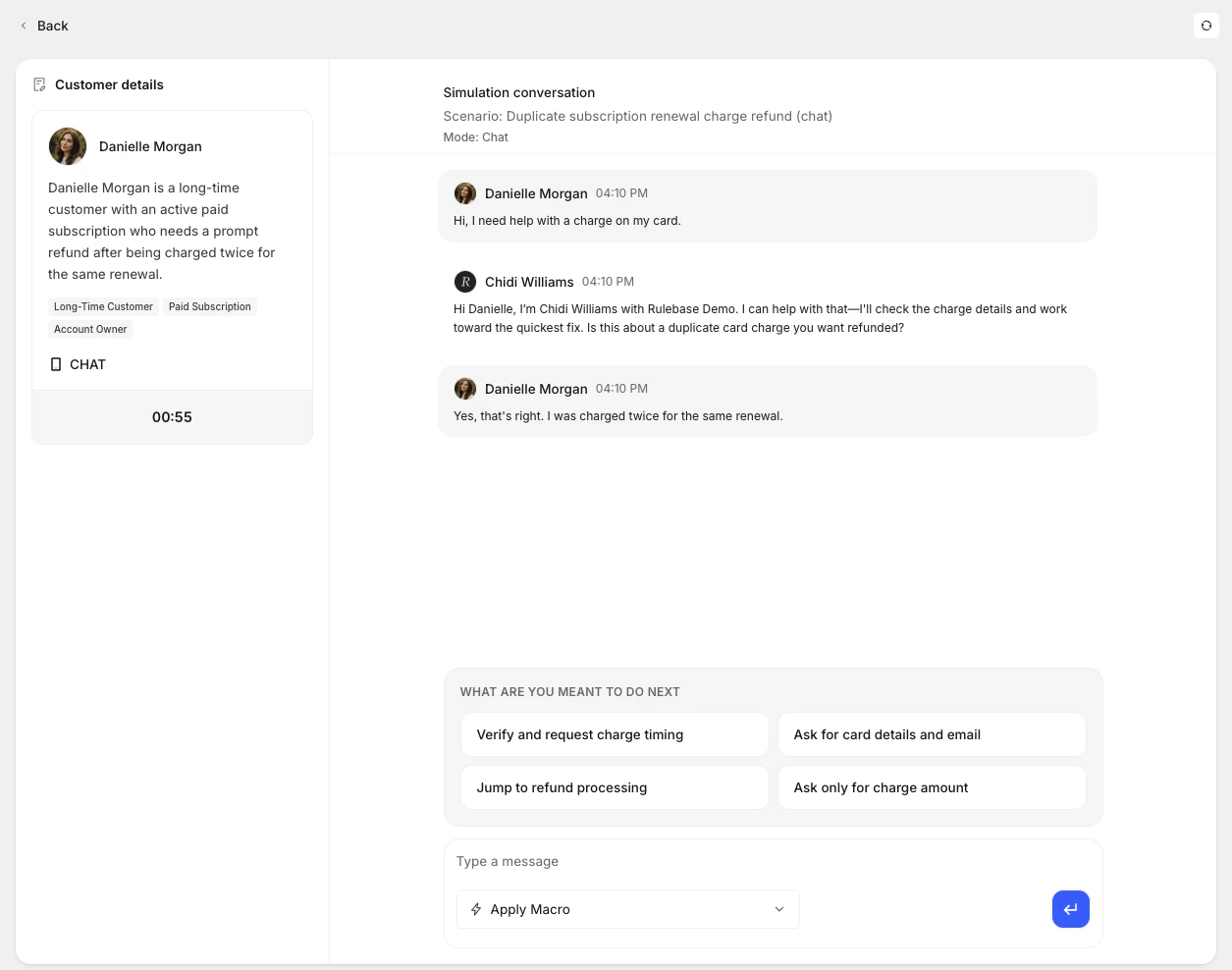
Your agents can now run realistic practice sessions before they handle real tickets. Coaching simulations let you design a scenario — complete with an AI-generated customer persona and a step-by-step plan — and then drop into a live chat where the AI plays the customer. You can ground the scenario in your own training documents and knowledge base, so the practice feels like your actual product and policies, not a generic exercise.
When you create a simulation, you describe the situation and optionally upload a PDF or reference your KB. Rulebase generates a customer persona with traits you can refine and a scenario plan with ordered steps. Once you're ready, you start the session and respond as the agent while the AI improvises as the customer within the scenario's boundaries.
When the session ends, Rulebase evaluates the transcript and generates a report: overall score, summary, knowledge gaps, key issues, and scorecard-aligned criterion results.
## Fixes
* Fixed calendar-based dashboard comparisons so month-to-date, week-to-date, year-to-date, and today use matching previous periods.
* Preserved dashboard team and partner scope when opening expanded charts.
* Kept manual evaluation feedback and review state scoped to the correct agent on multi-agent conversations.
* Kept completed QA evaluations visible after an agent is removed from the active roster.
* Fixed feedback-driven re-evaluations so the correct evaluation reruns.
* Prevented a failure that could stop call transcripts from processing.
## Improvements
* Grouped **Settings -> Evaluations** controls under **Eligibility**, **Timing**, **Scoring**, and **Review**, with **Score bands** under Scoring.
* Added Linq under **Settings -> Integrations** so Instruct and managed agents can send iMessage, RCS, and SMS messages.
* Made the agent chat sidebar resizable.
* Added the approver's identity to completed human approval workflow steps.
* Added **Open in new tab** to the conversation right-click menu.
* Added an **AI evaluation date** filter and restored score-level grouping in evaluation lists.
* Added a **Team lead** column to the Teams table.
* Let Front-connected agents download image attachments for analysis.
## Coaching sessions track follow-up work
Coaching sessions now live on agent profiles with notes, linked evidence tickets, ticket-specific feedback, and a history timeline. You can add evaluated tickets to a session from conversation review, open feedback links directly into the related session, see upcoming coaching on Home, and let Instruct create sessions that default to next Monday when no date is provided.
## Agent workflows have clearer version history
Managed agents now support workflow versions, restore summaries, publish validation, loop and note nodes, left-to-right graph layouts, node search, and clearer activity that shows tool calls and who started each run. Restored versions are summarized in the version dialog, and deleted agents no longer appear in active run, schedule, webhook, email, or chat workflows.
## Connected tools handle more support work
Agents can now search live Intercom conversations, tag Intercom conversations, pick Intercom assignees from searchable admin and team lists, send Slack DMs through directory tools, and match Zendesk tickets to Aircall call records. Slack and Intercom connections in Settings now use the newer connection flow where available.
## Fixes
* Fixed sidebar credits so they keep displaying when the agent-credits query fails.
* Fixed truncated status badges in the bulk review import table.
* Fixed human approval page and email titles to say "Awaiting your approval" instead of workflow node names.
* Guarded graph subflow connections to prevent invalid workflow links.
* Made scheduled runs and Slack-connected sessions more reliable.
* Rate-limited Aircall matching requests so call matching stays stable during Zendesk updates.
## Improvements
* Added configurable Home task widgets and an upcoming coaching module.
* Added canonical coaching session links, copy-link UI, and direct links from feedback to the related session.
* Added restore summaries, hover-only version actions, and version graph previews to managed-agent publishing.
* Added the run creator to agent activity so manual and delegated runs show who started them.
* Added live Intercom search, native Intercom tagging, and searchable Intercom assignment tools for managed-agent workflows.
* Added native Slack connection rows under Settings -> Integrations.
## Dashboards and reports get sharper
Insights can now create Average QA score and Evaluations boards from templates, with score-level trends, agent charts, AHT coverage, team or partner scope controls, and critical-error breakdowns by agent and failure reason. Report pages also have a cleaner reader, copy links, table-of-contents support, and better handoff into Instruct.
## Recurring exports move into Settings
Settings -> Export now lets you configure recurring exports for QA, evaluations, and all interactions, preview rows before saving, send an export now, and receive generated spreadsheets by email. Dashboard chart display settings are shared with everyone viewing the board, and expanded charts keep the same percent-of-total preferences as dashboard cards.
## Customers become company-backed records
The Customers area now uses company-backed records with list and detail views, saved tabs, grouping, company field filters, comments, clients, field-change activity, and agent tools for creating, updating, commenting on, and bulk-setting company attributes.
## Instruct and assistants carry more context
Instruct now understands stored views, dashboard statistics, selected reports, and page filters, so chat starts from the context you are looking at. Rulebase assistants can also work from Slack, Linear, Jira, and case threads with persisted tool context, Jira attachment analysis, case tools, and inline managed-agent delegation.
## Fixes
* Fixed expanded Instruct overlay layout and restored the shorter composer placeholder.
* Fixed weekly SLA outcome reporting and marked open weekly resolution outcomes correctly.
* Restored the QA Analysts analytics view on `/analytics`.
* Fixed team, partner, and site filtering in dashboard drilldowns.
* Prevented invalid generated React artifact sources from being saved.
* Restored email rendering for EU worker-sent exports and reports.
* Prevented Zendesk email comments and XCALLY dialer uploads from syncing with the wrong channel or customer direction.
## Improvements
* Added recurring export schedules, preview rows, background delivery, and manual Send now actions.
* Added copy links to dashboard sharing and shared chart display settings across dashboard cards and expanded views.
* Added dashboard team and partner scopes, rate-within-group metrics, agent heatmaps, and critical-error drilldowns.
* Added company-backed customer views with saved tabs, grouping, field filters, comments, people, field-change activity, and agent tools.
* Added Instruct view context, dashboard statistics access, drag-and-drop attachments, and role permissions for Chats and Instruct.
* Added Slack, Linear, Jira, and case assistant context persistence so follow-up turns keep tool results.
* Added holiday calendars, conditional work schedules, and frozen weekly SLA outcomes for schedule-aware reporting.
## Workbench brings agents and reviews together
Workbench now brings agent work, recent chats, assigned reviews, calibrations, and requested evaluations into one place. You can search recent chats and skills from the composer, attach images or files to Workbench chats, and start review work from compact task sections that keep conversation navigation scoped to the list you opened.

## Agent workflows are easier to build
Agent instructions now include a graph workspace for editing workflow steps, tools, schedules, and branching behavior. Undo and redo controls, clearer validation errors, live run progress, stored step outputs, and lock controls make workflow editing easier to inspect and recover from.

## Custom fields work across more surfaces
You can now create Rulebase-owned custom fields from Settings -> Objects, see conversation field values in the conversation details panel, use more field types as dashboard breakdowns, and let managed agents update owned conversation fields during a workflow.
## Dashboards and SLA drilldowns get sharper
Dashboard charts can keep their own date ranges, use searchable View by controls, show heatmaps, sort heatmap columns, and break down QA and SLA metrics by custom conversation fields. SLA charts now open outcome drilldowns with ticket rows, pending-outcome filters, exports, and clearer links back to the conversations behind each result.
## Fixes
* Fixed deleted-from-Intercom conversations so the badge appears first and broken external links are disabled.
* Reconnected dropped Instruct chat streams in the background after transient failures.
* Fixed QA Documentation scoring to use current linked-ticket context.
* Fixed dashboard drilldowns to preserve matching custom field filters and card actions.
* Fixed long links and wide markdown tables in shared chats and workflow output.
* Fixed employee read results for connected MCP clients.
* Prevented XCALLY re-uploads from leaving stale call-part authors and phone-agent metadata.
## Improvements
* Added compact task sections for assigned tickets, calibrations, and requested evaluations, with filtered bulk review requests.
* Added undo and redo controls, graph locks, stored step outputs, and clearer run progress to workflow graphs.
* Let dashboard charts keep their own date ranges, use searchable View by controls, and start from an Average QA score template.
* Added pending-outcome filters and exports to SLA outcome drilldowns.
* Made Rulebase-owned custom fields available from Settings -> Objects, dashboard breakdowns, and agent workflows.
* Preserved stored view display options and cleared the modified state when options return to defaults.
* Moved report pages onto the newer reports route with cleaner cards and direct report deletion.
## More flexible custom dashboards
You can now make any custom dashboard your homepage, arrange and resize dashboard charts across screen sizes, and add rich text cards for notes or explanations alongside charts. Dashboard charts can also be reused across boards and edited once to update every board that uses them.
Chart setup now starts from searchable metric cards, so you can pick a common metric quickly or still create a chart from scratch. You can also toggle chart data labels per board and drill from Evaluated agents charts into a per-agent sheet for the selected date.


## Chat with your data
Instruct now understands the current ticket, agent, dashboard, and chart with visible attachment chips, so follow-up questions start with the page you are viewing. Open it from a dashboard chart to carry the selected chart's data and filters into the conversation.
Instruct can also create and edit dashboards, groups, and charts directly from chat.

## Connect Rulebase with MCP
Rulebase now has a remote MCP server for AI clients like Claude Code, Claude Desktop, and Cursor. MCP clients can read Rulebase data including employees, scorecards, and knowledge-base answers after you sign in with your Rulebase account.
See the [MCP docs](/guides/mcp) for the endpoint and setup steps.
## Performance now lives in Insights
Agent Performance has moved into **Insights**, alongside **Radar** and **Analytics**. Use Insights as the home for QA performance, coaching opportunities, and team progress.
## Organize and personalize Insights boards
Your custom dashboards now live on the **Insights** page alongside **Radar** and **Analytics**. You can pin important boards, browse boards by section, and keep the views your team uses most in one place.
You will also notice filters for **All boards**, **Created by you**, and **Shared with you**, plus board menus for sharing, renaming, duplicating, deleting, and moving boards between sections.

Board cards can now have their own emoji, header color, and header pattern. Use this to make important boards easier to spot, especially when your Insights page has several sections.

## Chat artifacts can be shared
Chat-generated reports and artifacts now have public share links with richer preview cards, so teams can send the output of a chat without copying the full conversation.
## Dashboard chat keeps the handoff
Dashboard chat now opens in an overlay and preserves the session handoff from the page you started on. That makes it easier to ask a follow-up, return to the dashboard, and keep exploring the same analysis.
## Streams can resume
Long-running chat streams can now resume instead of leaving the page in a broken state when a connection is interrupted.
## Tags land on conversations
Conversation tags now appear in ticket views and filters, with operator-created tags loaded into the same tag list. Agents can also apply tags from automated workflows, keeping manual triage and automation aligned.
## Quality review gets its own view
Insights now includes a Quality review page with live QA data, critical-failure summaries, and lowest-scoring signals. Drilldowns make it easier to move from a pattern to the conversations behind it.
## Skills join Knowledge
Knowledge now includes a Skills section with an AI editor, giving teams a more direct place to manage the reusable instructions agents depend on.
## What's new moves into the app
Release notes now have an in-app **What's New** surface, so shipped product updates can be read from Rulebase instead of only through the docs site.
## Faster QA administration
Admins can now test QA eligibility rules before they run, backfill evaluations from the admin console, and choose which columns appear in QA exports. Reviewers also get a quicker path to re-evaluate from the feedback dialog when a result needs another pass.
Scorecards can now opt into single-sided ticket evaluations, so teams that review outbound-only or agent-only work can measure those conversations without reshaping their programs.
## Agents are easier to launch
The new agent setup flow makes it clearer which tools an agent can use and what will happen when it runs. Chat-triggered agent runs now queue reliably, show clearer statuses, and can alert a teammate when a conversation needs follow-up.
## QA navigation is cleaner
The QA sidebar now separates the main workflows from saved views, so teams can get to evaluations, requests, exports, and workload review without scanning a long mixed list.
## Security gains an audit trail
Privacy settings are now grouped under **Security**, where admins can review audit logs for sensitive account and access-management changes. Audit events include richer target previews and filters, so it is easier to answer who changed what without digging through internal logs.
## QA eligibility gets more precise
QA programs can now include custom eligibility instructions and organization timezone context, helping scheduled evaluations pick the right conversations for each team. Evaluation views also added group, brand, partner, and channel filters, plus clearer skip reasons in daily evaluation reports.
## Analytics can drill into risk and score levels
Compliance and QA charts now support risk-level and score-level breakdowns with clearer labels, colors, and drilldowns. Critical-only views make it easier to focus on high-impact failures before expanding into the full distribution.
## Agents can use more workspace context
Rulebase agents can now work with workspace data, Slack context, and structured tools when they respond to a request. This makes agent runs more useful for operational work like finding the right data, preparing a response, or assigning a conversation to the right person.
## QA requests show their progress
Scheduled and user-requested QA evaluations now expose clearer progress while they run. Requesters receive completion emails, admins can run scheduled requests on demand, and long-running jobs can be cancelled instead of left in an ambiguous state.
## Complaints are easier to slice
Complaint views added workspace columns, filters, CSV export fields, partner filters, and drilldowns from analytics charts. Linked complaints can now resolve with their conversations, keeping complaint queues closer to the work your team already closed.
## Coaching sessions feel more live
Simulation setup can now be guided by an agent, while live practice sessions stream customer responses and suggested next steps more smoothly. Reports finish faster, show clearer evaluation status, and keep the customer persona and internal context close at hand during review.
Teams can also add pacing controls, follow-up guidance, passing scores, and reattempt rules to assignments, making coaching useful for repeatable team training rather than one-off demos.
## Workload review gets better filters
Workload mode now handles per-agent scorecards and score-level filters, so managers can review the right set of evaluations for each agent. Criterion-level progress also appears while evaluations are running, making large review batches easier to track.
## Sheets can be restored
Rulebase sheets now keep version history. You can review previous versions and restore a sheet when an experiment, bulk edit, or automation changes more than expected.
## Introducing agent coaching
Your agents can now run realistic practice sessions before they handle real tickets. Coaching simulations let you design a scenario — complete with an AI-generated customer persona and a step-by-step plan — and then drop into a live chat where the AI plays the customer. You can ground the scenario in your own training documents and knowledge base, so the practice feels like your actual product and policies, not a generic exercise.
When you create a simulation, you describe the situation and optionally upload a PDF or reference your KB. Rulebase generates a customer persona with traits you can refine and a scenario plan with ordered steps. Once you're ready, you start the session and respond as the agent while the AI improvises as the customer within the scenario's boundaries.
When the session ends, Rulebase evaluates the transcript and generates a report: overall score, summary, knowledge gaps, key issues, and scorecard-aligned criterion results.
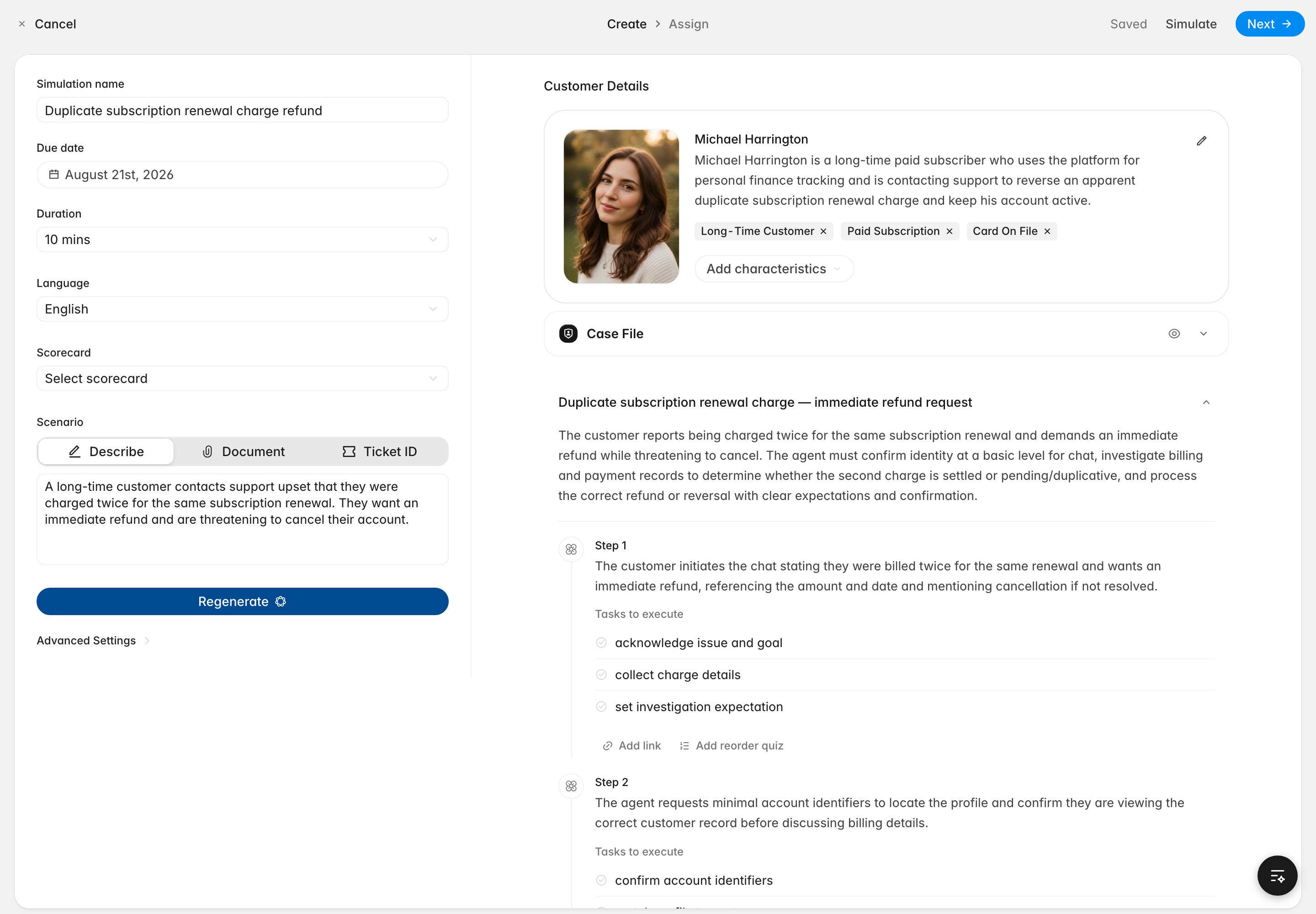 If you attach a scorecard to the simulation, the AI customer will probe the areas your rubric cares about — without explicitly lecturing on the criteria — and the post-session report maps directly to your scorecard structure. This means your agents are evaluated during practice with the same criteria you care about in real conversations.
 ## Richer analytics dashboards
Custom dashboards now give you substantially more control over how you visualize and explore your data. You can organize charts into named, collapsible sections — so a single dashboard can cover QA performance, complaint trends, and SLA metrics without becoming a wall of charts.
## Richer analytics dashboards
Custom dashboards now give you substantially more control over how you visualize and explore your data. You can organize charts into named, collapsible sections — so a single dashboard can cover QA performance, complaint trends, and SLA metrics without becoming a wall of charts.
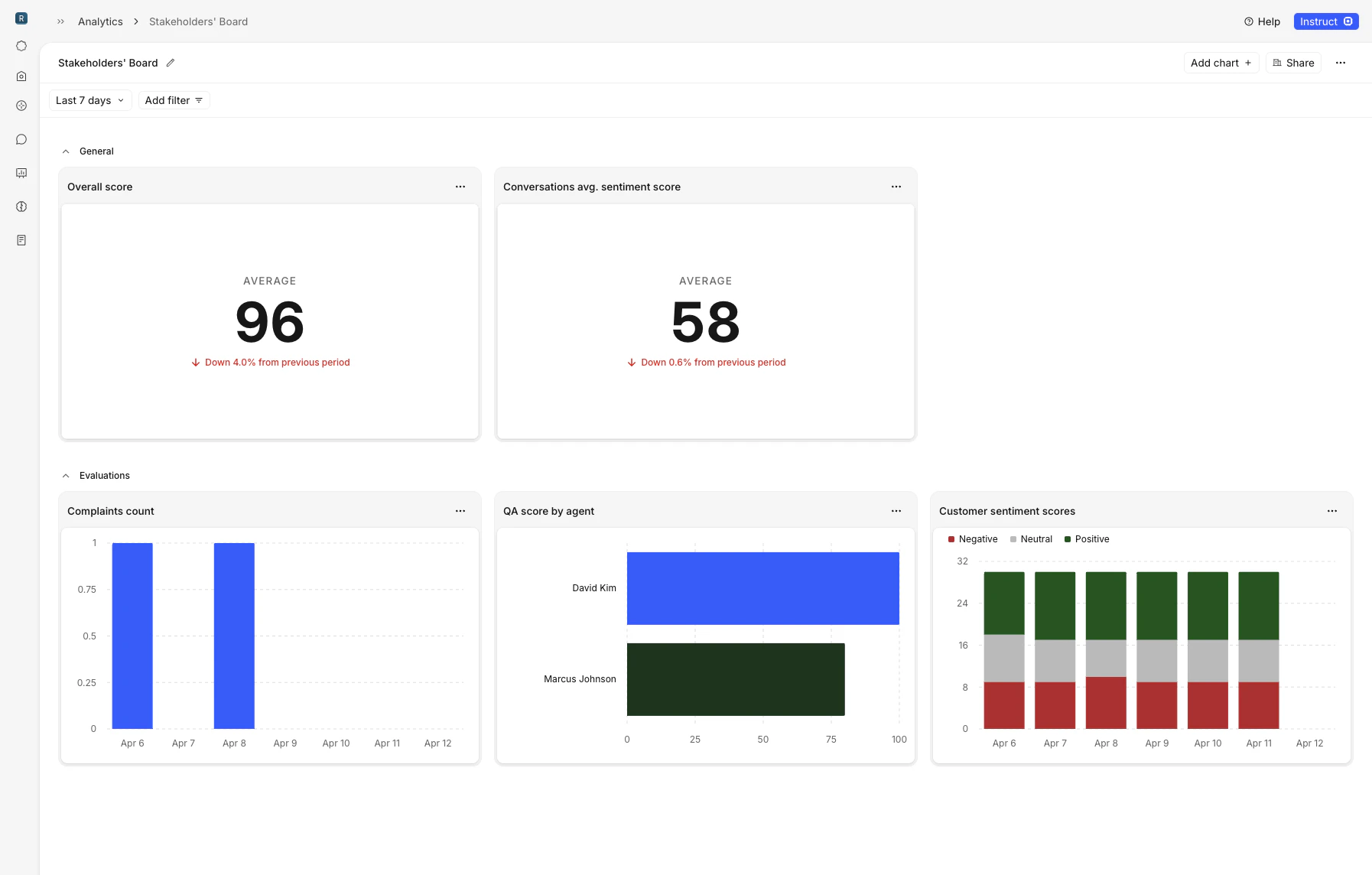 Charts support new display options. Time-series charts can group by day, week, or month, and you can enable a comparison period that overlays the prior window as a dashed line or faded bar. Stacked bar charts and pie charts are available alongside the existing line and bar types, and you can set a display unit — duration, percent, score — so axes and tooltips read in business terms instead of raw numbers.
You can now break down charts by agent, team, manager, and partner — and filter the entire dashboard by partner when relevant. QA evaluation charts support breakdowns by evaluation method (AI vs. human) and by reviewer. New chart types cover complaints, conversations, average handling time, and QA score distributions, each with their own dimension options.
## Marketing compliance reviews
You can now submit marketing materials for automated compliance review directly in Rulebase. Upload a file — or paste a website URL — and Rulebase runs an AI review against your selected regulatory frameworks. The system captures a screenshot and readable page content for websites, so the review covers the live page as your customers see it.
When a review completes, you see a summary alongside prioritized issues ranked by risk level: low, medium, or high. Each issue includes inline citations tied to specific framework documents, so you can trace every finding back to the regulation that supports it. The review list is searchable by material name with a dedicated Rejected section for flagged reviews, and status updates stream in real time so you never need to refresh.
## Smarter routing and workflow automation
Routing rules gained several new capabilities this month. Assignment queues now distribute work in round-robin order instead of picking at random, so load is shared more evenly across your team. You can route conversations directly to a named member, reorder rules with drag-and-drop, and trigger routing when a complaint is created — with conditions on workspace and complaint risk level.
You can also use an agent's QA score as a routing condition, separate from the conversation-level score. For contested evaluations, rules can branch on contest count and reassign ownership on subsequent contests.
## Agent performance and knowledge gaps
The agent performance table now shows average handle time, a trend indicator versus the prior period, and plain-language performance bands — Met expectations, On track, or Needs improvement — so managers can scan speed, direction, and standing at a glance. Summary metrics at the top of the page show the org-wide average QA score and how many agents need attention.
Rulebase also generates weekly knowledge gap reports that cluster weak spots tied to KB-linked criteria across your team. You can view gaps, supporting evidence, and which agents are affected from the agent performance dashboard.
## Partners and Intercom improvements
You can now create and manage third-party partners as first-class records — with types (BPO, fintech, sponsor bank), associated domains, and linked people. Partner data flows into analytics filters and routing conditions across the platform.
Intercom side conversations now appear in the conversation timeline, and Rulebase automatically detects and links related conversations when message text contains Intercom inbox URLs.
## Coaching moves into team workflows
Coaching assignments now use real workspace data, a dedicated learning tab, and a standalone agent practice experience. Drafts, autosave, persistent threads, and async document-based scenario generation make it easier to build a simulation without losing work.
During a simulation, agents can use macro-style response options or write and send manually. Afterward, report generation streams progress and shows evaluation status instead of leaving the session feeling finished but unscored.
## Marketing reviews can run in Rulebase
Marketing teams can submit files or URLs for automated compliance review against selected regulatory frameworks. Rulebase captures page context, ranks issues by risk level, and links findings back to the supporting framework language.
## Knowledge gaps show better evidence
Knowledge-gap dialogs now organize evidence more clearly, helping managers see which missed criteria, conversations, and supporting details led to a gap.
## Introducing agent coaching
Your agents can now run realistic practice sessions before they handle real tickets. Build a scenario, ground it in documents or knowledge-base content, and let an AI customer play through the situation while the agent responds.
When the session ends, Rulebase evaluates the transcript and generates a report with an overall score, summary, knowledge gaps, key issues, and scorecard-aligned criterion results.
## Performance views highlight who needs attention
Agent Performance now shows average handle time, trend direction, and plain-language performance bands like **Met expectations**, **On track**, and **Needs improvement**. Summary metrics at the top of the page show the org-wide average QA score and how many agents need attention.
Weekly knowledge-gap reports also cluster weak spots tied to KB-linked criteria, with supporting evidence and affected agents available from the performance dashboard.
## Dashboards get comparison views
Custom dashboards can now organize charts into sections, group time-series charts by day, week, or month, and show comparison periods against the prior window. Stacked bars, pie charts, duration units, percent units, and score units make charts easier to read without translating raw values.
## Dashboards can break down more work
Dashboard charts now support more dimensions, including agent, team, manager, partner, reviewer, and evaluation method. New complaint, conversation, handling-time, and QA score chart types help teams explore the operational work behind their review programs.
## Routing gets more operational
Routing rules can now use complaint creation, complaint risk, contest count, workspace, and agent QA score as conditions. Rules can be reordered, route directly to a named teammate, and distribute assignments in round-robin order so ownership is easier to control.
## QA lists show better context
Evaluation lists now default to a more useful recent window, and conversation views show more partner, brand, and group detail alongside QA controls. Employee scorecard scoping also appears more clearly, making it easier to understand why a scorecard applies before you review.
## Introducing compliance testing
Compliance teams have been stuck between spreadsheets that don't scale and rigid GRC tools that take months to configure. Rulebase compliance testing is a new way to build, run, and report on regulatory testing programs — designed to move at the speed your team actually works.
Describe what you want to test in plain language, optionally upload your policies, and Rulebase generates a complete program for you: controls, test scripts, sampling rules, and a ready-to-run test sheet. What used to take days of setup now takes minutes.
Six frameworks ship today — **BSA / AML**, **UDAAP**, **ECOA**, **Reg E**, **TILA / Reg Z**, and **FCRA / Reg V** — each with built-in controls and population-aware defaults. Select one or combine several to cover broader mandates.
You can test sales calls for UDAAP disclosure violations, review CX interactions for Reg E error-resolution compliance, audit dispute handling under TILA / Reg Z and FCRA, or evaluate SAR filings and KYC onboarding cases under BSA / AML. You pick the frameworks and Rulebase gives you the right controls and test population out of the box.
Charts support new display options. Time-series charts can group by day, week, or month, and you can enable a comparison period that overlays the prior window as a dashed line or faded bar. Stacked bar charts and pie charts are available alongside the existing line and bar types, and you can set a display unit — duration, percent, score — so axes and tooltips read in business terms instead of raw numbers.
You can now break down charts by agent, team, manager, and partner — and filter the entire dashboard by partner when relevant. QA evaluation charts support breakdowns by evaluation method (AI vs. human) and by reviewer. New chart types cover complaints, conversations, average handling time, and QA score distributions, each with their own dimension options.
## Marketing compliance reviews
You can now submit marketing materials for automated compliance review directly in Rulebase. Upload a file — or paste a website URL — and Rulebase runs an AI review against your selected regulatory frameworks. The system captures a screenshot and readable page content for websites, so the review covers the live page as your customers see it.
When a review completes, you see a summary alongside prioritized issues ranked by risk level: low, medium, or high. Each issue includes inline citations tied to specific framework documents, so you can trace every finding back to the regulation that supports it. The review list is searchable by material name with a dedicated Rejected section for flagged reviews, and status updates stream in real time so you never need to refresh.
## Smarter routing and workflow automation
Routing rules gained several new capabilities this month. Assignment queues now distribute work in round-robin order instead of picking at random, so load is shared more evenly across your team. You can route conversations directly to a named member, reorder rules with drag-and-drop, and trigger routing when a complaint is created — with conditions on workspace and complaint risk level.
You can also use an agent's QA score as a routing condition, separate from the conversation-level score. For contested evaluations, rules can branch on contest count and reassign ownership on subsequent contests.
## Agent performance and knowledge gaps
The agent performance table now shows average handle time, a trend indicator versus the prior period, and plain-language performance bands — Met expectations, On track, or Needs improvement — so managers can scan speed, direction, and standing at a glance. Summary metrics at the top of the page show the org-wide average QA score and how many agents need attention.
Rulebase also generates weekly knowledge gap reports that cluster weak spots tied to KB-linked criteria across your team. You can view gaps, supporting evidence, and which agents are affected from the agent performance dashboard.
## Partners and Intercom improvements
You can now create and manage third-party partners as first-class records — with types (BPO, fintech, sponsor bank), associated domains, and linked people. Partner data flows into analytics filters and routing conditions across the platform.
Intercom side conversations now appear in the conversation timeline, and Rulebase automatically detects and links related conversations when message text contains Intercom inbox URLs.
## Coaching moves into team workflows
Coaching assignments now use real workspace data, a dedicated learning tab, and a standalone agent practice experience. Drafts, autosave, persistent threads, and async document-based scenario generation make it easier to build a simulation without losing work.
During a simulation, agents can use macro-style response options or write and send manually. Afterward, report generation streams progress and shows evaluation status instead of leaving the session feeling finished but unscored.
## Marketing reviews can run in Rulebase
Marketing teams can submit files or URLs for automated compliance review against selected regulatory frameworks. Rulebase captures page context, ranks issues by risk level, and links findings back to the supporting framework language.
## Knowledge gaps show better evidence
Knowledge-gap dialogs now organize evidence more clearly, helping managers see which missed criteria, conversations, and supporting details led to a gap.
## Introducing agent coaching
Your agents can now run realistic practice sessions before they handle real tickets. Build a scenario, ground it in documents or knowledge-base content, and let an AI customer play through the situation while the agent responds.
When the session ends, Rulebase evaluates the transcript and generates a report with an overall score, summary, knowledge gaps, key issues, and scorecard-aligned criterion results.
## Performance views highlight who needs attention
Agent Performance now shows average handle time, trend direction, and plain-language performance bands like **Met expectations**, **On track**, and **Needs improvement**. Summary metrics at the top of the page show the org-wide average QA score and how many agents need attention.
Weekly knowledge-gap reports also cluster weak spots tied to KB-linked criteria, with supporting evidence and affected agents available from the performance dashboard.
## Dashboards get comparison views
Custom dashboards can now organize charts into sections, group time-series charts by day, week, or month, and show comparison periods against the prior window. Stacked bars, pie charts, duration units, percent units, and score units make charts easier to read without translating raw values.
## Dashboards can break down more work
Dashboard charts now support more dimensions, including agent, team, manager, partner, reviewer, and evaluation method. New complaint, conversation, handling-time, and QA score chart types help teams explore the operational work behind their review programs.
## Routing gets more operational
Routing rules can now use complaint creation, complaint risk, contest count, workspace, and agent QA score as conditions. Rules can be reordered, route directly to a named teammate, and distribute assignments in round-robin order so ownership is easier to control.
## QA lists show better context
Evaluation lists now default to a more useful recent window, and conversation views show more partner, brand, and group detail alongside QA controls. Employee scorecard scoping also appears more clearly, making it easier to understand why a scorecard applies before you review.
## Introducing compliance testing
Compliance teams have been stuck between spreadsheets that don't scale and rigid GRC tools that take months to configure. Rulebase compliance testing is a new way to build, run, and report on regulatory testing programs — designed to move at the speed your team actually works.
Describe what you want to test in plain language, optionally upload your policies, and Rulebase generates a complete program for you: controls, test scripts, sampling rules, and a ready-to-run test sheet. What used to take days of setup now takes minutes.
Six frameworks ship today — **BSA / AML**, **UDAAP**, **ECOA**, **Reg E**, **TILA / Reg Z**, and **FCRA / Reg V** — each with built-in controls and population-aware defaults. Select one or combine several to cover broader mandates.
You can test sales calls for UDAAP disclosure violations, review CX interactions for Reg E error-resolution compliance, audit dispute handling under TILA / Reg Z and FCRA, or evaluate SAR filings and KYC onboarding cases under BSA / AML. You pick the frameworks and Rulebase gives you the right controls and test population out of the box.
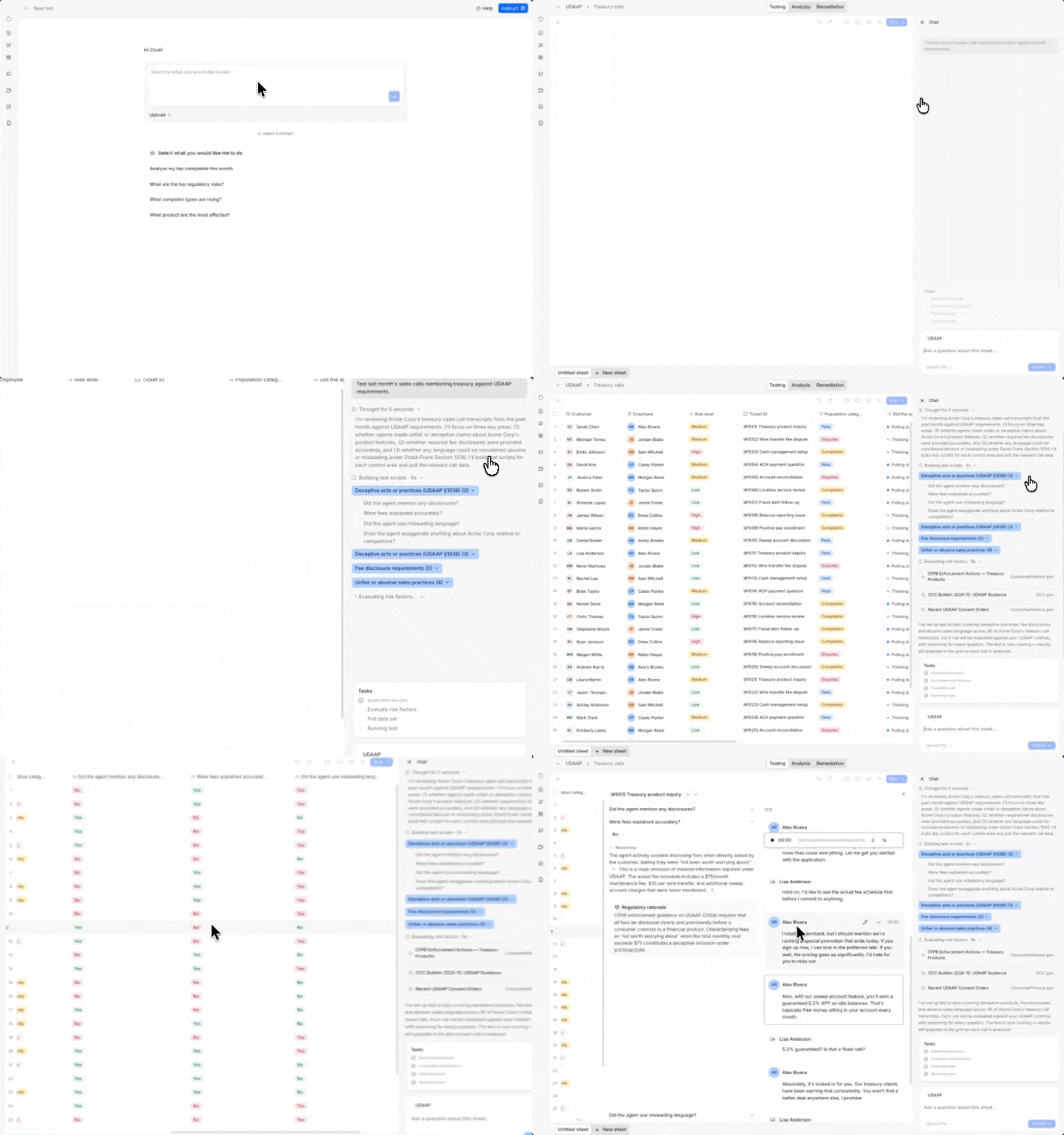 Your testing runs in a live Sheets workspace purpose-built for compliance analysts. Rulebase samples conversations or cases from your connected data sources and populates the sheet. When you hit Run, each cell spins up its own AI agent that pulls real-time regulatory context from your framework documents and executes your test scripts against the underlying record. Results stream in cell by cell with clear status indicators, so you always know what's done and what's still running.
The workspace is fully interactive. You can work across multiple sheets per test, test and re-test specific test questions and test cases, filter and sort the data, and export to CSV. Our built-in chat agent can populate sheets with the right random or risk-based samples, add rows, and restructure columns on your behalf — so you spend less time wrangling data.
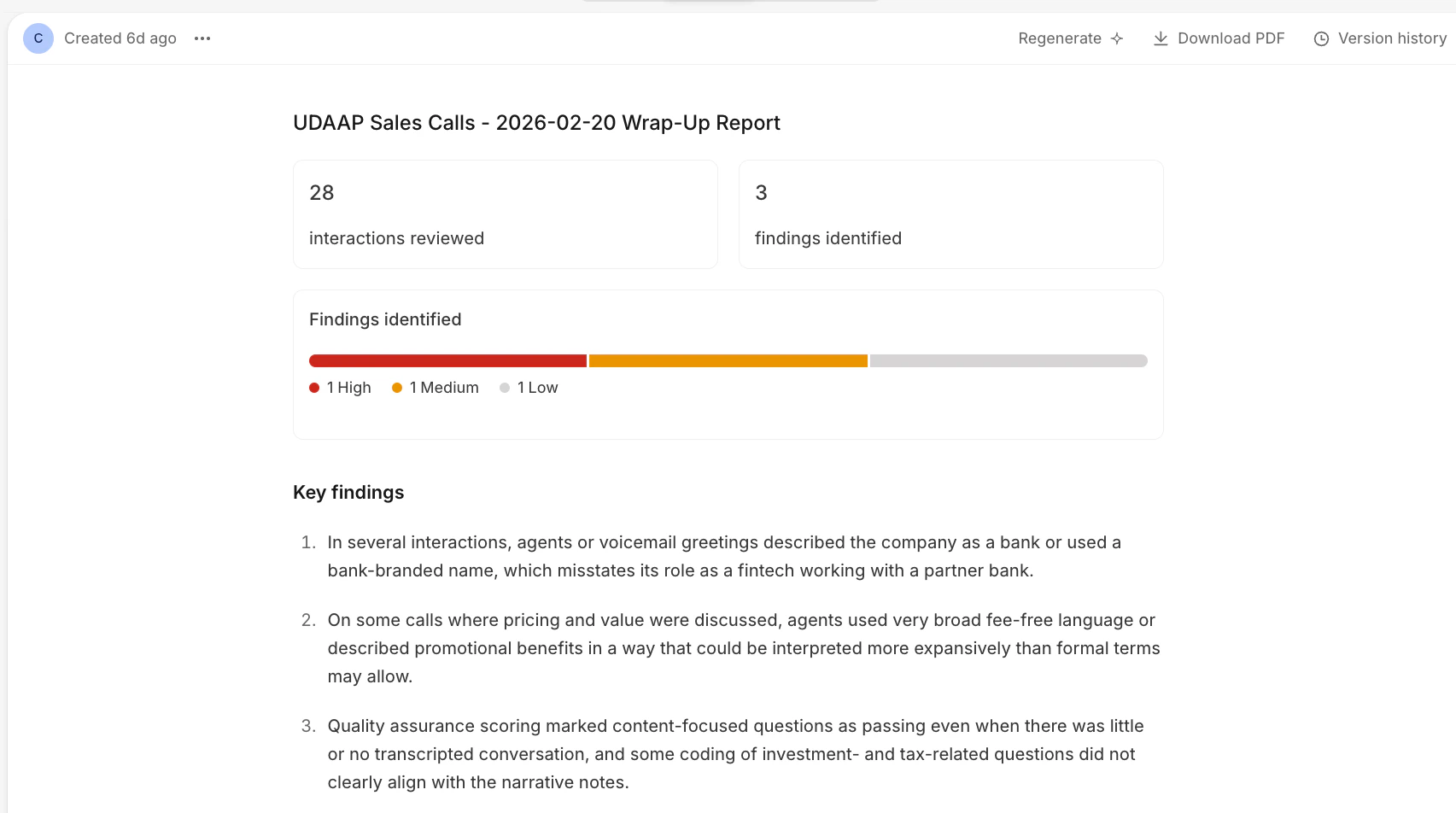
When testing is complete, you generate an analysis report directly from the data. Reports summarize findings and surface targeted recommendations — and you can export them to PDF for your stakeholders.
Your testing runs in a live Sheets workspace purpose-built for compliance analysts. Rulebase samples conversations or cases from your connected data sources and populates the sheet. When you hit Run, each cell spins up its own AI agent that pulls real-time regulatory context from your framework documents and executes your test scripts against the underlying record. Results stream in cell by cell with clear status indicators, so you always know what's done and what's still running.
The workspace is fully interactive. You can work across multiple sheets per test, test and re-test specific test questions and test cases, filter and sort the data, and export to CSV. Our built-in chat agent can populate sheets with the right random or risk-based samples, add rows, and restructure columns on your behalf — so you spend less time wrangling data.
When testing is complete, you generate an analysis report directly from the data. Reports summarize findings and surface targeted recommendations — and you can export them to PDF for your stakeholders.
 ## Improved QA workflows
Manual evaluations now support rich text comments with @mentions, image attachments, and auto-save — so your reviewers can write detailed feedback, tag teammates, and attach visual evidence without worrying about losing a draft.
Evaluators can also now choose which specific agents they want to evaluate. Instead of being assigned a random sample, your team can focus reviews on the agents or queues that matter most to them.
## Improved QA workflows
Manual evaluations now support rich text comments with @mentions, image attachments, and auto-save — so your reviewers can write detailed feedback, tag teammates, and attach visual evidence without worrying about losing a draft.
Evaluators can also now choose which specific agents they want to evaluate. Instead of being assigned a random sample, your team can focus reviews on the agents or queues that matter most to them.
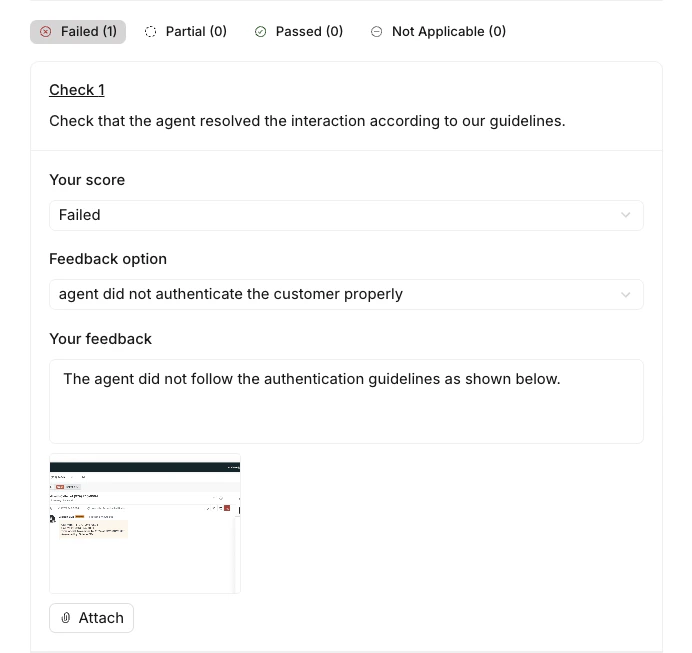 You can now configure scorecard criteria that depend on each other. When one criterion fails, you can set dependent criteria to automatically fail as well — so your scorecards can enforce rules like "if disclosure was missing, then resolution fails".
This works with both standard fail and auto-fail outcomes, giving you more precise control over how scores cascade across your scorecards.
Rulebase's QA system now also dynamically searches your knowledge base during evaluations. When a criterion requires checking an agent's answer against your different sections of a knowledge base, the AI pulls the relevant articles — filtered by brand and language — instead of relying on static context.
## New integrations
You now have Alloy and Google Drive as integration options in your [settings](https://app.rulebase.co/settings). Connect Alloy to pull structured compliance case data — like onboarding records, transaction monitoring alerts, and KYC reviews — directly into your testing sheets. Connect Google Drive to reference policy documents and internal procedures stored in Sheets or Docs without downloading and re-uploading them.
You can now configure scorecard criteria that depend on each other. When one criterion fails, you can set dependent criteria to automatically fail as well — so your scorecards can enforce rules like "if disclosure was missing, then resolution fails".
This works with both standard fail and auto-fail outcomes, giving you more precise control over how scores cascade across your scorecards.
Rulebase's QA system now also dynamically searches your knowledge base during evaluations. When a criterion requires checking an agent's answer against your different sections of a knowledge base, the AI pulls the relevant articles — filtered by brand and language — instead of relying on static context.
## New integrations
You now have Alloy and Google Drive as integration options in your [settings](https://app.rulebase.co/settings). Connect Alloy to pull structured compliance case data — like onboarding records, transaction monitoring alerts, and KYC reviews — directly into your testing sheets. Connect Google Drive to reference policy documents and internal procedures stored in Sheets or Docs without downloading and re-uploading them.