> ## Documentation Index
> Fetch the complete documentation index at: https://docs.rulebase.co/llms.txt
> Use this file to discover all available pages before exploring further.
# Contest an evaluation
> Dispute a criterion you think was scored wrongly, attach your evidence, and follow the review through to a decision.
If a criterion was marked as failed and you think that is wrong, you can say so on
the ticket itself. Contesting sends the specific criteria you name to a reviewer,
along with your explanation, and they either change the result or tell you why they
are keeping it.
Disputes are a normal part of a QA program, and a clear, specific dispute is
useful to your team even when the original result stands.
## When you can contest
* The evaluation has to have **at least one failed criterion**. There is nothing to
dispute on a clean result.
* It must be **your current evaluation** for that ticket. If a reviewer has already
replaced it, the newer one is the one that counts.
* You have to be inside your organization's **dispute window**, counted in days
from the date of the evaluation. The length is a setting, and some organizations
turn it off so there is no deadline at all.
* You can have **one open dispute per ticket** at a time. Once the reviewer
finishes, you can raise another on the same ticket if the new result is still
wrong.
The **Contest score** button on the evaluation is disabled (not hidden) when
one of these does not hold, and hovering it tells you which one. "The dispute
window has closed" means the deadline passed; "Tickets cannot be contested while an
active contest is open" means your earlier dispute is still with a reviewer.
## Start the dispute
1. Open the ticket from your [Evaluations](https://app.rulebase.co/agent/evaluations)
list and read the criterion you disagree with, along with its reasoning.
2. Click **Contest score** above the breakdown.
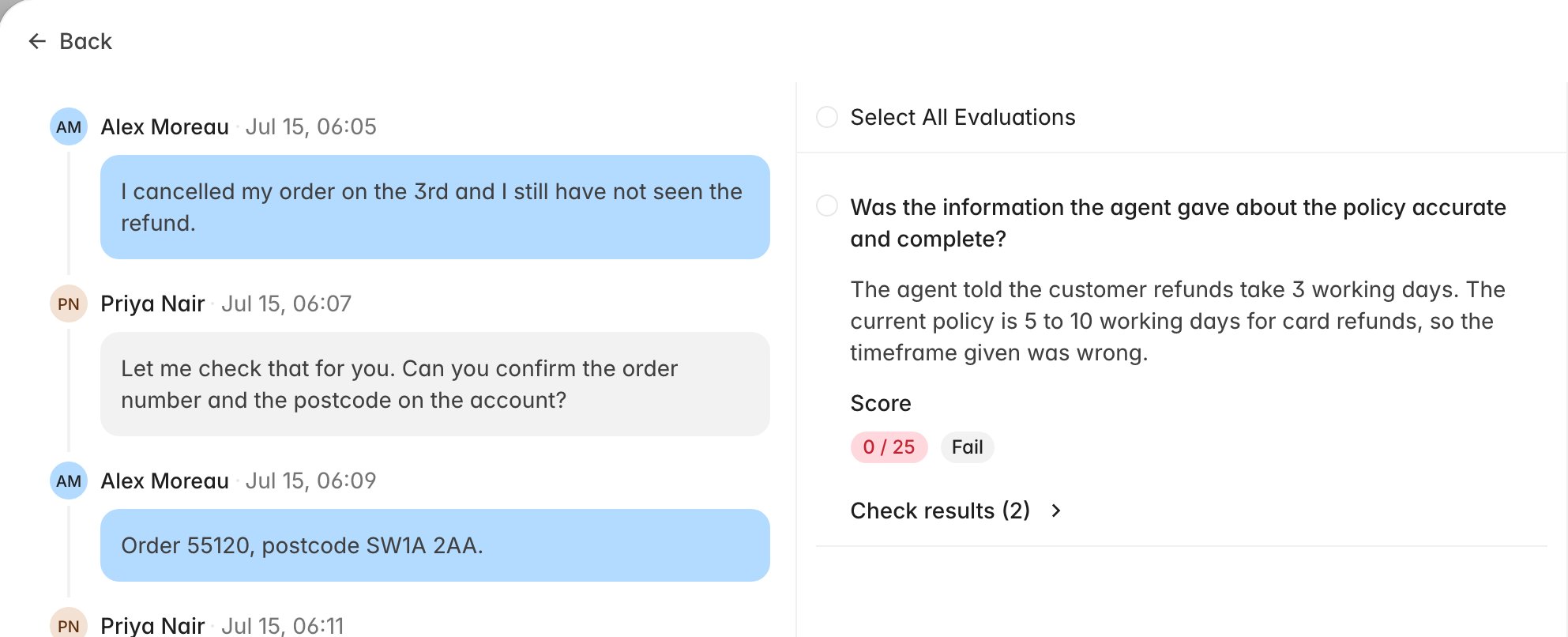
3. Rulebase opens the contest form. The transcript sits on the left, and the
failed criteria are listed in the middle with a checkbox each.
4. Tick the criteria you want reviewed. **Select All Evaluations** takes every
failed criterion on that scorecard, and **Check results** expands the individual
checks behind a criterion, which is where the specific judgement usually sits.
 Only failed criteria appear. If the scorecard you are looking at has none, switch
scorecards with the picker at the top when the ticket was scored against more
than one.
## Make your case
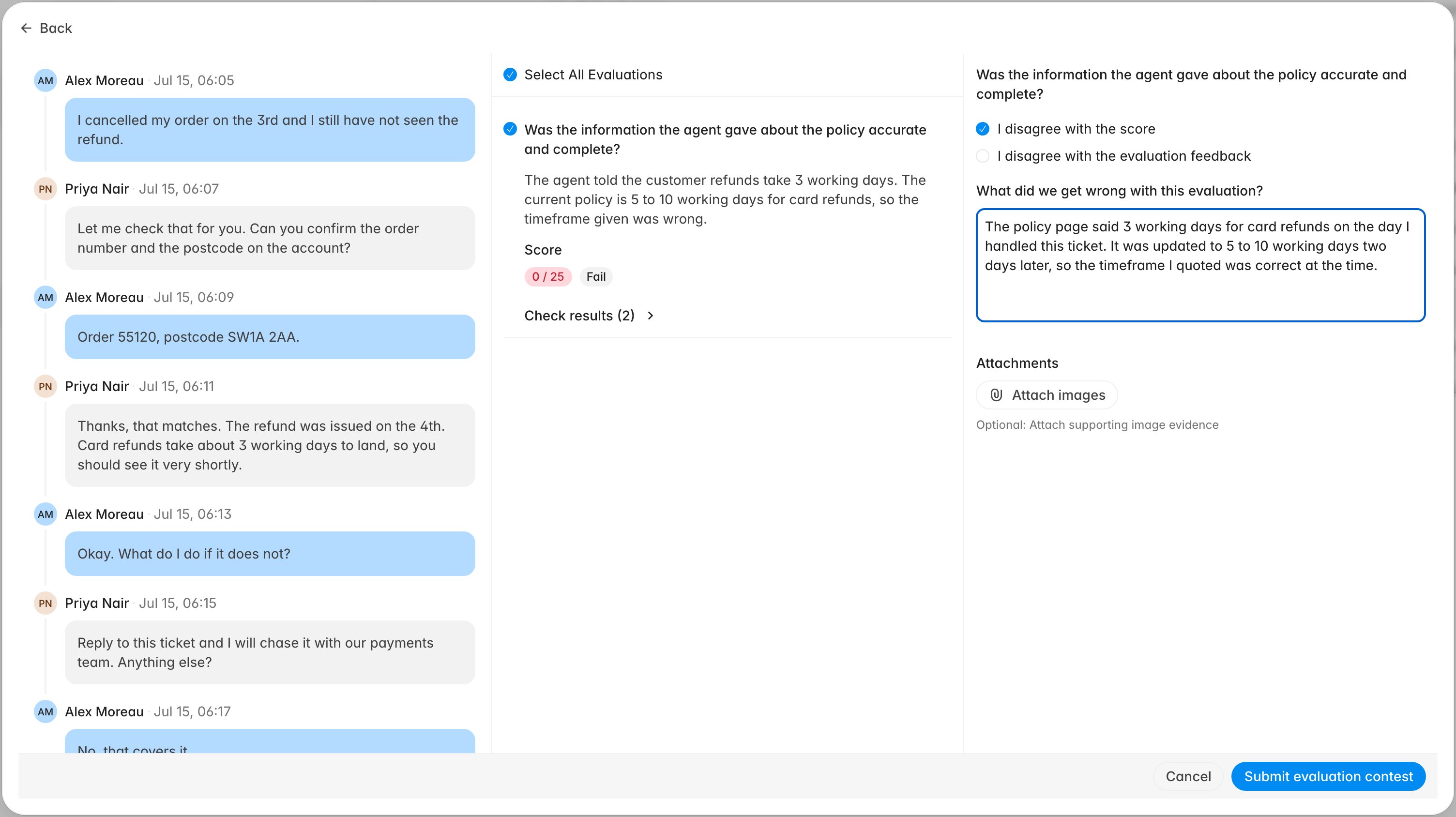
Each criterion you tick opens its own block on the right, with two optional
checkboxes and one thing you have to write:
* **I disagree with the score**: tick this when the pass or fail is wrong.
* **I disagree with the evaluation feedback**: tick this when the result may be
fair but the reasoning misrepresents what happened.
* **What did we get wrong with this evaluation?**: your explanation, and the only
required field. **Submit evaluation contest** stays disabled until every criterion
you selected has one, so a dispute cannot go out with a blank criterion attached
to it.
You can attach images as evidence under each criterion. This is the place for a
screenshot of the policy you followed or the internal note you were working from.
Attachments are optional and images only.
Only failed criteria appear. If the scorecard you are looking at has none, switch
scorecards with the picker at the top when the ticket was scored against more
than one.
## Make your case
Each criterion you tick opens its own block on the right, with two optional
checkboxes and one thing you have to write:
* **I disagree with the score**: tick this when the pass or fail is wrong.
* **I disagree with the evaluation feedback**: tick this when the result may be
fair but the reasoning misrepresents what happened.
* **What did we get wrong with this evaluation?**: your explanation, and the only
required field. **Submit evaluation contest** stays disabled until every criterion
you selected has one, so a dispute cannot go out with a blank criterion attached
to it.
You can attach images as evidence under each criterion. This is the place for a
screenshot of the policy you followed or the internal note you were working from.
Attachments are optional and images only.
 Point at something checkable. "The refund timeframe I quoted is the one in the help
centre article on that date, screenshot attached" gives a reviewer something they can
confirm in a minute. "This is unfair" leaves them nothing to act on, even when you
are right.
When you are ready, click **Submit evaluation contest**.
## What happens next
Submitting marks the ticket as under review and puts it in front of a reviewer.
On the ticket you will see an orange banner reading **This evaluation is currently
being reviewed**. The score stays as-is while the dispute is open, and there is no
way to edit or withdraw it once submitted, so reread your explanation before you
send it.
The reviewer works through your dispute criterion by criterion. They can accept
your point and re-score that criterion, or keep the original result and explain
their reasoning. Where they change the score, Rulebase produces an updated
evaluation, and that one becomes the score that counts for you. The original stays
readable as the history of the ticket.
When the review is finished, the ticket shows a green **Your dispute has been
reviewed** banner with a link to the updated evaluation.
## Follow it in Contested Evaluations
Once you have raised your first dispute, a **Contested Evaluations** tab appears in
your portal navigation. It lists your disputes in two groups.
Point at something checkable. "The refund timeframe I quoted is the one in the help
centre article on that date, screenshot attached" gives a reviewer something they can
confirm in a minute. "This is unfair" leaves them nothing to act on, even when you
are right.
When you are ready, click **Submit evaluation contest**.
## What happens next
Submitting marks the ticket as under review and puts it in front of a reviewer.
On the ticket you will see an orange banner reading **This evaluation is currently
being reviewed**. The score stays as-is while the dispute is open, and there is no
way to edit or withdraw it once submitted, so reread your explanation before you
send it.
The reviewer works through your dispute criterion by criterion. They can accept
your point and re-score that criterion, or keep the original result and explain
their reasoning. Where they change the score, Rulebase produces an updated
evaluation, and that one becomes the score that counts for you. The original stays
readable as the history of the ticket.
When the review is finished, the ticket shows a green **Your dispute has been
reviewed** banner with a link to the updated evaluation.
## Follow it in Contested Evaluations
Once you have raised your first dispute, a **Contested Evaluations** tab appears in
your portal navigation. It lists your disputes in two groups.
 * **Unresolved**: still with a reviewer. The status column reads **Unresolved**
and there is nothing for you to do.
* **Resolved**: decided. The status column shows **Accepted** when every point you
raised was accepted, or **Rejected** when at least one was kept.
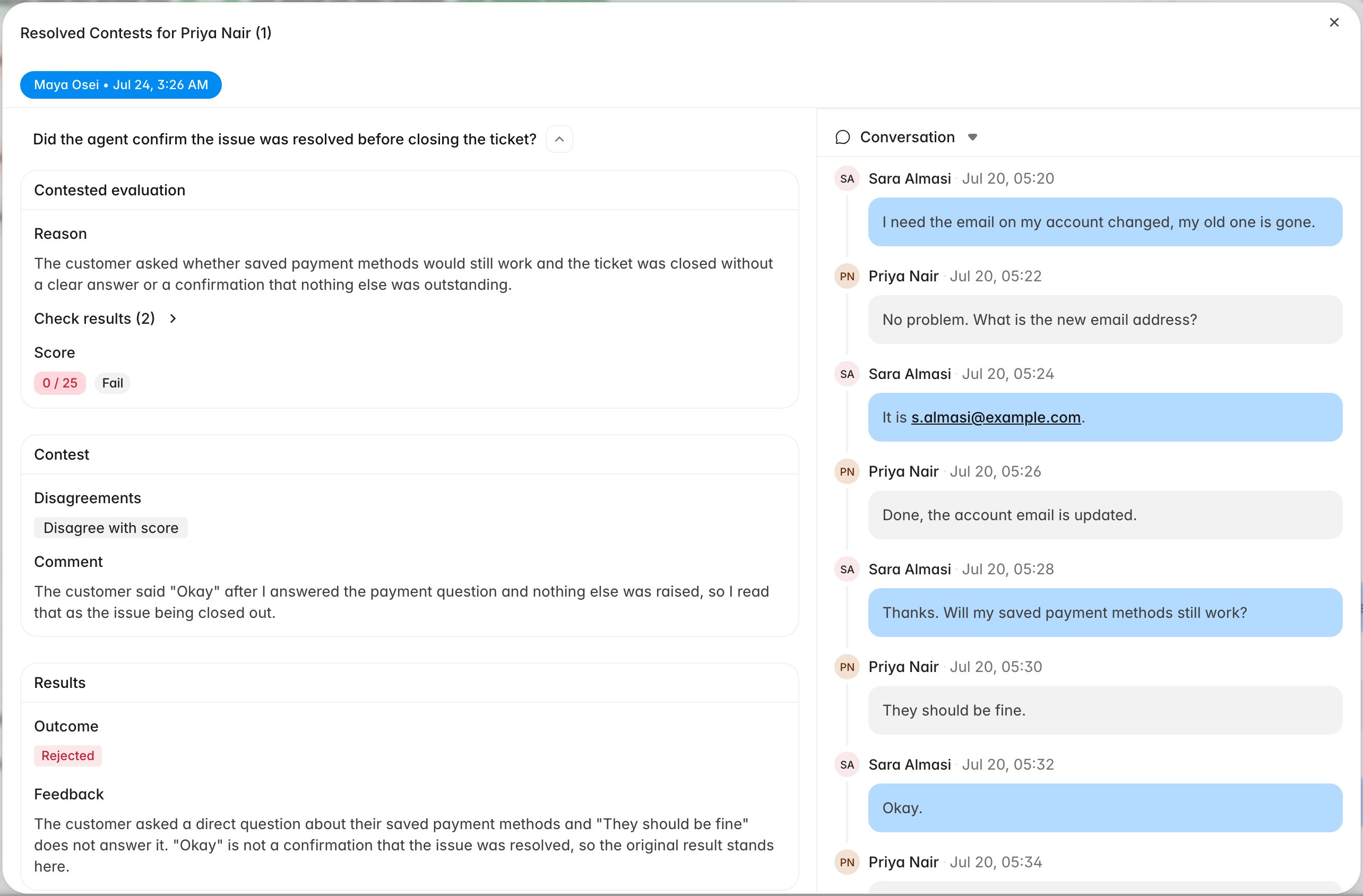
**Rejected** does not always mean the whole dispute failed. It means at least one
criterion was kept; the others may have been accepted. Click the row to open the
ticket, then use **View results** next to **Evaluation contested** on the
evaluation. Each criterion you raised is laid out three ways: the original result,
your **Contest** with the comment and any images you attached, and **Results** with
the outcome, the new score where your point was accepted, and the reviewer's
written feedback.
* **Unresolved**: still with a reviewer. The status column reads **Unresolved**
and there is nothing for you to do.
* **Resolved**: decided. The status column shows **Accepted** when every point you
raised was accepted, or **Rejected** when at least one was kept.
**Rejected** does not always mean the whole dispute failed. It means at least one
criterion was kept; the others may have been accepted. Click the row to open the
ticket, then use **View results** next to **Evaluation contested** on the
evaluation. Each criterion you raised is laid out three ways: the original result,
your **Contest** with the comment and any images you attached, and **Results** with
the outcome, the new score where your point was accepted, and the reviewer's
written feedback.
 Read the feedback before deciding whether to raise a second dispute. Where a point
was kept, the reviewer is usually naming the specific thing the transcript does not
show; address that point if you dispute again.
## Related
* [Read your evaluations and feedback](/guides/agent-portal/read-your-evaluations)
* [Use the agent portal](/guides/agent-portal/overview)
* [Rulebase glossary](/guides/concepts/glossary)
Read the feedback before deciding whether to raise a second dispute. Where a point
was kept, the reviewer is usually naming the specific thing the transcript does not
show; address that point if you dispute again.
## Related
* [Read your evaluations and feedback](/guides/agent-portal/read-your-evaluations)
* [Use the agent portal](/guides/agent-portal/overview)
* [Rulebase glossary](/guides/concepts/glossary)