> ## Documentation Index
> Fetch the complete documentation index at: https://docs.rulebase.co/llms.txt
> Use this file to discover all available pages before exploring further.
# Set up API access
> Create a Rulebase API key, store it safely, and send requests to the correct regional base URL for your organization.
Anything you send to Rulebase programmatically travels over an API key: pushing
conversations from a helpdesk we don't have a native integration with, or filing
back-office work items from your internal admin tool. One key is usually enough
to get started.
The base URL is region-specific. Rulebase runs separate US and EU
deployments, and a key issued in one region does not work in the other. A valid
key sent to the wrong host returns the same `401 Unauthorized` as a mistyped one,
so the error message won't tell you which mistake you made.
 ## Before you start
* You need permission to manage integrations. Admin roles have it; if the
**Create API key** button is greyed out, that's what's missing.
* Know which region your organization is on; the next section explains how to
tell.
* Have somewhere to put the key before you create it. A secrets manager or your
deployment platform's environment variables are both fine. A chat message is
not, and you only get one chance to copy it.
## Create a key
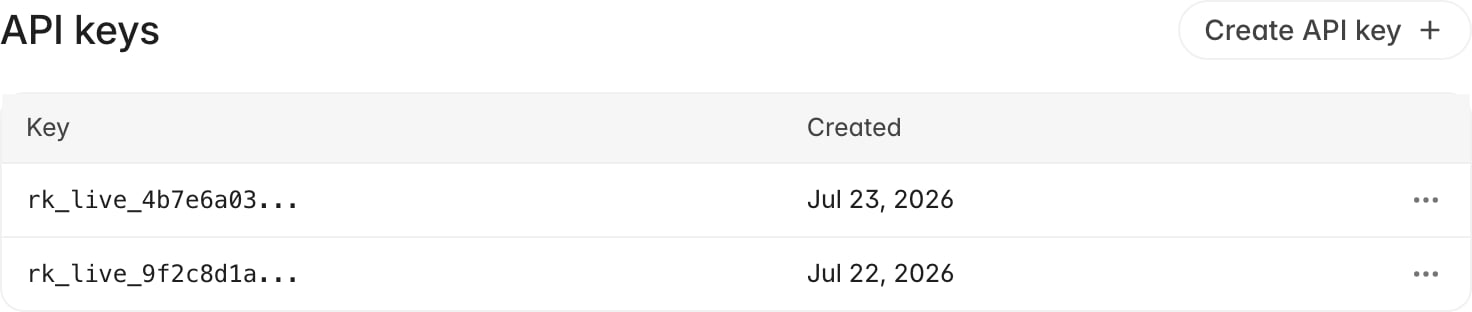
API keys live on the **API keys** tab in Connections settings.
1. Go to [Settings > Connections](https://app.rulebase.co/settings/connections).
2. Open the **API keys** tab.
3. Click **Create API key**.
4. Copy the key from the **API key created** dialog, using the copy button next
to it.
5. Paste it into your secret store, then click **Done**.
## Before you start
* You need permission to manage integrations. Admin roles have it; if the
**Create API key** button is greyed out, that's what's missing.
* Know which region your organization is on; the next section explains how to
tell.
* Have somewhere to put the key before you create it. A secrets manager or your
deployment platform's environment variables are both fine. A chat message is
not, and you only get one chance to copy it.
## Create a key
API keys live on the **API keys** tab in Connections settings.
1. Go to [Settings > Connections](https://app.rulebase.co/settings/connections).
2. Open the **API keys** tab.
3. Click **Create API key**.
4. Copy the key from the **API key created** dialog, using the copy button next
to it.
5. Paste it into your secret store, then click **Done**.
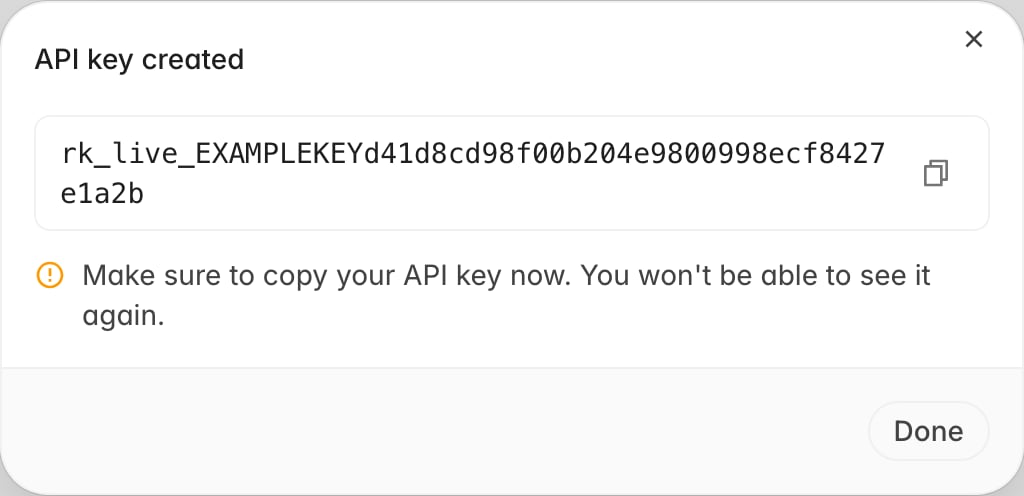 There are no options to fill in. The key is generated the moment you click, works
straight away, and never expires on its own.
The dialog is the only place the full key is ever shown. Once you close it,
Rulebase can't display the key again, and there is no "reveal" action on the
list. If you lose a key, create a new one and revoke the old one.
Production keys start with `rk_live_`. Back on the list, each row shows only the
first 16 characters followed by an ellipsis, which is enough to tell your keys
apart when you come back to revoke one, and not enough to authenticate with.
## Find your region's base URL
Your region is the one you sign in to. If you log in at `app.rulebase.co` you're
on US; if you log in at `eu.app.rulebase.co` you're on EU. There's no region
setting to look up, and no way to change it yourself.
Rulebase exposes two API versions, and each has a host per region:
| Surface | US | EU |
| ------- | -------------------------- | ----------------------------- |
| App | `https://app.rulebase.co` | `https://eu.app.rulebase.co` |
| API v1 | `https://api.rulebase.co` | `https://eu.api.rulebase.co` |
| API v2 | `https://api2.rulebase.co` | `https://eu.api2.rulebase.co` |
Which version you need depends on the endpoint, not on your region. Conversation
uploads are documented against v1, while work items and the upload-confirmation
reads are on v2. The same key authenticates both, so the only thing to keep
straight is the `eu.` prefix.
Public v2 endpoints are versioned in the path: work items live under
`/v1/work_items`. The older unversioned paths still answer, with `Deprecation`
and `Sunset` headers, and will be removed.
If you're on EU, put the base URL in one configuration value that every call site
reads, rather than writing the host into each request. Otherwise a single unprefixed URL can survive into production and show up
later as a `401` that looks like a credentials problem.
## Send your first request
Authenticate by putting the key in an `Authorization: Bearer` header. Listing
conversation uploads is a good first call because it only reads, so you can run
it against a live organization without changing anything:
```bash theme={null}
curl "https://api2.rulebase.co/conversation_uploads?limit=1" \
-H "Authorization: Bearer YOUR_API_KEY"
```
A working key returns `200` with an envelope, even when your organization hasn't
uploaded anything yet:
```json theme={null}
{
"data": [],
"meta": {
"page": {
"next": null,
"limit": 1
}
}
}
```
A key that Rulebase doesn't recognize returns `401` with this body, on both API
versions:
```json theme={null}
{ "error": "Unauthorized" }
```
If you get the `401`, check these three things:
* **The host.** If you sign in at `eu.app.rulebase.co`, confirm you're calling
`eu.api2.rulebase.co` and not `api2.rulebase.co`. Rule this out first, because
nothing in the response hints at it.
* **The header.** The value is the word `Bearer`, a space, then the key. A
trailing newline from a shell variable is enough to break it.
* **The key itself.** Check the first 16 characters against the list in
[Settings > Connections](https://app.rulebase.co/settings/connections). If
the row isn't there, the key was revoked.
`rulebase doctor` (from `npm install -g @rulebase/cli`) tries your key against
both regions and names the one that accepts it, which settles the first bullet
in one command. See the
[Rulebase CLI](/guides/cli) guide.
## What a key carries
Every key has the same properties:
* **Organization-wide access.** A key authenticates as your organization, not as
the person who created it. Requests made with it aren't attributed to you and
aren't limited by your role.
* **No per-key scopes.** There are no read-only keys, no per-endpoint
permissions, and no IP restrictions. Every key can reach every endpoint that
accepts API-key authentication.
* **Tied to one region.** Each region keeps its own key store, so a key created
in the EU app authenticates only against EU hosts.
* **No expiry.** A key stays valid until someone revokes it.
Because a key is org-wide and open-ended, treat it as a shared production
credential. Creating one key per integration costs nothing and means you can
retire a single system later without breaking the others.
## Revoke a key
Revoking is a delete. There's no disable-and-re-enable, so only do this once
you're sure the key is out of service or you know it's leaked.
1. Go to [Settings > Connections](https://app.rulebase.co/settings/connections)
and find the key in the **API keys** list, matching on its prefix.
2. Open the overflow menu at the end of its row.
3. Click **Delete**.
4. Confirm with **Delete** in the dialog.
There are no options to fill in. The key is generated the moment you click, works
straight away, and never expires on its own.
The dialog is the only place the full key is ever shown. Once you close it,
Rulebase can't display the key again, and there is no "reveal" action on the
list. If you lose a key, create a new one and revoke the old one.
Production keys start with `rk_live_`. Back on the list, each row shows only the
first 16 characters followed by an ellipsis, which is enough to tell your keys
apart when you come back to revoke one, and not enough to authenticate with.
## Find your region's base URL
Your region is the one you sign in to. If you log in at `app.rulebase.co` you're
on US; if you log in at `eu.app.rulebase.co` you're on EU. There's no region
setting to look up, and no way to change it yourself.
Rulebase exposes two API versions, and each has a host per region:
| Surface | US | EU |
| ------- | -------------------------- | ----------------------------- |
| App | `https://app.rulebase.co` | `https://eu.app.rulebase.co` |
| API v1 | `https://api.rulebase.co` | `https://eu.api.rulebase.co` |
| API v2 | `https://api2.rulebase.co` | `https://eu.api2.rulebase.co` |
Which version you need depends on the endpoint, not on your region. Conversation
uploads are documented against v1, while work items and the upload-confirmation
reads are on v2. The same key authenticates both, so the only thing to keep
straight is the `eu.` prefix.
Public v2 endpoints are versioned in the path: work items live under
`/v1/work_items`. The older unversioned paths still answer, with `Deprecation`
and `Sunset` headers, and will be removed.
If you're on EU, put the base URL in one configuration value that every call site
reads, rather than writing the host into each request. Otherwise a single unprefixed URL can survive into production and show up
later as a `401` that looks like a credentials problem.
## Send your first request
Authenticate by putting the key in an `Authorization: Bearer` header. Listing
conversation uploads is a good first call because it only reads, so you can run
it against a live organization without changing anything:
```bash theme={null}
curl "https://api2.rulebase.co/conversation_uploads?limit=1" \
-H "Authorization: Bearer YOUR_API_KEY"
```
A working key returns `200` with an envelope, even when your organization hasn't
uploaded anything yet:
```json theme={null}
{
"data": [],
"meta": {
"page": {
"next": null,
"limit": 1
}
}
}
```
A key that Rulebase doesn't recognize returns `401` with this body, on both API
versions:
```json theme={null}
{ "error": "Unauthorized" }
```
If you get the `401`, check these three things:
* **The host.** If you sign in at `eu.app.rulebase.co`, confirm you're calling
`eu.api2.rulebase.co` and not `api2.rulebase.co`. Rule this out first, because
nothing in the response hints at it.
* **The header.** The value is the word `Bearer`, a space, then the key. A
trailing newline from a shell variable is enough to break it.
* **The key itself.** Check the first 16 characters against the list in
[Settings > Connections](https://app.rulebase.co/settings/connections). If
the row isn't there, the key was revoked.
`rulebase doctor` (from `npm install -g @rulebase/cli`) tries your key against
both regions and names the one that accepts it, which settles the first bullet
in one command. See the
[Rulebase CLI](/guides/cli) guide.
## What a key carries
Every key has the same properties:
* **Organization-wide access.** A key authenticates as your organization, not as
the person who created it. Requests made with it aren't attributed to you and
aren't limited by your role.
* **No per-key scopes.** There are no read-only keys, no per-endpoint
permissions, and no IP restrictions. Every key can reach every endpoint that
accepts API-key authentication.
* **Tied to one region.** Each region keeps its own key store, so a key created
in the EU app authenticates only against EU hosts.
* **No expiry.** A key stays valid until someone revokes it.
Because a key is org-wide and open-ended, treat it as a shared production
credential. Creating one key per integration costs nothing and means you can
retire a single system later without breaking the others.
## Revoke a key
Revoking is a delete. There's no disable-and-re-enable, so only do this once
you're sure the key is out of service or you know it's leaked.
1. Go to [Settings > Connections](https://app.rulebase.co/settings/connections)
and find the key in the **API keys** list, matching on its prefix.
2. Open the overflow menu at the end of its row.
3. Click **Delete**.
4. Confirm with **Delete** in the dialog.
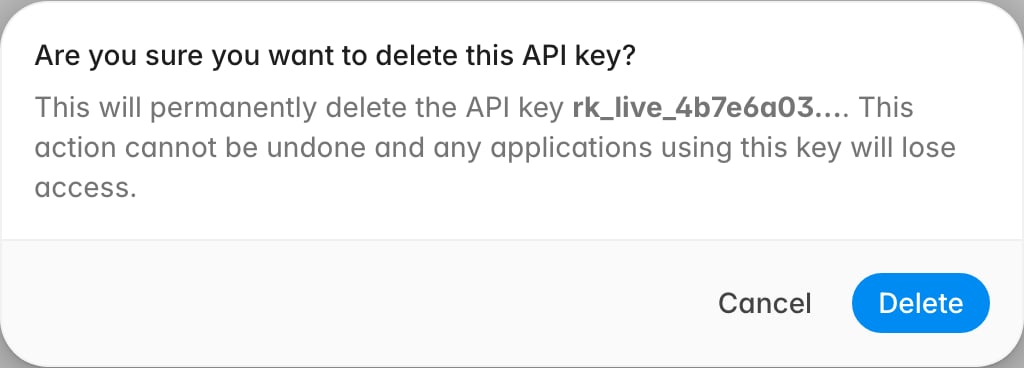 The key stops working straight away, and anything still sending it starts
getting `401 Unauthorized`. Rulebase keeps the data that was uploaded with the
key; only the credential goes away. To rotate rather than retire an integration,
create the replacement key and deploy it first, then come back and delete the
old one.
## Related
* [Upload a conversation](/api-reference/conversations/upload-a-conversation) and
the rest of the v1 REST reference
* [List conversation uploads](/api-v2-reference/list-conversation-uploads) and
the rest of the v2 REST reference
* [Uploading conversations](/guides/uploads/conversations)
* [Confirm received uploads](/guides/uploads/confirm-received-uploads)
* [Uploading work items](/guides/uploads/work-items)
* [Rulebase CLI](/guides/cli)
* [Roles and permissions](/guides/roles-and-permissions)
The key stops working straight away, and anything still sending it starts
getting `401 Unauthorized`. Rulebase keeps the data that was uploaded with the
key; only the credential goes away. To rotate rather than retire an integration,
create the replacement key and deploy it first, then come back and delete the
old one.
## Related
* [Upload a conversation](/api-reference/conversations/upload-a-conversation) and
the rest of the v1 REST reference
* [List conversation uploads](/api-v2-reference/list-conversation-uploads) and
the rest of the v2 REST reference
* [Uploading conversations](/guides/uploads/conversations)
* [Confirm received uploads](/guides/uploads/confirm-received-uploads)
* [Uploading work items](/guides/uploads/work-items)
* [Rulebase CLI](/guides/cli)
* [Roles and permissions](/guides/roles-and-permissions)