> ## Documentation Index
> Fetch the complete documentation index at: https://docs.rulebase.co/llms.txt
> Use this file to discover all available pages before exploring further.
# Run a coaching session
> Log a 1:1 coaching session for an agent, grounded in real tickets and their QA scores.
A coaching session is where you capture a one-on-one coaching conversation with
an agent. Ground it in their QA results: pull in the specific tickets and
evaluations ("evidence") that prompted the conversation, add your notes, and the
agent has a clear record to work from after you meet.
## Before you start
* **Coaching** must be enabled for your organization ([Settings > Features](https://app.rulebase.co/settings/features)).
* You need a coach or admin role. Agents can view their own sessions but can't
create or edit them.
* Have the tickets or evaluations you want to reference in mind; sessions are
most useful when grounded in real interactions.
## Create a session
Coaching sessions live on the agent's performance page, not the Coaching page.
The score trend, the criteria the agent keeps failing, and the tickets behind
both are already in front of you there. [Use team and agent
performance](/guides/insights/team-and-agent-performance) covers reading that page
before you book the 1:1.
1. Open the agent's performance page ([Insights > Teams](https://app.rulebase.co/insights/teams),
then drill into the agent, or open the agent from any evaluation).
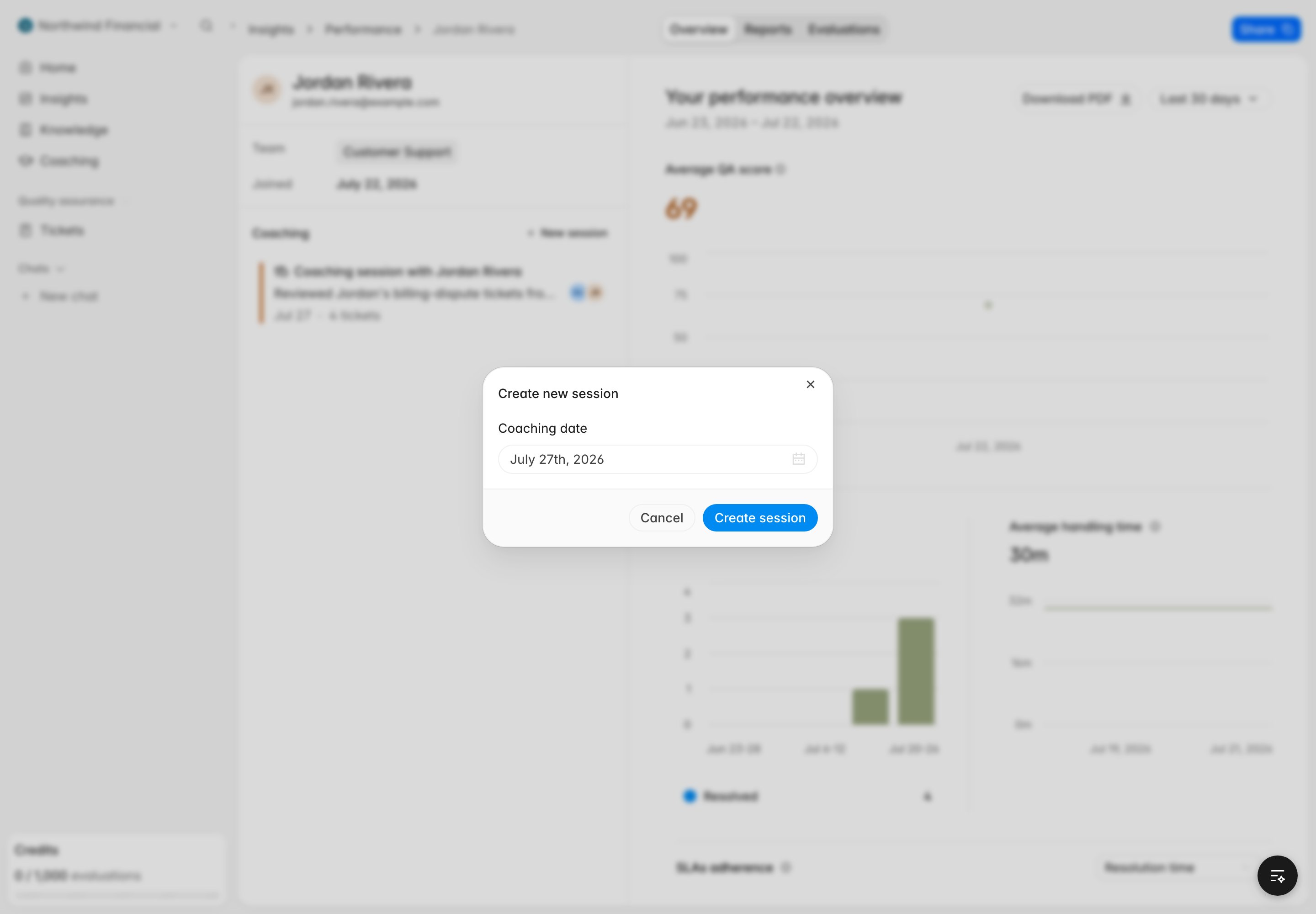
2. In the **Coaching sessions** timeline, click **New session**.
3. Pick the coaching **date**. New sessions default to the upcoming Monday at
noon; change it to when the coaching happened or is planned.
4. Save. The session opens so you can add notes and evidence.
 A session dated in the future shows up as **upcoming** on both the agent's
timeline and your own upcoming-coaching list, so you can plan sessions ahead
of time.
## Add evidence: tickets and evaluations
Evidence links a coaching point to a real ticket and its QA result.
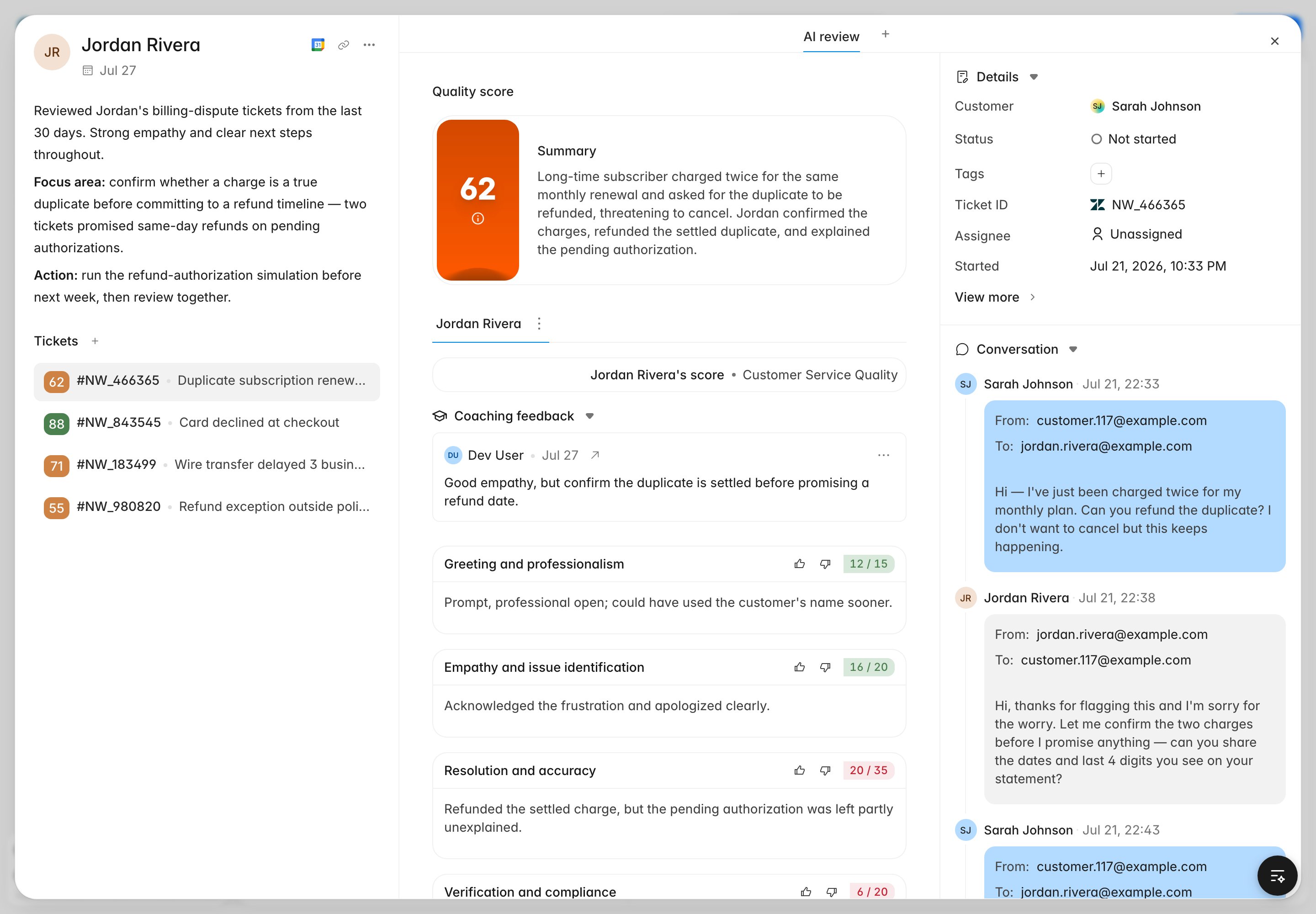
1. In the open session, add a ticket by its conversation.
2. Rulebase attaches the ticket's QA score. If you don't choose a specific
evaluation, it automatically uses the best completed evaluation for that
ticket and this agent, preferring a human evaluation over an AI one, and the
most recent.
3. Add per-ticket **feedback** to explain what you want the agent to notice.
You can also attach a ticket to a session directly from a conversation or
evaluation using **Add to coaching**, without opening the agent's page first.
An evaluation can only be attached as evidence when it belongs to the same
ticket **and** the agent being coached. Rulebase blocks mismatched evidence so a
session never references another agent's score.
## Write notes
Session notes use markdown, so you can structure the conversation with headings,
bullets, and links. Keep notes specific and tied to the evidence you attached.
A session dated in the future shows up as **upcoming** on both the agent's
timeline and your own upcoming-coaching list, so you can plan sessions ahead
of time.
## Add evidence: tickets and evaluations
Evidence links a coaching point to a real ticket and its QA result.
1. In the open session, add a ticket by its conversation.
2. Rulebase attaches the ticket's QA score. If you don't choose a specific
evaluation, it automatically uses the best completed evaluation for that
ticket and this agent, preferring a human evaluation over an AI one, and the
most recent.
3. Add per-ticket **feedback** to explain what you want the agent to notice.
You can also attach a ticket to a session directly from a conversation or
evaluation using **Add to coaching**, without opening the agent's page first.
An evaluation can only be attached as evidence when it belongs to the same
ticket **and** the agent being coached. Rulebase blocks mismatched evidence so a
session never references another agent's score.
## Write notes
Session notes use markdown, so you can structure the conversation with headings,
bullets, and links. Keep notes specific and tied to the evidence you attached.
 ## Share a session
Use **Copy link** in the session to share a direct URL
(`/coaching/sessions/{id}`). The link resolves the session and opens it on the
agent's performance page, so recipients land in the right place.
## What the agent sees
The agent opens the same **Coaching sessions** timeline on their own performance
view, but read-only: they can read your notes, open the linked tickets, and see
the QA scores, but they can't add, edit, or delete anything. There's no
acknowledgement step; the record stays available.
## Related
* [Coaching overview](/guides/coaching/overview)
* [Coaching simulations](/guides/coaching/simulations)
* [Use team and agent performance](/guides/insights/team-and-agent-performance)
* [Manage the QA agent roster](/guides/quality-assurance/manage-agent-roster)
## Share a session
Use **Copy link** in the session to share a direct URL
(`/coaching/sessions/{id}`). The link resolves the session and opens it on the
agent's performance page, so recipients land in the right place.
## What the agent sees
The agent opens the same **Coaching sessions** timeline on their own performance
view, but read-only: they can read your notes, open the linked tickets, and see
the QA scores, but they can't add, edit, or delete anything. There's no
acknowledgement step; the record stays available.
## Related
* [Coaching overview](/guides/coaching/overview)
* [Coaching simulations](/guides/coaching/simulations)
* [Use team and agent performance](/guides/insights/team-and-agent-performance)
* [Manage the QA agent roster](/guides/quality-assurance/manage-agent-roster)