> ## Documentation Index
> Fetch the complete documentation index at: https://docs.rulebase.co/llms.txt
> Use this file to discover all available pages before exploring further.
# Configure complaint taxonomy
> Define the complaint categories Rulebase matches tickets against, write descriptions and keywords it can classify from, and set the risk level that becomes each case's priority.
Complaint detection has no built-in idea of what counts as a complaint at your firm. It works
entirely from the categories you define: a ticket is compared against them, and a case is opened only
when one of them fits. The taxonomy therefore decides what your complaints register contains. Too few
categories and real complaints go undetected; overlapping categories and every case arrives
carrying several tags.
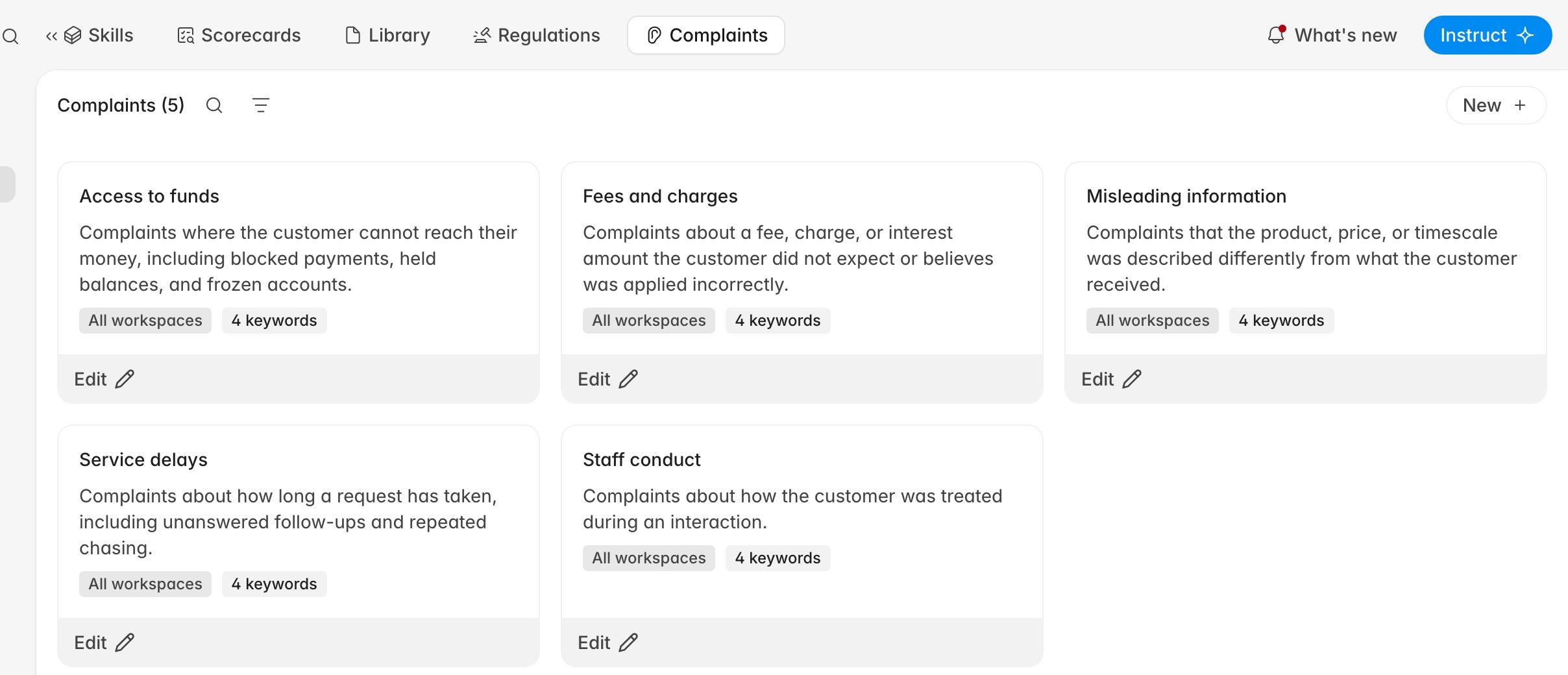
The taxonomy lives under **Knowledge > Complaints**, alongside scorecards and regulations, rather
than under **Compliance** with the cases themselves.
 ## Before you start
* You need an Administrator or Quality Analyst role. **New** and **Edit** are visible but disabled
for everyone else, including the Compliance Analyst role, so ask an administrator if you cannot
click them.
* Decide whether a category applies across the whole organization or to one workspace before you
create it. Detection only considers categories that apply to the ticket's workspace.
* If your firm already reports complaints against a published taxonomy, use those names here. The
category name is what appears as the tag on every case.
## Add a category
1. Go to **Knowledge > Complaints**.
2. Click **New**.
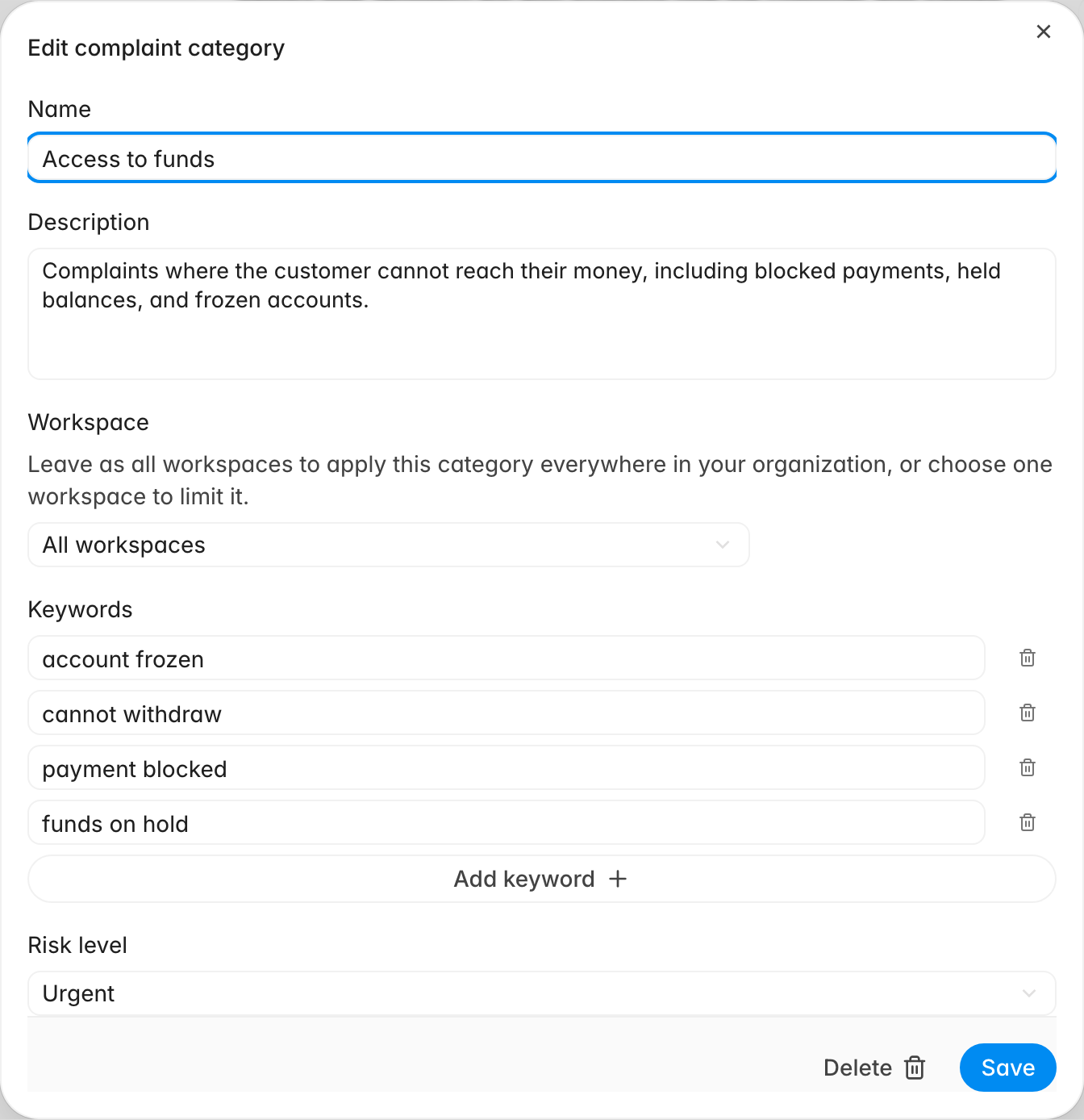
3. Fill in the **Name** and **Description**.
4. Leave **Workspace** as **All workspaces**, or pick the single workspace the category applies to.
5. Add the wording customers use with **Add keyword**, one phrase per row.
6. Set the **Risk level**.
7. Click **Save**.
The new category appears as a card with its description, its workspace scope, and its keyword count.
Each card carries an **Edit** action that reopens the same form, with a **Delete** action at the
bottom of the dialog.
## Before you start
* You need an Administrator or Quality Analyst role. **New** and **Edit** are visible but disabled
for everyone else, including the Compliance Analyst role, so ask an administrator if you cannot
click them.
* Decide whether a category applies across the whole organization or to one workspace before you
create it. Detection only considers categories that apply to the ticket's workspace.
* If your firm already reports complaints against a published taxonomy, use those names here. The
category name is what appears as the tag on every case.
## Add a category
1. Go to **Knowledge > Complaints**.
2. Click **New**.
3. Fill in the **Name** and **Description**.
4. Leave **Workspace** as **All workspaces**, or pick the single workspace the category applies to.
5. Add the wording customers use with **Add keyword**, one phrase per row.
6. Set the **Risk level**.
7. Click **Save**.
The new category appears as a card with its description, its workspace scope, and its keyword count.
Each card carries an **Edit** action that reopens the same form, with a **Delete** action at the
bottom of the dialog.
 ## What each field does
* **Name** — the category as it appears on a case and in the **Category** filter. Short and
recognisable.
* **Description** — the definition detection classifies against. This is where the work goes: say
what belongs in the category and, where it helps, what does not. `Complaints about a fee, charge,
or interest amount the customer did not expect or believes was applied incorrectly` gives the
model something to judge; `Fee issues` does not.
* **Workspace** — **All workspaces**, or one connected help desk. A workspace-scoped category is
invisible to tickets from anywhere else, which is the way to run a different taxonomy for a
separate brand or entity.
* **Keywords** — the phrases your customers actually use, such as `payment blocked` or `cannot
withdraw`. They are supplied to the model alongside the name and description as hints about
wording.
* **Risk level** — **Low**, **Medium**, **High**, or **Urgent**. It becomes the priority of any case
matched to this category.
Keywords are hints, not filters. A ticket can be classified into a category without containing any of
its keywords, and containing one does not force a match. Use them to teach the vocabulary your
customers use, and rely on the description for the actual boundary of the category.
## How risk level drives the case
The risk level you set here is the same value the complaints list calls priority. When a ticket
matches more than one category, the highest risk level among them wins.
| Risk level | On the case |
| ---------- | ----------------------------------------------------------------------------------------------- |
| **Urgent** | Groups under **Urgent** on the complaints list and can raise an immediate email or Slack alert. |
| **High** | Groups under **High** and can raise the same immediate alert. |
| **Medium** | Groups under **Medium**. No alert. |
| **Low** | Groups under **Low**. No alert. |
Alerting for high and urgent cases is configured once for the organization in
[Configure notifications](/guides/settings/configure-notifications), so the risk level you choose
here decides which cases trigger those alerts.
## Keep the taxonomy working
Aim for a small set of categories that a person could sort complaints into without hesitating. When
two categories overlap, detection tends to apply both, and the case's priority quietly follows the
more severe one.
Changes take effect on future detection only. Editing a description does not reclassify complaints
that have already been raised, and **Delete** takes a category out of detection from that point
onward while cases already tagged with it keep their tag. If a category is producing cases you do not
consider complaints, tighten its description rather than deleting it, then check the next few days of
detections on the complaints list.
A category with no keywords still works. A taxonomy with no categories does not: detection has
nothing to match against, and no cases are created at all.
## Related
* [Work a complaint case](/guides/compliance/work-a-complaint-case)
* [Configure notifications](/guides/settings/configure-notifications)
* [Rulebase glossary](/guides/concepts/glossary)
## What each field does
* **Name** — the category as it appears on a case and in the **Category** filter. Short and
recognisable.
* **Description** — the definition detection classifies against. This is where the work goes: say
what belongs in the category and, where it helps, what does not. `Complaints about a fee, charge,
or interest amount the customer did not expect or believes was applied incorrectly` gives the
model something to judge; `Fee issues` does not.
* **Workspace** — **All workspaces**, or one connected help desk. A workspace-scoped category is
invisible to tickets from anywhere else, which is the way to run a different taxonomy for a
separate brand or entity.
* **Keywords** — the phrases your customers actually use, such as `payment blocked` or `cannot
withdraw`. They are supplied to the model alongside the name and description as hints about
wording.
* **Risk level** — **Low**, **Medium**, **High**, or **Urgent**. It becomes the priority of any case
matched to this category.
Keywords are hints, not filters. A ticket can be classified into a category without containing any of
its keywords, and containing one does not force a match. Use them to teach the vocabulary your
customers use, and rely on the description for the actual boundary of the category.
## How risk level drives the case
The risk level you set here is the same value the complaints list calls priority. When a ticket
matches more than one category, the highest risk level among them wins.
| Risk level | On the case |
| ---------- | ----------------------------------------------------------------------------------------------- |
| **Urgent** | Groups under **Urgent** on the complaints list and can raise an immediate email or Slack alert. |
| **High** | Groups under **High** and can raise the same immediate alert. |
| **Medium** | Groups under **Medium**. No alert. |
| **Low** | Groups under **Low**. No alert. |
Alerting for high and urgent cases is configured once for the organization in
[Configure notifications](/guides/settings/configure-notifications), so the risk level you choose
here decides which cases trigger those alerts.
## Keep the taxonomy working
Aim for a small set of categories that a person could sort complaints into without hesitating. When
two categories overlap, detection tends to apply both, and the case's priority quietly follows the
more severe one.
Changes take effect on future detection only. Editing a description does not reclassify complaints
that have already been raised, and **Delete** takes a category out of detection from that point
onward while cases already tagged with it keep their tag. If a category is producing cases you do not
consider complaints, tighten its description rather than deleting it, then check the next few days of
detections on the complaints list.
A category with no keywords still works. A taxonomy with no categories does not: detection has
nothing to match against, and no cases are created at all.
## Related
* [Work a complaint case](/guides/compliance/work-a-complaint-case)
* [Configure notifications](/guides/settings/configure-notifications)
* [Rulebase glossary](/guides/concepts/glossary)