> ## Documentation Index
> Fetch the complete documentation index at: https://docs.rulebase.co/llms.txt
> Use this file to discover all available pages before exploring further.
# Set up a compliance testing program
> Create a testing program, agree the controls and test scripts it runs, define how its population is sampled, and add the periodic tests that hold each cycle's work.
A testing program is the standing definition of one piece of monitoring: which records it examines
and which control questions it asks of each. Each cycle of that program is a **test**, holding a
sheet of sampled records with one column per question. Finish the definition before anyone draws a sample, so cycles stay comparable
across the year.
 Programs live under **Compliance > Testing**. Parts of the flow say *test* where they mean
*program*: the create page is headed **Create a test** and the setup wizard reads **Set up
test**. You are building a program in both. Individual tests come after the program is
confirmed.
## Before you start
* **Compliance** must be enabled for your organization
([Settings > Features](https://app.rulebase.co/settings/features)). If **Compliance** is missing
from the sidebar, ask an administrator to switch it on.
* The records you intend to test need to be reaching Rulebase already: tickets and sales calls from
your help desk, or cases and alerts from a monitoring tool such as
[Unit21](/guides/integrations/unit21).
* Have your control language to hand. Rulebase drafts controls and questions, but the wording that
ends up in the program is what your testing will be judged against, so edit it before you accept
it.
## How programs, tests, and samples relate
* **Program**: the reusable definition. Record type, controls, test scripts, population and
sampling rules, frequency.
* **Test**: one cycle of that program, bounded by a start and end date, holding a sheet and its
own analysis.
* **Sample**: the rows inside a test's sheet, the specific records drawn for that period.
Drawing the sample is covered in
[Populate a compliance test](/guides/compliance/populate-tests), and reading the result in
[Run and analyze a compliance test](/guides/compliance/run-and-analyze-a-test).
## Create the program
1. Go to **Compliance > Testing**.
2. Click **New**.
3. Either describe the program in **Describe what you would like to test** and submit it
(optionally attaching a policy or procedure with **Upload**), or click a framework card under
**or select from a program**. Each card shows how many control modules it brings.
4. Rulebase creates the program and opens the setup wizard on the **Details** step.
Programs live under **Compliance > Testing**. Parts of the flow say *test* where they mean
*program*: the create page is headed **Create a test** and the setup wizard reads **Set up
test**. You are building a program in both. Individual tests come after the program is
confirmed.
## Before you start
* **Compliance** must be enabled for your organization
([Settings > Features](https://app.rulebase.co/settings/features)). If **Compliance** is missing
from the sidebar, ask an administrator to switch it on.
* The records you intend to test need to be reaching Rulebase already: tickets and sales calls from
your help desk, or cases and alerts from a monitoring tool such as
[Unit21](/guides/integrations/unit21).
* Have your control language to hand. Rulebase drafts controls and questions, but the wording that
ends up in the program is what your testing will be judged against, so edit it before you accept
it.
## How programs, tests, and samples relate
* **Program**: the reusable definition. Record type, controls, test scripts, population and
sampling rules, frequency.
* **Test**: one cycle of that program, bounded by a start and end date, holding a sheet and its
own analysis.
* **Sample**: the rows inside a test's sheet, the specific records drawn for that period.
Drawing the sample is covered in
[Populate a compliance test](/guides/compliance/populate-tests), and reading the result in
[Run and analyze a compliance test](/guides/compliance/run-and-analyze-a-test).
## Create the program
1. Go to **Compliance > Testing**.
2. Click **New**.
3. Either describe the program in **Describe what you would like to test** and submit it
(optionally attaching a policy or procedure with **Upload**), or click a framework card under
**or select from a program**. Each card shows how many control modules it brings.
4. Rulebase creates the program and opens the setup wizard on the **Details** step.
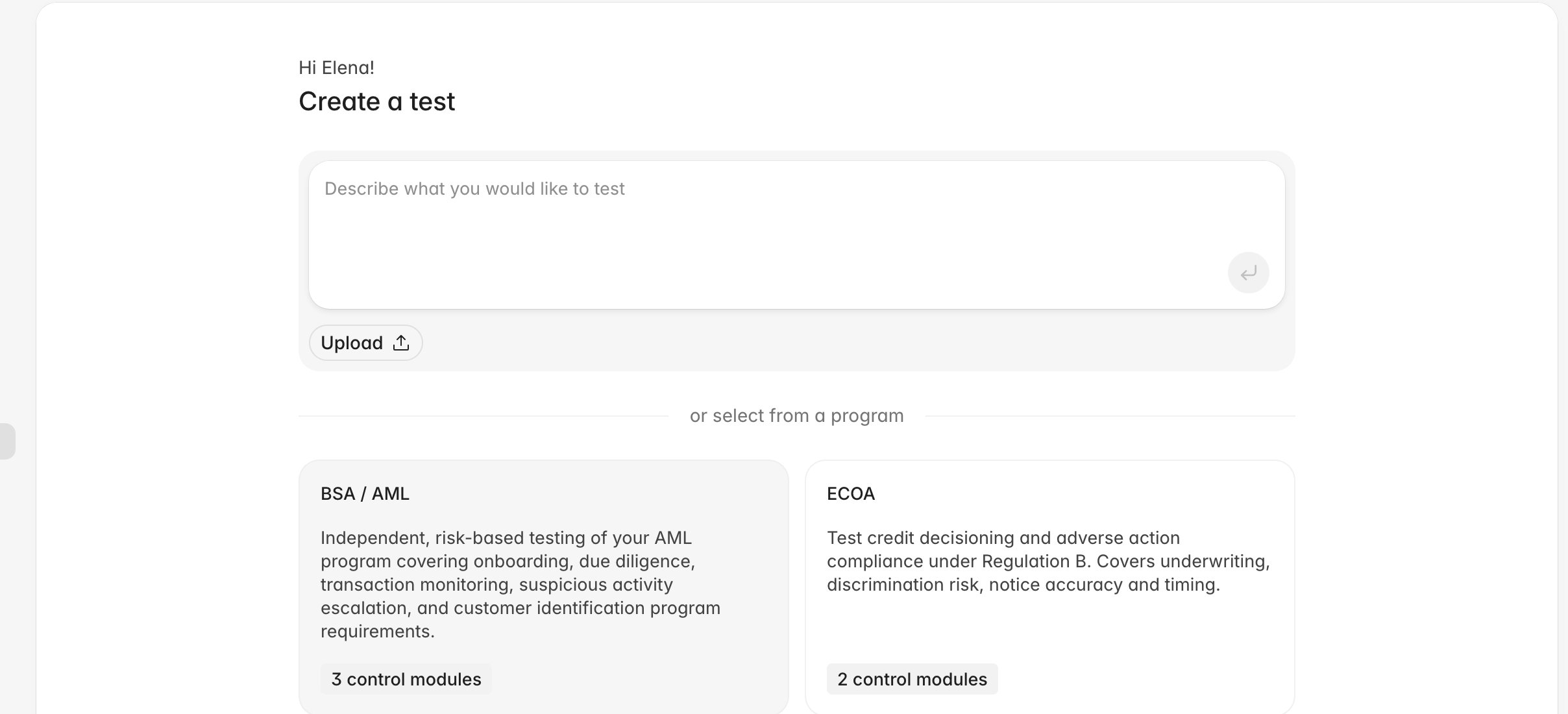 Both routes land in the same wizard with the same three steps: **Details**, **Population**, and
**Risk factors**. The framework route pre-selects a control library instead of inferring one from
your description.
## Confirm the details
The **Details** step fixes the program's scope:
* **Test name**: the program name, and the name that appears on every test and report it produces.
* **Description**: what the program covers. Rulebase uses it as context when it fills a test.
* **Applies to**: the record type the program examines: **Interactions**, **Disputes**,
**Cases**, or **Alerts**. It decides which filters the **Populate test** dialog offers and which
columns a new test sheet is built with, so settle it before you sample: sheets that already exist
keep the columns they were created with.
* **Frequency**: **Weekly**, **Monthly**, or **Quarterly**. It sets the default period for each
new test.
Underneath, the control library shows every control in the framework with a checkbox. Checked
controls are in the program, and each holds its test scripts on the right: the questions Rulebase
answers for each sampled record. Add a question in the **Does the agent...?** field and click
**Add new**; write them as questions with a defensible yes, because the analysis counts answers per
question.
Both routes land in the same wizard with the same three steps: **Details**, **Population**, and
**Risk factors**. The framework route pre-selects a control library instead of inferring one from
your description.
## Confirm the details
The **Details** step fixes the program's scope:
* **Test name**: the program name, and the name that appears on every test and report it produces.
* **Description**: what the program covers. Rulebase uses it as context when it fills a test.
* **Applies to**: the record type the program examines: **Interactions**, **Disputes**,
**Cases**, or **Alerts**. It decides which filters the **Populate test** dialog offers and which
columns a new test sheet is built with, so settle it before you sample: sheets that already exist
keep the columns they were created with.
* **Frequency**: **Weekly**, **Monthly**, or **Quarterly**. It sets the default period for each
new test.
Underneath, the control library shows every control in the framework with a checkbox. Checked
controls are in the program, and each holds its test scripts on the right: the questions Rulebase
answers for each sampled record. Add a question in the **Does the agent...?** field and click
**Add new**; write them as questions with a defensible yes, because the analysis counts answers per
question.
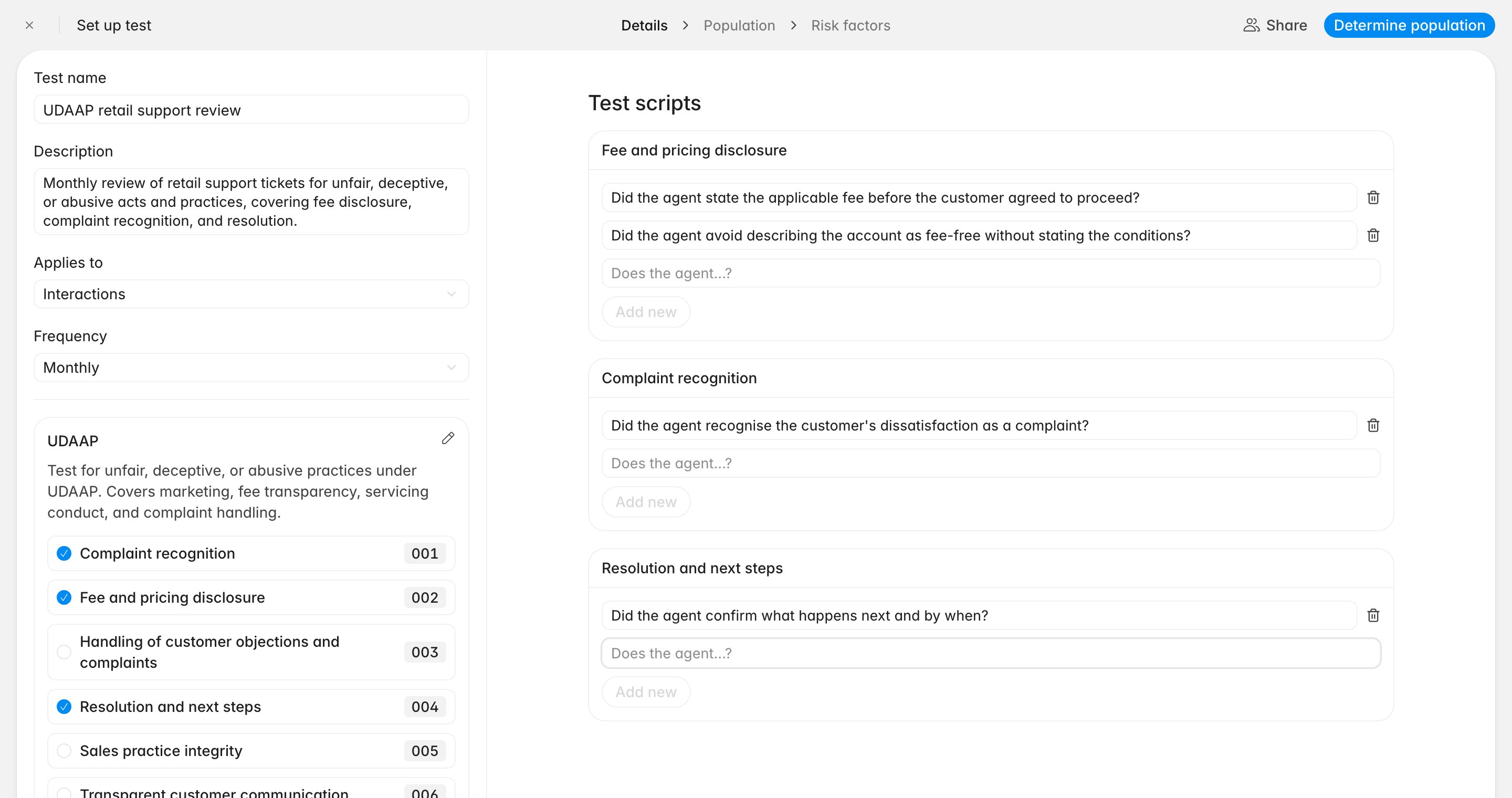 Uncheck a control to take it out of this program. The pencil beside the framework name switches the
list into editing mode, where you can rename a control or delete it with the bin icon. A deletion
there removes the control from your whole organization, across every program, without asking twice.
Unchecking is what you want in almost every case.
When the details are right, click **Determine population**. The button stays disabled while a draft
question is pending, so finish or discard any half-written one first.
## Define how the population is sampled
This step records what the program covers and how much you intend to test; the
wording becomes part of your audit record.
1. Click **Add test population**.
2. Give the population a **Population name**, such as `Retail support tickets`.
3. Under **Determine test population**, choose **Natural language** and describe the population, or
choose **Determine via attributes** and set a condition on a field such as **Interaction type**
or **Channel**. The attributes option appears for the record types that support it, and the
panel takes one condition.
4. Save the population, then set **Sample size** as a percentage of it. Check **Test the full
population.** instead when the program is a census of every record.
Uncheck a control to take it out of this program. The pencil beside the framework name switches the
list into editing mode, where you can rename a control or delete it with the bin icon. A deletion
there removes the control from your whole organization, across every program, without asking twice.
Unchecking is what you want in almost every case.
When the details are right, click **Determine population**. The button stays disabled while a draft
question is pending, so finish or discard any half-written one first.
## Define how the population is sampled
This step records what the program covers and how much you intend to test; the
wording becomes part of your audit record.
1. Click **Add test population**.
2. Give the population a **Population name**, such as `Retail support tickets`.
3. Under **Determine test population**, choose **Natural language** and describe the population, or
choose **Determine via attributes** and set a condition on a field such as **Interaction type**
or **Channel**. The attributes option appears for the record types that support it, and the
panel takes one condition.
4. Save the population, then set **Sample size** as a percentage of it. Check **Test the full
population.** instead when the program is a census of every record.
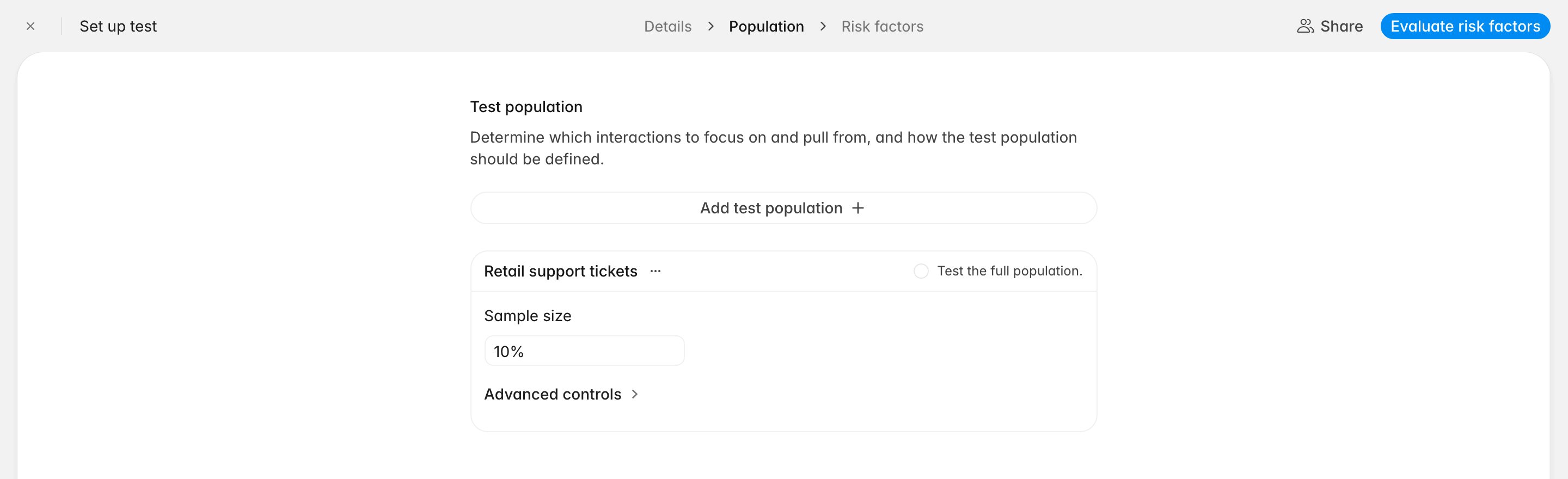 Where coverage should scale with volume, open **Advanced controls** and turn on **Define tiered
sampling rules and sample size**. Each tier takes a **Population size** band and its own **Sample
size**, as a percentage (**%**) or a fixed count (**items**); **Add tier** adds the next band.
Rulebase passes these rules to the AI as program context when it fills a test sheet, and they stand
as the program's documented methodology. They do not prefill the **Populate test** dialog: you still
choose the filters and sample size when drawing each sample.
Click **Evaluate risk factors** to continue. At least one population is required.
## Review the risk factors
Rulebase reads what it already knows about your interactions and drafts the failure patterns worth
watching: a fee described without its condition, dissatisfaction acknowledged but never logged.
Each factor has a title and a short explanation. Use **Add instructions** to add your own guidance
to one, **Remove** to drop it, and **Add risk factor** to write one Rulebase missed.
Where coverage should scale with volume, open **Advanced controls** and turn on **Define tiered
sampling rules and sample size**. Each tier takes a **Population size** band and its own **Sample
size**, as a percentage (**%**) or a fixed count (**items**); **Add tier** adds the next band.
Rulebase passes these rules to the AI as program context when it fills a test sheet, and they stand
as the program's documented methodology. They do not prefill the **Populate test** dialog: you still
choose the filters and sample size when drawing each sample.
Click **Evaluate risk factors** to continue. At least one population is required.
## Review the risk factors
Rulebase reads what it already knows about your interactions and drafts the failure patterns worth
watching: a fee described without its condition, dissatisfaction acknowledged but never logged.
Each factor has a title and a short explanation. Use **Add instructions** to add your own guidance
to one, **Remove** to drop it, and **Add risk factor** to write one Rulebase missed.
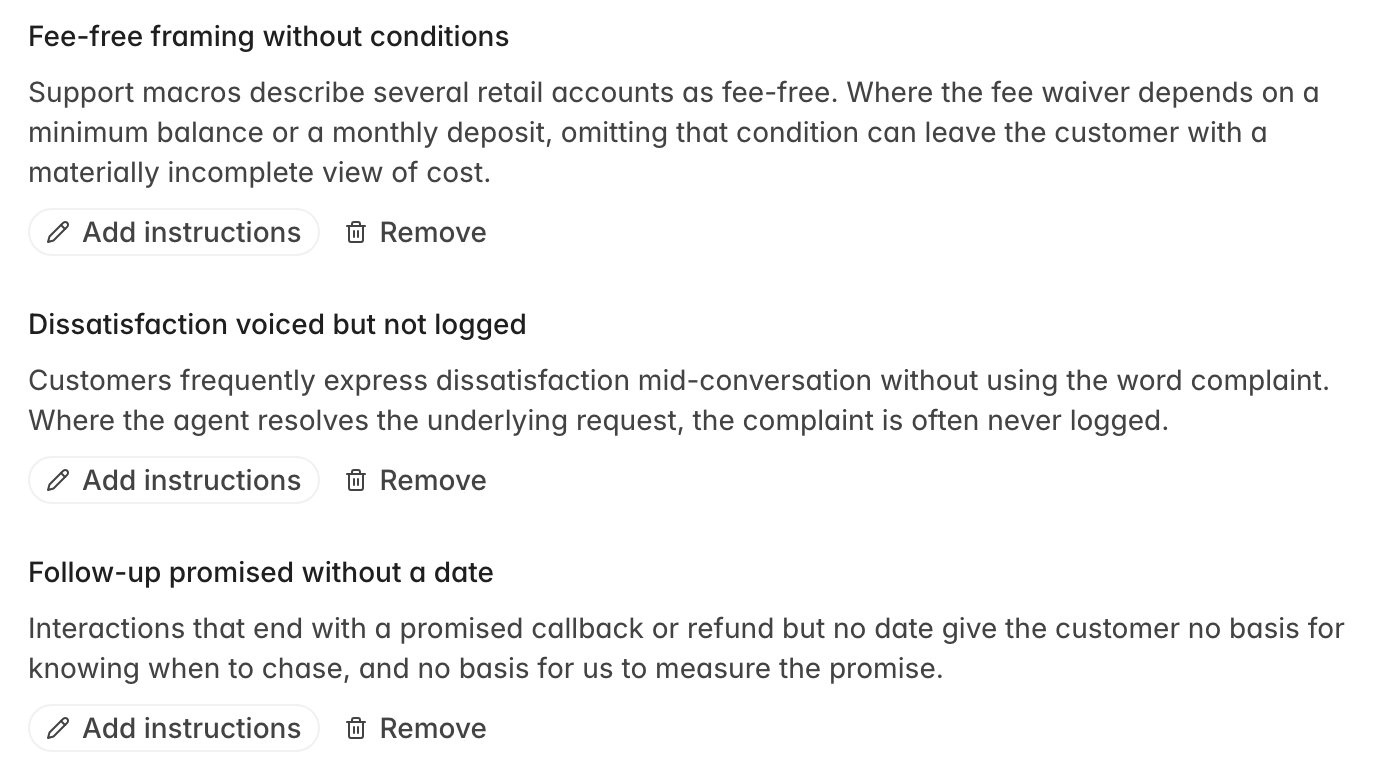 Treat this step as a review of your own thinking. Risk factors are recorded on the program; they are
not fed into cell filling or the analysis report, so anything you actually want tested has to exist
as a test script on the **Details** step.
**Confirm risk factors** finishes setup and opens the program.
## Add the tests
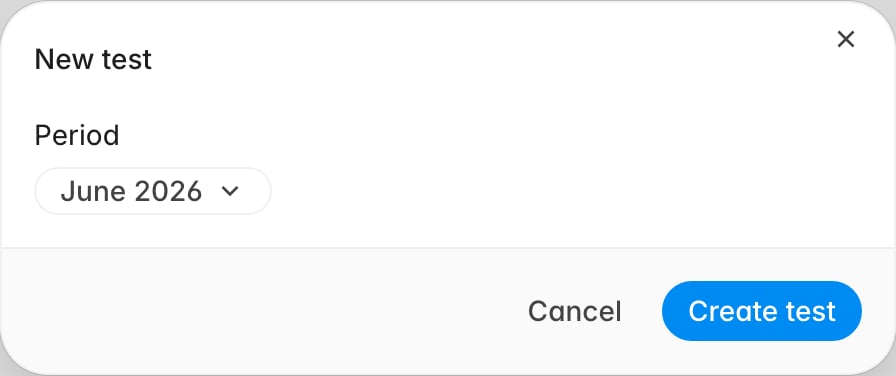
A confirmed program has no tests until you create them; a test holds a period's sample.
1. On the program, click **New test**.
2. Set the **Period**. It defaults to the current period for the program's frequency.
3. Click **Create test**.
Rulebase names the test after its period (a full calendar month becomes `June 2026 test`) and
opens it on an empty sheet.
Treat this step as a review of your own thinking. Risk factors are recorded on the program; they are
not fed into cell filling or the analysis report, so anything you actually want tested has to exist
as a test script on the **Details** step.
**Confirm risk factors** finishes setup and opens the program.
## Add the tests
A confirmed program has no tests until you create them; a test holds a period's sample.
1. On the program, click **New test**.
2. Set the **Period**. It defaults to the current period for the program's frequency.
3. Click **Create test**.
Rulebase names the test after its period (a full calendar month becomes `June 2026 test`) and
opens it on an empty sheet.
 Create each test when you are ready to sample it. The period you choose is the window the sample is
drawn from, so a test created for the wrong month quietly produces the wrong population.
Next, [Populate a compliance test](/guides/compliance/populate-tests) draws the sample into this
sheet.
## Change a program later
The **...** menu beside the program name offers **Edit**, which reopens the setup wizard with your
confirmations intact, and **Delete**, which removes the program along with its tests. Editing a
program does not change tests that have already run: their sheets keep their columns, so a mid-year
change to the test scripts shows up in the next test and leaves the last one as it was.
Each test row has its own **...** menu with **Rename** and **Delete**. Renaming is cosmetic. The
period controls what a test covers, regardless of the name.
## Related
* [Populate a compliance test](/guides/compliance/populate-tests)
* [Run and analyze a compliance test](/guides/compliance/run-and-analyze-a-test)
* [Unit21](/guides/integrations/unit21)
* [Rulebase glossary](/guides/concepts/glossary)
Create each test when you are ready to sample it. The period you choose is the window the sample is
drawn from, so a test created for the wrong month quietly produces the wrong population.
Next, [Populate a compliance test](/guides/compliance/populate-tests) draws the sample into this
sheet.
## Change a program later
The **...** menu beside the program name offers **Edit**, which reopens the setup wizard with your
confirmations intact, and **Delete**, which removes the program along with its tests. Editing a
program does not change tests that have already run: their sheets keep their columns, so a mid-year
change to the test scripts shows up in the next test and leaves the last one as it was.
Each test row has its own **...** menu with **Rename** and **Delete**. Renaming is cosmetic. The
period controls what a test covers, regardless of the name.
## Related
* [Populate a compliance test](/guides/compliance/populate-tests)
* [Run and analyze a compliance test](/guides/compliance/run-and-analyze-a-test)
* [Unit21](/guides/integrations/unit21)
* [Rulebase glossary](/guides/concepts/glossary)