> ## Documentation Index
> Fetch the complete documentation index at: https://docs.rulebase.co/llms.txt
> Use this file to discover all available pages before exploring further.
# Work a complaint case
> Find a detected complaint, read the tickets and timeline behind it, record your investigation, and close it, including what closing a linked ticket does to the case.
Rulebase opens a complaint case on its own. Every ticket it evaluates is checked for a complaint, and
when it finds one it writes a case from that ticket and classifies it against your complaint
categories. A person then confirms the classification, investigates, and closes the case
with a documented trail behind it.
## Before you start
* **Compliance** must be enabled for your organization
([Settings > Features](https://app.rulebase.co/settings/features)). Without it the complaints list
is not reachable.
* At least one complaint category must exist. Detection matches tickets against your categories, so
an empty taxonomy detects nothing; see
[Configure complaint taxonomy](/guides/compliance/complaint-taxonomy).
* Anyone who can open the Compliance area can change a complaint's status and add updates. There is
no separate complaints permission.
The complaints list has no sidebar entry today. Open it directly at
[app.rulebase.co/compliance/complaints](https://app.rulebase.co/compliance/complaints) and bookmark
it. The **Complaints** tab under **Knowledge** is the category taxonomy, not the casework list, and
the **Complaints** view in the ticket lists shows tickets rather than cases.
## Where a case comes from
The complaint check runs on tickets (not on sales calls) as part of the evaluation Rulebase
performs when a ticket is assessed. It compares the conversation against the complaint categories
that apply to that ticket's workspace, using each category's name, description, and keywords. If
nothing matches, no case is created, however unhappy the customer sounded.
When something does match, Rulebase writes the case's title and summary from the conversation, tags
it with every category that matched, and sets the priority from the highest risk level among those
categories. A case tagged both `Fees and charges` at high risk and `Service delays` at medium risk is
a high-priority case.
Repeat contact is handled for you. When a customer writes again, Rulebase checks that customer's
unresolved cases first, and if the new ticket is about the same issue it attaches it to the existing
case rather than opening a second one.
Once a case is resolved it is closed for good: a later contact opens a fresh case instead of
reopening it.
Linking is automatic and there is no control for attaching or detaching a ticket by hand. A case's
tickets are exactly the ones detection associated with it.
## Find the case
The list opens on the last 7 days, grouped by priority, with a count beside each group.
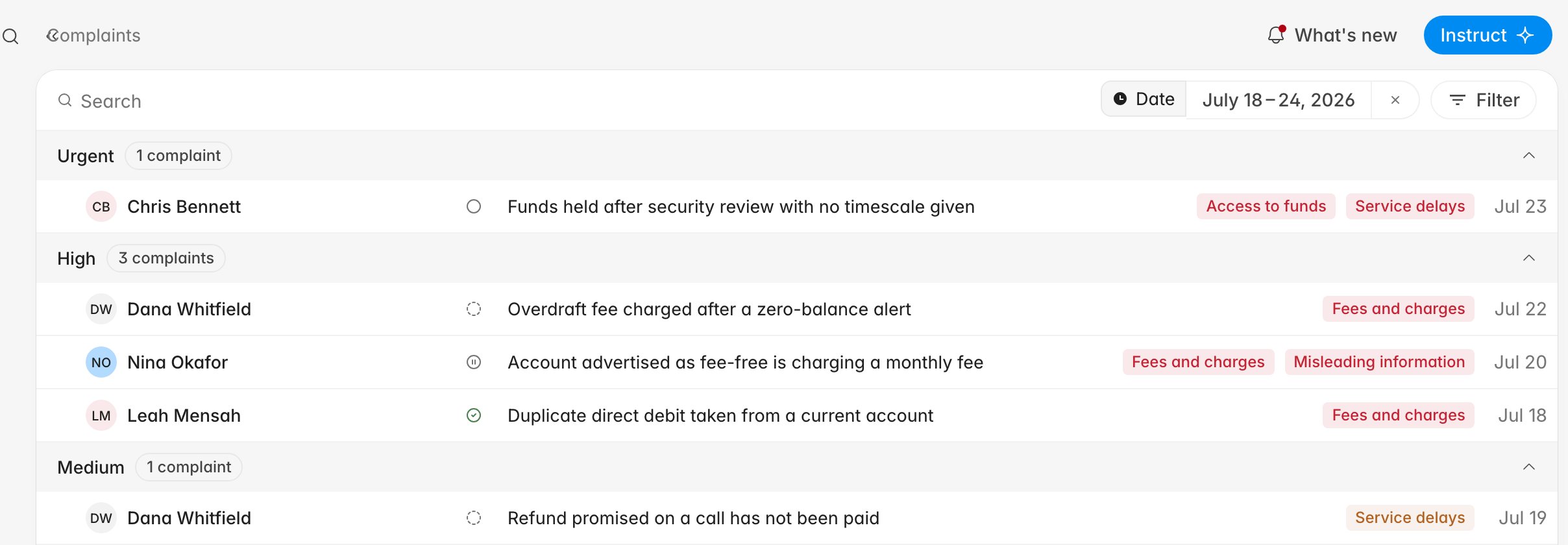 Search matches a case's title and summary. **Filter** narrows the list further:
| Filter | What it does |
| ------------- | -------------------------------------------------------------------- |
| **Date** | The window cases were created in. Defaults to the last 7 days. |
| **Status** | One of the five workflow statuses, or **All statuses**. |
| **Priority** | **Urgent**, **High**, **Medium**, or **Low**, or **All priorities**. |
| **Customer** | Cases for one customer. |
| **Workspace** | Cases from one connected help desk workspace. |
| **Category** | Cases carrying one or more of your complaint categories. |
For a regulated complaints register, filter by a date range plus a status other
than **Resolved** to get your open population for the period.
## Read the case
Opening a case shows the summary and the timeline on the left, and the case's properties and tickets
on the right.
Search matches a case's title and summary. **Filter** narrows the list further:
| Filter | What it does |
| ------------- | -------------------------------------------------------------------- |
| **Date** | The window cases were created in. Defaults to the last 7 days. |
| **Status** | One of the five workflow statuses, or **All statuses**. |
| **Priority** | **Urgent**, **High**, **Medium**, or **Low**, or **All priorities**. |
| **Customer** | Cases for one customer. |
| **Workspace** | Cases from one connected help desk workspace. |
| **Category** | Cases carrying one or more of your complaint categories. |
For a regulated complaints register, filter by a date range plus a status other
than **Resolved** to get your open population for the period.
## Read the case
Opening a case shows the summary and the timeline on the left, and the case's properties and tickets
on the right.
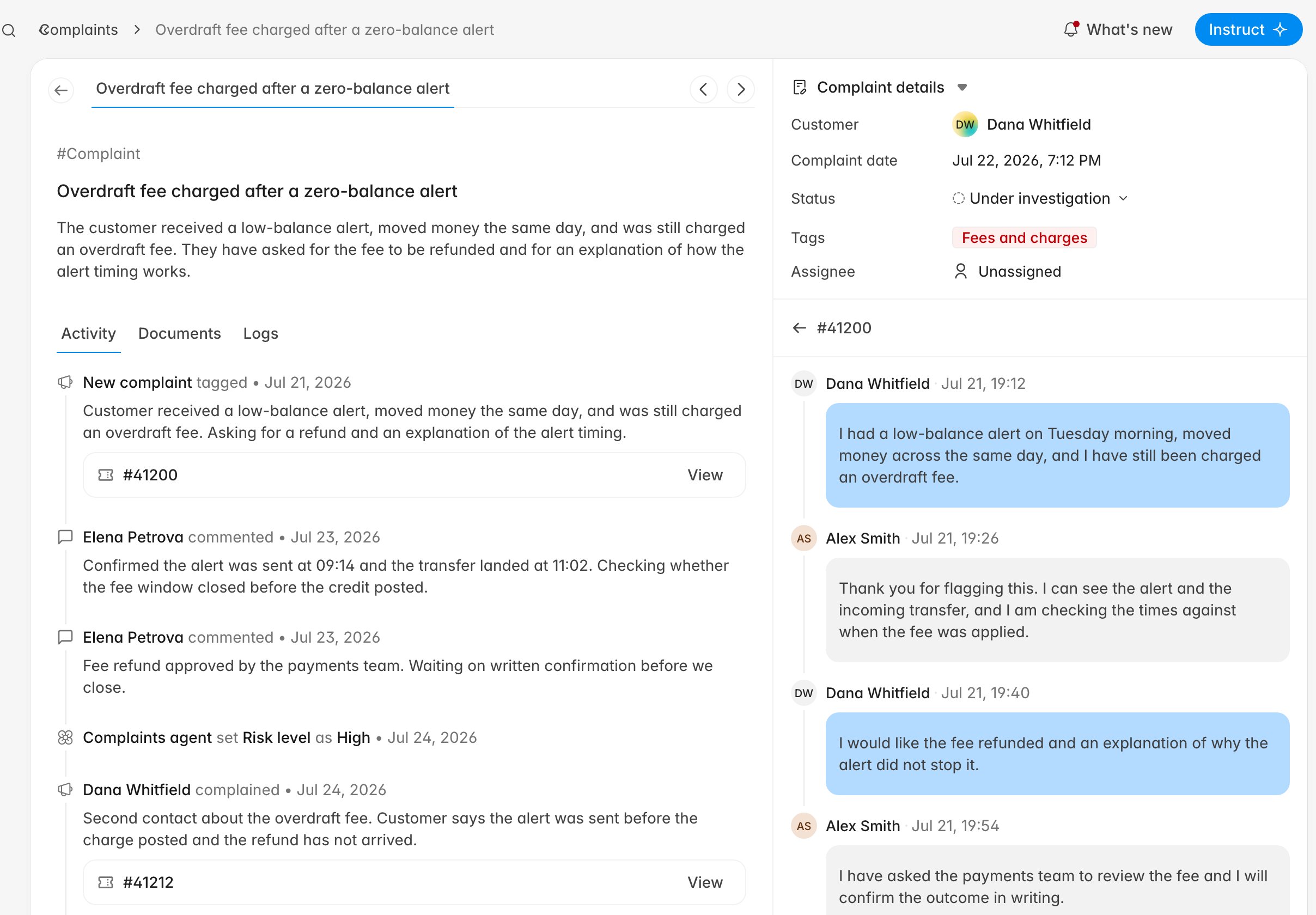 The timeline is the case history in order:
* **New complaint tagged** — detection created the case, with the originating ticket beneath it.
* **Complaints agent set Risk level as ...** — the priority detection assigned to the case.
* **\ complained** — a later contact from the same customer that attached to this case.
* Comments — updates you and your colleagues added.
Complaints detected from tickets carry no reference number of their own, so the line above the title
reads `#Complaint`. Identify a case by its customer and title, or by its URL.
The **Documents** tab holds files you attach. **Logs** exists but is empty today.
## Record your investigation
Everything you do outside Rulebase (the call to the payments team, the
approval, the letter) belongs on the case; the timeline is what a reviewer
reads months later.
1. In **Activity**, type into **Add update** and click **Add**. It is recorded as a comment against
your name with today's date.
2. To attach evidence, open **Documents** and click **Upload file**. PDFs, images, text, CSV, Word,
and Excel files are accepted, up to 25 MB each. **Delete** removes one.
3. Move the status as the work progresses, from the **Status** row on the right.
The five statuses map to complaint-handling stages:
* **Open** — detected and not yet picked up.
* **Under investigation** — someone is working it.
* **On hold** — waiting on the customer or another team.
* **Provisional credit issued** — money has been returned pending the outcome.
* **Resolved** — the case is closed.
## Check the tickets behind it
**Complaint details** shows the customer, the complaint date, the status, the category tags, and the
assignee. **Tickets** lists every conversation linked to the case; click one to read its thread
inline, and use the back arrow to return to the list.
The timeline is the case history in order:
* **New complaint tagged** — detection created the case, with the originating ticket beneath it.
* **Complaints agent set Risk level as ...** — the priority detection assigned to the case.
* **\ complained** — a later contact from the same customer that attached to this case.
* Comments — updates you and your colleagues added.
Complaints detected from tickets carry no reference number of their own, so the line above the title
reads `#Complaint`. Identify a case by its customer and title, or by its URL.
The **Documents** tab holds files you attach. **Logs** exists but is empty today.
## Record your investigation
Everything you do outside Rulebase (the call to the payments team, the
approval, the letter) belongs on the case; the timeline is what a reviewer
reads months later.
1. In **Activity**, type into **Add update** and click **Add**. It is recorded as a comment against
your name with today's date.
2. To attach evidence, open **Documents** and click **Upload file**. PDFs, images, text, CSV, Word,
and Excel files are accepted, up to 25 MB each. **Delete** removes one.
3. Move the status as the work progresses, from the **Status** row on the right.
The five statuses map to complaint-handling stages:
* **Open** — detected and not yet picked up.
* **Under investigation** — someone is working it.
* **On hold** — waiting on the customer or another team.
* **Provisional credit issued** — money has been returned pending the outcome.
* **Resolved** — the case is closed.
## Check the tickets behind it
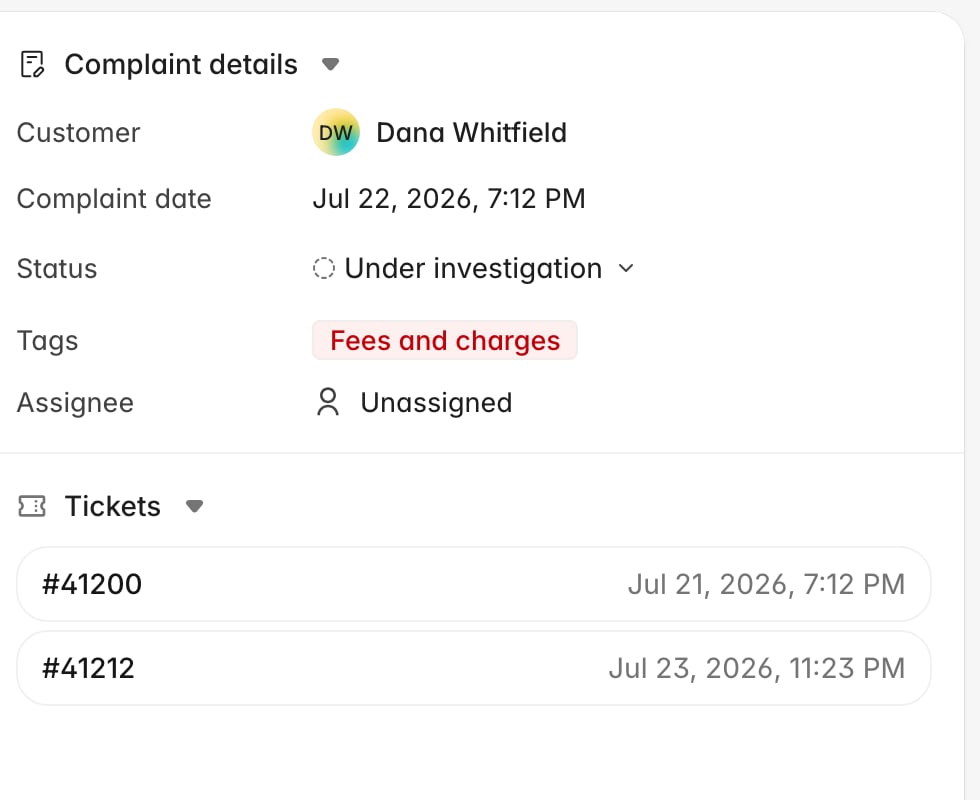
**Complaint details** shows the customer, the complaint date, the status, the category tags, and the
assignee. **Tickets** lists every conversation linked to the case; click one to read its thread
inline, and use the back arrow to return to the list.
 Read the tickets before you accept the classification. Detection is good at spotting dissatisfaction
and less good at knowing which of your categories a firm would file it under, and the tags drive the
priority, so a miscategorised case is also mis-prioritised.
**Assignee** shows accounts or roles assigned to the case through the API. It is not editable from
this page.
## Close the case
Set **Status** to **Resolved** when the complaint is answered. Resolving the review on a linked ticket also resolves the case: marking a ticket
**Done** sets every unresolved complaint linked to that ticket to **Resolved**, so a colleague
finishing their QA work can close your case.
After resolution, further contact from the same customer opens a new case rather than reopening this
one. If a case was closed too early, you
can move it back to any other status from the same menu.
High and urgent cases can raise an email or Slack alert the moment they are detected, turn this on
if you work to a response deadline. See
[Configure notifications](/guides/settings/configure-notifications).
## Related
* [Configure complaint taxonomy](/guides/compliance/complaint-taxonomy)
* [Configure notifications](/guides/settings/configure-notifications)
* [Set up a compliance testing program](/guides/compliance/set-up-a-testing-program)
* [Rulebase glossary](/guides/concepts/glossary)
Read the tickets before you accept the classification. Detection is good at spotting dissatisfaction
and less good at knowing which of your categories a firm would file it under, and the tags drive the
priority, so a miscategorised case is also mis-prioritised.
**Assignee** shows accounts or roles assigned to the case through the API. It is not editable from
this page.
## Close the case
Set **Status** to **Resolved** when the complaint is answered. Resolving the review on a linked ticket also resolves the case: marking a ticket
**Done** sets every unresolved complaint linked to that ticket to **Resolved**, so a colleague
finishing their QA work can close your case.
After resolution, further contact from the same customer opens a new case rather than reopening this
one. If a case was closed too early, you
can move it back to any other status from the same menu.
High and urgent cases can raise an email or Slack alert the moment they are detected, turn this on
if you work to a response deadline. See
[Configure notifications](/guides/settings/configure-notifications).
## Related
* [Configure complaint taxonomy](/guides/compliance/complaint-taxonomy)
* [Configure notifications](/guides/settings/configure-notifications)
* [Set up a compliance testing program](/guides/compliance/set-up-a-testing-program)
* [Rulebase glossary](/guides/concepts/glossary)