> ## Documentation Index
> Fetch the complete documentation index at: https://docs.rulebase.co/llms.txt
> Use this file to discover all available pages before exploring further.
# Add scorecard additional instructions
> Attach exceptions and clarifying guidance to a single scorecard check so AI QA scores it the way your team would.
Most scorecard checks are a single sentence, and most of the time that's enough.
The trouble starts with the exceptions your reviewers hold in their heads: the
apology check that shouldn't fail when the customer apologized first, the
verification step that doesn't apply to a returning caller. Additional
instructions are where you write those exceptions down so AI QA applies them the
same way every time.
## How instructions differ from the other check controls
| Control | What it does | Use it when |
| --------------------------- | ----------------------------------------------- | ------------------------------------------------------- |
| Check description | The main statement the evaluator scores against | You're defining the behavior itself |
| **Apply to** conditions | Limits which tickets the check runs on at all | The check is irrelevant to a whole class of tickets |
| **Additional instructions** | Extra guidance applied while scoring the check | The check should run, but with a caveat or an exception |
Conditions decide whether the check runs; additional instructions shape how
it's judged when it does. If you find
yourself writing "ignore this check when…", that's usually a condition, not an
instruction.
## Before you start
You need permission to manage evaluation scorecards, and you need a scorecard
that already has a section, criterion, and at least one check; instructions
attach to an existing check. Have the exception
worded before you open the editor; it's easier to write clear guidance away from
the form.
## Add instructions to a check
1. Go to [Knowledge > Scorecards](https://app.rulebase.co/knowledge/scorecards)
and open the scorecard.
2. Navigate to the section and criterion holding the check you want to adjust.
3. On the check card, click **Add additional instructions**. A text area labeled
**Additional instructions** opens beneath the check.
4. Type the guidance, for example
`If the customer already apologized, do not fail for missing apology.`
5. Click **Save as draft** to keep working, or **Publish** to make the change
live for future evaluations.
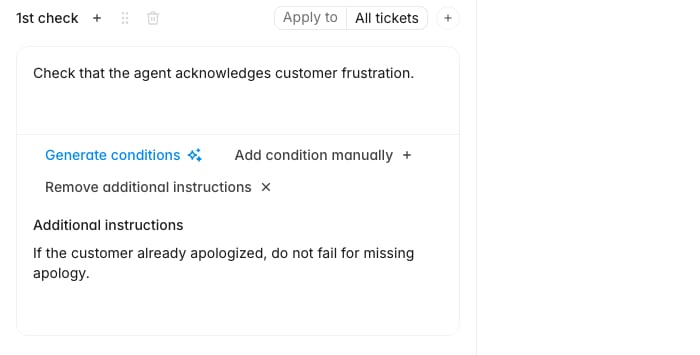 Instructions are scoped to the one check you added them to. A sibling check in
the same criterion is unaffected. That lets you carve out a narrow exception
without loosening the rest of the criterion.
## Writing instructions the evaluator can act on
Instructions work best when they read like a rule a reviewer could follow, not a
general principle:
* **Name the trigger and the outcome.** "If the customer already apologized, do
not fail for missing apology" gives both. "Be lenient about apologies" gives
neither.
* **Keep one exception per instruction.** Stacking three unrelated caveats into
one block makes it hard to tell which one fired when you review a score later.
* **Point at what's visible in the ticket.** The evaluator works from the
conversation, so an instruction that depends on information outside the
transcript won't be applied consistently.
After publishing, spot-check a handful of evaluations where the exception should
have applied. If the check still fails on those tickets, the instruction is
probably too abstract. Rewrite it as a concrete if/then and republish.
## Removing instructions
When an exception no longer reflects your policy, click **Remove additional
instructions** on the same check. This clears the text rather than hiding it, so
copy anything you might want back before removing it. As with adding, the change
takes effect for future evaluations once you publish.
Evaluations that already ran keep the scores they were given. Instructions change
how new evaluations are judged, not historical results. If you need old tickets
rescored under the new guidance, re-evaluate them.
## Related
* [Give feedback on AI QA evaluations](/guides/quality-assurance/give-feedback-on-ai-qa)
* [Perform a manual evaluation](/guides/quality-assurance/perform-a-manual-evaluation)
* [Create a routing rule](/guides/quality-assurance/create-routing-rules)
Instructions are scoped to the one check you added them to. A sibling check in
the same criterion is unaffected. That lets you carve out a narrow exception
without loosening the rest of the criterion.
## Writing instructions the evaluator can act on
Instructions work best when they read like a rule a reviewer could follow, not a
general principle:
* **Name the trigger and the outcome.** "If the customer already apologized, do
not fail for missing apology" gives both. "Be lenient about apologies" gives
neither.
* **Keep one exception per instruction.** Stacking three unrelated caveats into
one block makes it hard to tell which one fired when you review a score later.
* **Point at what's visible in the ticket.** The evaluator works from the
conversation, so an instruction that depends on information outside the
transcript won't be applied consistently.
After publishing, spot-check a handful of evaluations where the exception should
have applied. If the check still fails on those tickets, the instruction is
probably too abstract. Rewrite it as a concrete if/then and republish.
## Removing instructions
When an exception no longer reflects your policy, click **Remove additional
instructions** on the same check. This clears the text rather than hiding it, so
copy anything you might want back before removing it. As with adding, the change
takes effect for future evaluations once you publish.
Evaluations that already ran keep the scores they were given. Instructions change
how new evaluations are judged, not historical results. If you need old tickets
rescored under the new guidance, re-evaluate them.
## Related
* [Give feedback on AI QA evaluations](/guides/quality-assurance/give-feedback-on-ai-qa)
* [Perform a manual evaluation](/guides/quality-assurance/perform-a-manual-evaluation)
* [Create a routing rule](/guides/quality-assurance/create-routing-rules)