> ## Documentation Index
> Fetch the complete documentation index at: https://docs.rulebase.co/llms.txt
> Use this file to discover all available pages before exploring further.
# Configure evaluation eligibility
> Decide which tickets automatic AI QA runs on using coverage rules, eligibility instructions, and the eligibility tester before you go live.
Rulebase does not evaluate every ticket that closes. It runs gates first: is this
a ticket you asked to cover, was there a real conversation to judge, has enough
time passed. Eligibility settings control those gates. Set them wrong and you burn
evaluations on "thanks!" tickets or score nothing.
 ## Before you start
* Everything here lives under
[Settings > Evaluations](https://app.rulebase.co/settings/evaluations), in the
**Configuration** part of the settings sidebar.
* You need an admin role. Without it the controls render but stay disabled.
* Publish at least one scorecard first. Eligibility decides which tickets are
considered; a scorecard decides whether any rubric applies. See
[Create a scorecard](/guides/quality-assurance/create-a-scorecard).
## What each setting does
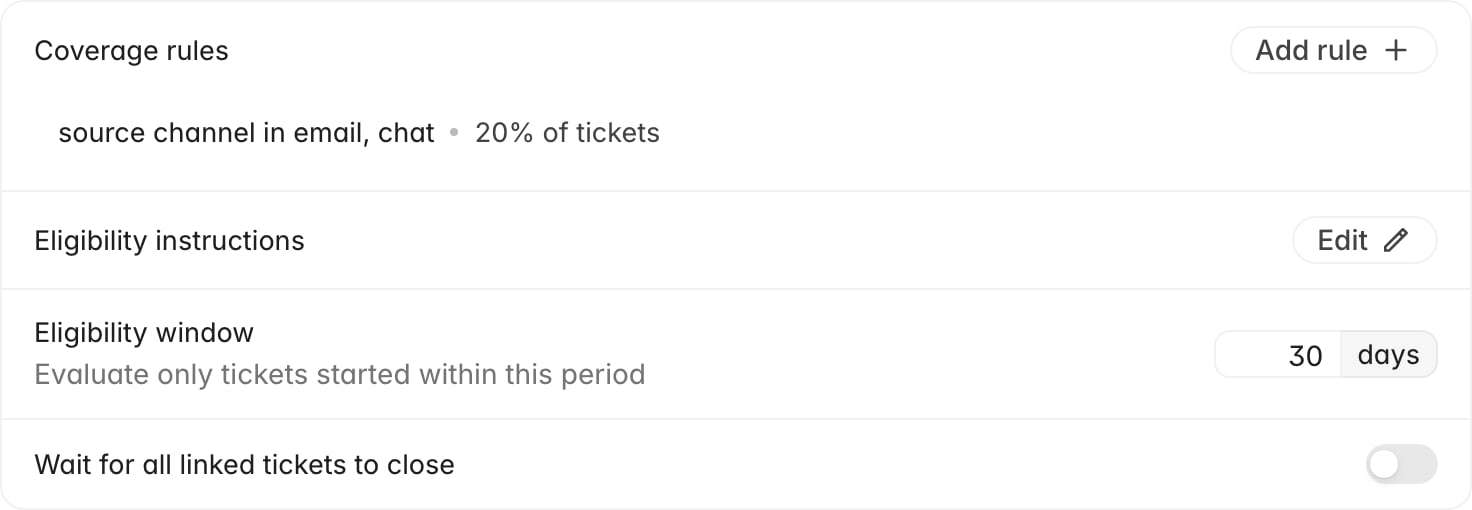
The **Eligibility** card holds:
* **Coverage rules**: how much of your ticket volume to sample, optionally
narrowed to a channel, brand, team, or group. With no rules, every eligible
ticket is evaluated.
* **Eligibility instructions**: plain-language rules Rulebase applies to the
conversation itself, to filter out tickets with nothing worth scoring.
* **Eligibility window**: an age limit. Tickets that started before the window
are left alone, which stops a backlog import from flooding QA.
* **Wait for all linked tickets to close**: holds evaluation until every linked
ticket in the thread is resolved, for teams that split one issue across several
tickets.
Below that, **Timing** holds the **Evaluation delay**, which decides how long
after close Rulebase starts.
## Set your coverage rules
Covering 100% from day one produces more evaluations than most teams can
review. Start low, check volume after a week, and raise it.
1. Next to **Coverage rules**, click **Add rule**.
2. Under **Applies to**, pick what the rule keys on: **Source channel**,
**Brand**, **Team**, or **Group**, then choose the values.
3. Add a second condition with **Add condition** if the rule should require both.
4. Under **Target**, choose how much to cover.
5. Click **Create rule**.
## Before you start
* Everything here lives under
[Settings > Evaluations](https://app.rulebase.co/settings/evaluations), in the
**Configuration** part of the settings sidebar.
* You need an admin role. Without it the controls render but stay disabled.
* Publish at least one scorecard first. Eligibility decides which tickets are
considered; a scorecard decides whether any rubric applies. See
[Create a scorecard](/guides/quality-assurance/create-a-scorecard).
## What each setting does
The **Eligibility** card holds:
* **Coverage rules**: how much of your ticket volume to sample, optionally
narrowed to a channel, brand, team, or group. With no rules, every eligible
ticket is evaluated.
* **Eligibility instructions**: plain-language rules Rulebase applies to the
conversation itself, to filter out tickets with nothing worth scoring.
* **Eligibility window**: an age limit. Tickets that started before the window
are left alone, which stops a backlog import from flooding QA.
* **Wait for all linked tickets to close**: holds evaluation until every linked
ticket in the thread is resolved, for teams that split one issue across several
tickets.
Below that, **Timing** holds the **Evaluation delay**, which decides how long
after close Rulebase starts.
## Set your coverage rules
Covering 100% from day one produces more evaluations than most teams can
review. Start low, check volume after a week, and raise it.
1. Next to **Coverage rules**, click **Add rule**.
2. Under **Applies to**, pick what the rule keys on: **Source channel**,
**Brand**, **Team**, or **Group**, then choose the values.
3. Add a second condition with **Add condition** if the rule should require both.
4. Under **Target**, choose how much to cover.
5. Click **Create rule**.
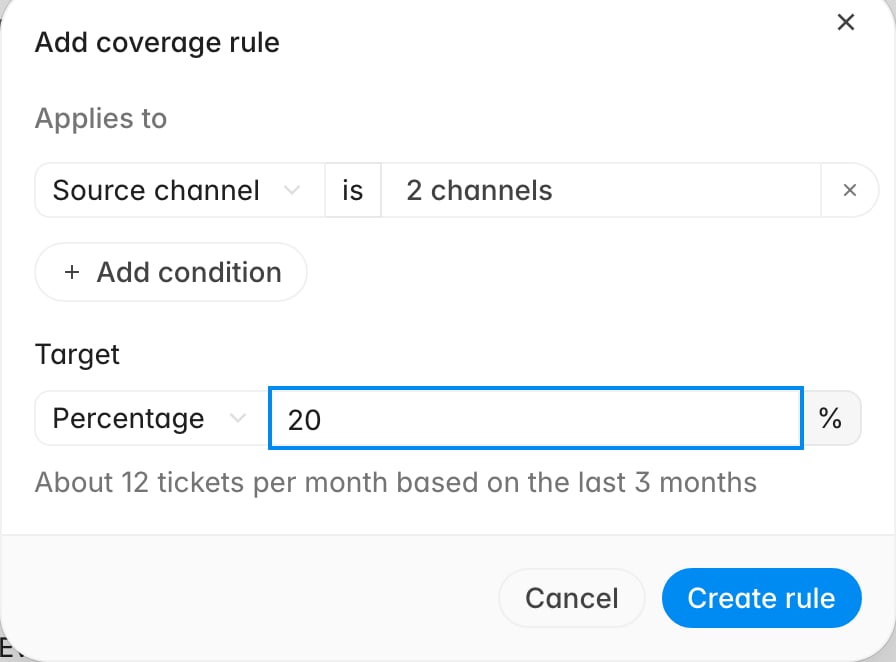 A target is either a percentage or a fixed count:
| Target | What it means | Use it when |
| --------------- | ---------------------------------------------------------------------------------------------------------------------------------------------------------- | ------------------------------------------------------------------------ |
| **Percentage** | A share of matching tickets, shown as an estimate of tickets per month based on the last three months | You want coverage to scale with volume |
| **Fixed count** | A set number **per day**, **per week**, or **per month**, optionally split **per brand**, **per group**, **per team**, **per agent**, or **per scorecard** | You have a fixed review capacity, or you need every agent covered evenly |
Rules stack: a ticket is sampled if any rule selects it. Click an existing rule to
reopen it as **Edit sampling rule**, where you can change the target or delete the
rule.
With no coverage rules, every ticket that passes the other gates is evaluated, and
there is no sampling limit. That is a reasonable start for a low-volume team and
expensive for everybody else.
## Write your eligibility instructions
Coverage rules work on ticket metadata; eligibility instructions work on the
conversation, keeping AI QA off tickets where nobody would score anything: a
customer who typed "hello?" and vanished, spam, a bot handoff with no human reply.
Every organization starts with a default set, so this is usually an edit. Click
**Edit** next to **Eligibility instructions** to see them.
A target is either a percentage or a fixed count:
| Target | What it means | Use it when |
| --------------- | ---------------------------------------------------------------------------------------------------------------------------------------------------------- | ------------------------------------------------------------------------ |
| **Percentage** | A share of matching tickets, shown as an estimate of tickets per month based on the last three months | You want coverage to scale with volume |
| **Fixed count** | A set number **per day**, **per week**, or **per month**, optionally split **per brand**, **per group**, **per team**, **per agent**, or **per scorecard** | You have a fixed review capacity, or you need every agent covered evenly |
Rules stack: a ticket is sampled if any rule selects it. Click an existing rule to
reopen it as **Edit sampling rule**, where you can change the target or delete the
rule.
With no coverage rules, every ticket that passes the other gates is evaluated, and
there is no sampling limit. That is a reasonable start for a low-volume team and
expensive for everybody else.
## Write your eligibility instructions
Coverage rules work on ticket metadata; eligibility instructions work on the
conversation, keeping AI QA off tickets where nobody would score anything: a
customer who typed "hello?" and vanished, spam, a bot handoff with no human reply.
Every organization starts with a default set, so this is usually an edit. Click
**Edit** next to **Eligibility instructions** to see them.
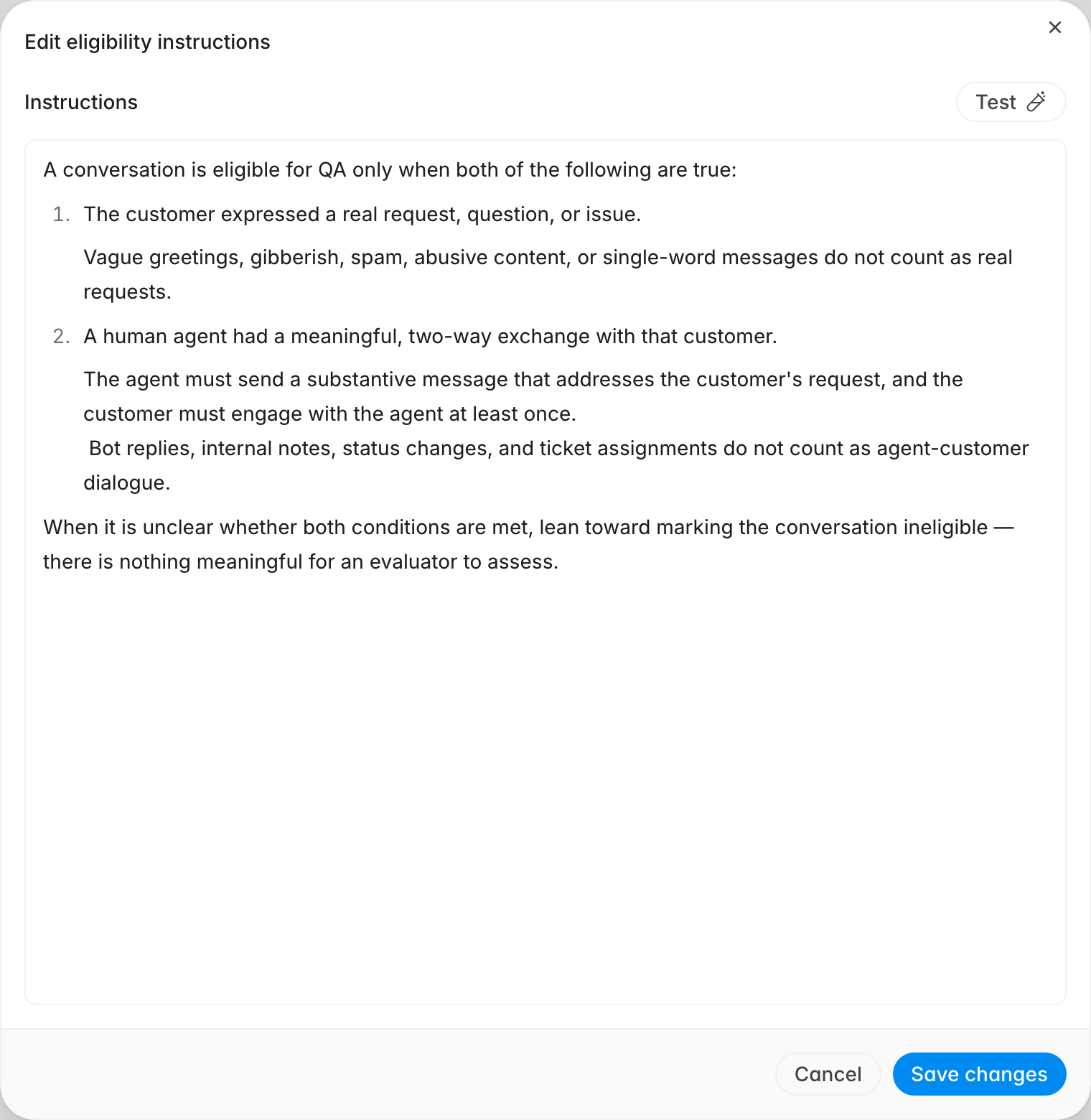 The default asks for two things: the customer expressed a real request, and a
human agent had a two-way exchange about it. Write additions in the same shape, as
rules about the conversation. "Skip tickets where the only agent message is an
automated acknowledgement" belongs here; "Only evaluate chat" belongs in a
coverage rule.
Click **Save changes** when done. The new wording applies to every ticket Rulebase
considers from that point on. Tickets already skipped on an AI eligibility verdict
are not re-checked, so request an evaluation by hand on any you still want scored.
Eligibility instructions only gate **automatic** QA. Someone can still request an
evaluation by hand on a ticket the instructions filtered out, and that request
also bypasses your coverage rules.
## Test a ticket before you save
The eligibility tester runs the same gates Rulebase applies when a ticket closes,
against a real ticket. It uses whatever instructions are currently in the editor,
including unsaved edits. Test a wording change here before committing it.
1. In the **Edit eligibility instructions** dialog, click **Test**.
2. Search by ticket ID or subject, then pick a ticket.
3. Read the result above the editor.
A pass names the ticket, says what will happen, and shows each agent it would
evaluate as a badge.
The default asks for two things: the customer expressed a real request, and a
human agent had a two-way exchange about it. Write additions in the same shape, as
rules about the conversation. "Skip tickets where the only agent message is an
automated acknowledgement" belongs here; "Only evaluate chat" belongs in a
coverage rule.
Click **Save changes** when done. The new wording applies to every ticket Rulebase
considers from that point on. Tickets already skipped on an AI eligibility verdict
are not re-checked, so request an evaluation by hand on any you still want scored.
Eligibility instructions only gate **automatic** QA. Someone can still request an
evaluation by hand on a ticket the instructions filtered out, and that request
also bypasses your coverage rules.
## Test a ticket before you save
The eligibility tester runs the same gates Rulebase applies when a ticket closes,
against a real ticket. It uses whatever instructions are currently in the editor,
including unsaved edits. Test a wording change here before committing it.
1. In the **Edit eligibility instructions** dialog, click **Test**.
2. Search by ticket ID or subject, then pick a ticket.
3. Read the result above the editor.
A pass names the ticket, says what will happen, and shows each agent it would
evaluate as a badge.
 A failure names the first gate that blocked it, following the order Rulebase
applies them in, so the top line is the thing to fix.
A failure names the first gate that blocked it, following the order Rulebase
applies them in, so the top line is the thing to fix.
 When a result is eligible but automatic QA would not have run, the tester says so
and lists the automatic-only blockers under **Auto QA**. Badges are grouped as
**Rules**, **Auto QA**, and **Agents**; hovering one shows the full reason.
Test two tickets every time you change these settings: one you are sure should be
evaluated, and one you are sure should not.
## Delay the start, or limit how far back you go
The **Evaluation delay** under **Timing** waits a set period after a ticket closes
before evaluating. It exists because tickets reopen: an evaluation that ran at
close would score an unfinished conversation. Click **Add delay**, then set the
value and choose **minutes** or **hours**.
When a result is eligible but automatic QA would not have run, the tester says so
and lists the automatic-only blockers under **Auto QA**. Badges are grouped as
**Rules**, **Auto QA**, and **Agents**; hovering one shows the full reason.
Test two tickets every time you change these settings: one you are sure should be
evaluated, and one you are sure should not.
## Delay the start, or limit how far back you go
The **Evaluation delay** under **Timing** waits a set period after a ticket closes
before evaluating. It exists because tickets reopen: an evaluation that ran at
close would score an unfinished conversation. Click **Add delay**, then set the
value and choose **minutes** or **hours**.
 The **Eligibility window** measures how old a ticket is. Set it to 30 days and
Rulebase ignores tickets that started earlier, which is what you want the first
time you connect a help desk carrying years of history. Click **Add window** to
enable it, or clear it to evaluate regardless of age.
## Confirm your setup before go-live
Check these in order:
* A coverage rule exists and its estimate matches your review capacity.
* The eligibility tester returns **Eligible for QA** for a ticket you would
expect QA on, with the agents you expect listed as badges.
* The same tester returns **Not eligible for QA** for a throwaway ticket.
* The **Evaluation delay** is long enough that reopened tickets settle first, and
short enough that reviewers are not waiting a day for scores.
If a ticket you expected still comes back with nothing,
[Why wasn't my ticket evaluated?](/guides/troubleshooting/why-wasnt-my-ticket-evaluated)
walks the remaining causes in the order Rulebase applies them.
## Related
* [Create a scorecard](/guides/quality-assurance/create-a-scorecard)
* [Why wasn't my ticket evaluated?](/guides/troubleshooting/why-wasnt-my-ticket-evaluated)
* [Manage the QA agent roster](/guides/quality-assurance/manage-agent-roster)
* [Give feedback on AI QA](/guides/quality-assurance/give-feedback-on-ai-qa)
* [How AI QA works](/guides/concepts/how-ai-qa-works)
The **Eligibility window** measures how old a ticket is. Set it to 30 days and
Rulebase ignores tickets that started earlier, which is what you want the first
time you connect a help desk carrying years of history. Click **Add window** to
enable it, or clear it to evaluate regardless of age.
## Confirm your setup before go-live
Check these in order:
* A coverage rule exists and its estimate matches your review capacity.
* The eligibility tester returns **Eligible for QA** for a ticket you would
expect QA on, with the agents you expect listed as badges.
* The same tester returns **Not eligible for QA** for a throwaway ticket.
* The **Evaluation delay** is long enough that reopened tickets settle first, and
short enough that reviewers are not waiting a day for scores.
If a ticket you expected still comes back with nothing,
[Why wasn't my ticket evaluated?](/guides/troubleshooting/why-wasnt-my-ticket-evaluated)
walks the remaining causes in the order Rulebase applies them.
## Related
* [Create a scorecard](/guides/quality-assurance/create-a-scorecard)
* [Why wasn't my ticket evaluated?](/guides/troubleshooting/why-wasnt-my-ticket-evaluated)
* [Manage the QA agent roster](/guides/quality-assurance/manage-agent-roster)
* [Give feedback on AI QA](/guides/quality-assurance/give-feedback-on-ai-qa)
* [How AI QA works](/guides/concepts/how-ai-qa-works)