> ## Documentation Index
> Fetch the complete documentation index at: https://docs.rulebase.co/llms.txt
> Use this file to discover all available pages before exploring further.
# An agent is missing from reports
> Find out why someone doesn't appear in QA or performance views: roster membership, team assignment, whether they were evaluated at all, or a second record under another email.
Someone's lead says they cannot find them in performance. "Missing" covers four
different situations.
| What you are seeing | Where to start |
| --------------------------------------------------------------- | ------------------------ |
| Their name is nowhere in Rulebase | The roster |
| They exist, but not under their team | Their team assignment |
| They are listed with no score, or fewer tickets than you expect | Their evaluations |
| Their numbers are split, or the same person appears twice | A duplicate record |
| The team page reads zero, or no teams appear at all | The view, not the person |
Work through them in order; each rules out the next, even if you have a hunch.
## Start on the roster
The agent roster at
[Settings > People > Agents](https://app.rulebase.co/settings/people/employees)
is the list of people Rulebase runs QA and performance on, and everything
downstream reads from it. If someone is not on this page, they will not appear in
reports, and no amount of looking in Insights will change that.
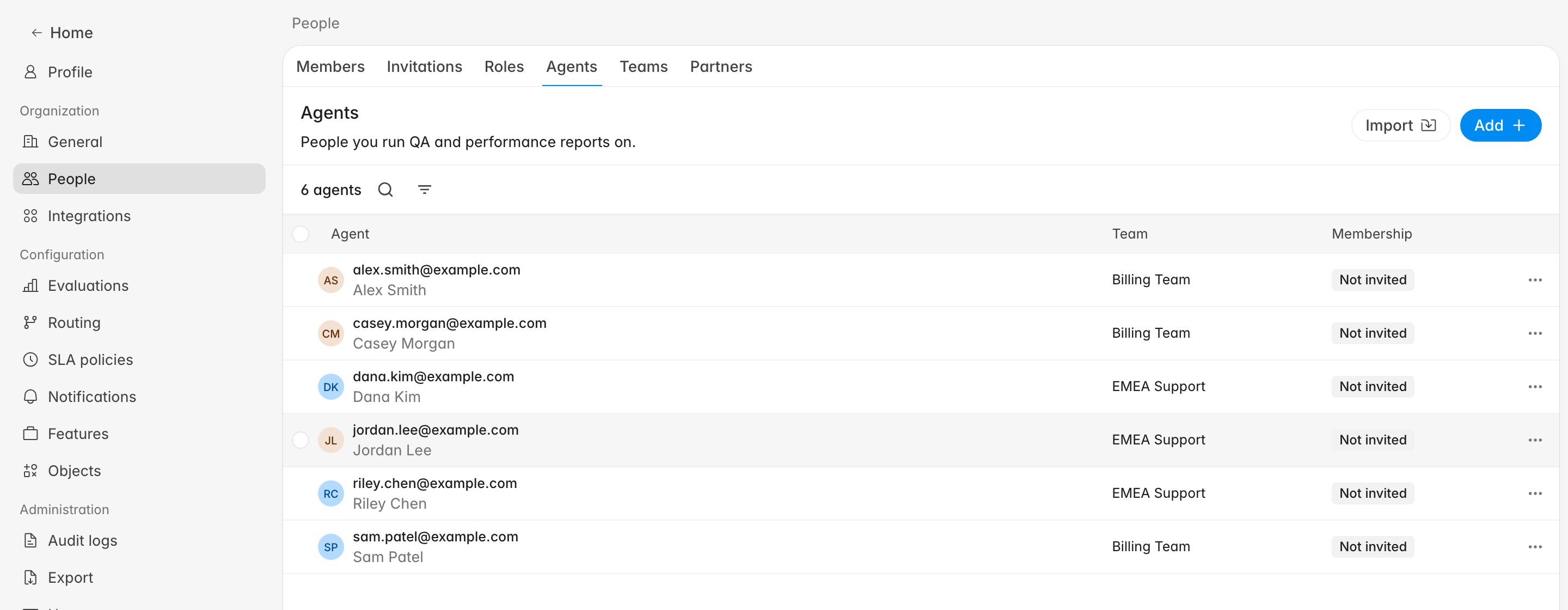 Search by email, since it is the identifier Rulebase matches on and names are often
shortened or spelled differently. Clear any filters first. The filter icon next to
the agent count narrows by **Team** and **Workspace**, and a **Workspace** filter
left on **Sales** hides every customer service agent on the roster.
If they are genuinely not listed, one of two things happened: they were never
added (common for someone who arrived through a help desk integration), or they
were removed from the active roster deliberately. Either way the fix is the same:
**Add** them, or include them in your next roster import.
The roster and a Rulebase login are separate things. The **Membership** column
tracks the login separately, and an agent showing **Not invited** is evaluated
normally. Do not chase an invitation to fix a reporting gap.
Adding someone back does not create a fresh person. Their previous evaluations,
scores, and history are still attached and reappear with them.
## Team views only show agents who have a team
The roster gives this away in a single column. An agent whose **Team** column
reads `-` belongs to no team, and team performance is organized entirely by team:
[Insights > Teams](https://app.rulebase.co/insights/teams) drills from a team into
its agents, so someone with no team has no page to be found on. Their tickets are
still evaluated and their evaluations still exist. There is just no route to them
through team views.
Search by email, since it is the identifier Rulebase matches on and names are often
shortened or spelled differently. Clear any filters first. The filter icon next to
the agent count narrows by **Team** and **Workspace**, and a **Workspace** filter
left on **Sales** hides every customer service agent on the roster.
If they are genuinely not listed, one of two things happened: they were never
added (common for someone who arrived through a help desk integration), or they
were removed from the active roster deliberately. Either way the fix is the same:
**Add** them, or include them in your next roster import.
The roster and a Rulebase login are separate things. The **Membership** column
tracks the login separately, and an agent showing **Not invited** is evaluated
normally. Do not chase an invitation to fix a reporting gap.
Adding someone back does not create a fresh person. Their previous evaluations,
scores, and history are still attached and reappear with them.
## Team views only show agents who have a team
The roster gives this away in a single column. An agent whose **Team** column
reads `-` belongs to no team, and team performance is organized entirely by team:
[Insights > Teams](https://app.rulebase.co/insights/teams) drills from a team into
its agents, so someone with no team has no page to be found on. Their tickets are
still evaluated and their evaluations still exist. There is just no route to them
through team views.
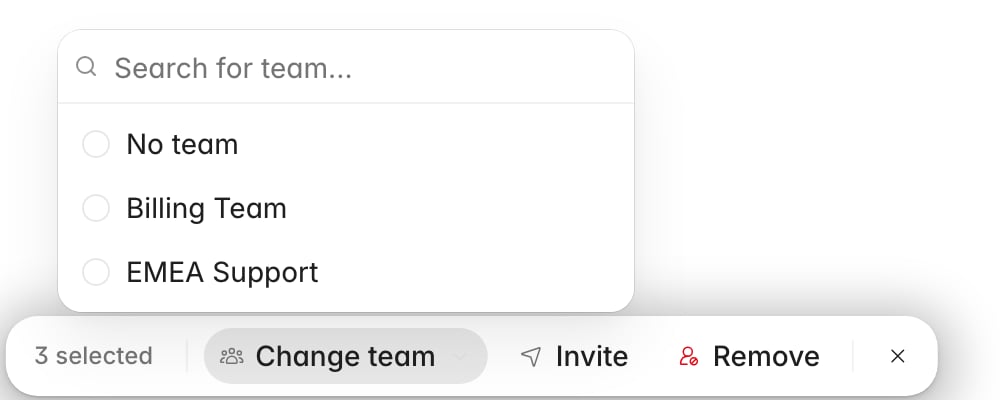 Select them on the roster, click **Change team**, and pick the team. An agent
belongs to one team at a time. Someone appearing under a team their lead did
not expect usually moved teams in a CSV import, where the **Team** column reassigns silently.
After any bulk roster change, scan the **Team** column for rows sitting on `-`,
and check the team filter for names you do not recognize. An import that misspells
a team name silently creates the misspelled team, parking a handful of agents
somewhere nobody is looking.
## On the roster, in a team, but no score
The agent is visible now, but the numbers are empty or lower than you expect.
Performance figures are built from evaluations, and an evaluation only counts
towards an agent's score when all of the following are true:
* It finished processing. An evaluation still in progress contributes nothing.
* It is the current one. When an evaluation is superseded by a later one (a
manual evaluation replacing an AI result, for instance), only the replacement
counts.
* Its ticket was evaluated inside the date range you are looking at.
Performance is dated by **when the evaluation happened**, which can differ from
when the ticket arrived. A backfill of last
quarter's tickets scored today lands in today's date range, so a week that looks
empty for one agent may just be a week where nothing of theirs was scored yet.
Widen the range before concluding anything.
If the count is zero across every range, their tickets were probably never
evaluated at all. That is a separate diagnosis with its own causes: eligibility
settings, scorecard scoping, and roster timing among them. Work through
[Why wasn't my ticket evaluated?](/guides/troubleshooting/why-wasnt-my-ticket-evaluated)
next.
## One person, two records
Here the agent is split across two records. When someone's tickets arrive under a
second email address (a help desk account created after a name change, or a
personal address on one integration and a work address on another), Rulebase
treats those as two people. Each holds part of the history, so both look wrong: one
has the tickets you remember and the other has none, and neither total matches
reality.
Search the roster by surname, since a full-email search finds only one of the two
records, and scan the **Agent** column for their name. Two rows for one person
usually means the record is duplicated. Confirm both rows belong to the same
person, by matching email or employee ID, before merging; merging reassigns
interactions and evaluations and the wrong merge corrupts history.
To combine them, open the overflow menu on the row you want to retire and choose
**Merge**. Pick the record to keep under **Merge into**, and everything linked to
the record you opened (interactions, evaluations, and the rest) is reassigned to
it. The checkbox underneath, **Delete … after merging** with the retired record's
name in it, throws the emptied record away. Leaving it unticked is the safer
choice on your first merge.
The search inside **Merge into** is not limited to the roster, so it can find a
record removed from the roster earlier that is holding history you want back.
## When the problem is the view
Sometimes the agent record is fine and the view is the problem. You can tell
without checking the roster again.
**No teams appear anywhere.** If [Insights > Teams](https://app.rulebase.co/insights/teams)
reads "No teams found" while
[Settings > People > Teams](https://app.rulebase.co/settings/people/teams)
clearly lists teams, stop looking at your data. That combination means your own
membership cannot resolve which teams it is allowed to see, and the page shows an
empty result without telling you so. Nothing you change on the roster will help.
Ask a colleague to open the same page: if they see the teams, the problem is your
account and Rulebase support can correct it.
**A team total reads zero above agents with real numbers.** A team page showing 0
resolved tickets or 0% review coverage, while the agents table underneath shows
tickets and scores for the same period, is a contradiction. The team-level figure
needs each ticket linked to a team; the agent-level figure does not, so the two can
disagree on the same work. Trust the agent rows, which count from the evaluations
themselves, and treat the team summary as unreliable until it agrees with them. We
are fixing this.
Neither of these is caused by anything you did, and neither is fixed by moving
people between teams. Re-importing a roster to chase a zero that turns out to be
this will reassign agents you did not mean to touch, so rule it out before you
start editing.
## After you fix it
Roster changes take effect going forward, and the reports catch up on their own.
Add someone back or move them into a team and their existing evaluations attach to
them again. Nothing needs recalculating by hand, because the numbers derive from
evaluations that were already there.
Before you close the ticket, confirm:
* The agent count above the roster matches the number of people you expect to be
evaluated.
* Their team's page under [Insights > Teams](https://app.rulebase.co/insights/teams)
lists them, and their own detail page shows the tickets you expected.
If a person's tickets were never evaluated in the first place, fixing the roster
only helps from now on. Past tickets stay unevaluated unless someone re-runs them.
## Related
* [Manage the QA agent roster](/guides/quality-assurance/manage-agent-roster)
* [Create and manage teams](/guides/access-management/create-and-manage-teams)
* [Team and agent performance](/guides/insights/team-and-agent-performance)
* [Why wasn't my ticket evaluated?](/guides/troubleshooting/why-wasnt-my-ticket-evaluated)
* [Export QA evaluation data](/guides/quality-assurance/export-qa-evaluations)
Select them on the roster, click **Change team**, and pick the team. An agent
belongs to one team at a time. Someone appearing under a team their lead did
not expect usually moved teams in a CSV import, where the **Team** column reassigns silently.
After any bulk roster change, scan the **Team** column for rows sitting on `-`,
and check the team filter for names you do not recognize. An import that misspells
a team name silently creates the misspelled team, parking a handful of agents
somewhere nobody is looking.
## On the roster, in a team, but no score
The agent is visible now, but the numbers are empty or lower than you expect.
Performance figures are built from evaluations, and an evaluation only counts
towards an agent's score when all of the following are true:
* It finished processing. An evaluation still in progress contributes nothing.
* It is the current one. When an evaluation is superseded by a later one (a
manual evaluation replacing an AI result, for instance), only the replacement
counts.
* Its ticket was evaluated inside the date range you are looking at.
Performance is dated by **when the evaluation happened**, which can differ from
when the ticket arrived. A backfill of last
quarter's tickets scored today lands in today's date range, so a week that looks
empty for one agent may just be a week where nothing of theirs was scored yet.
Widen the range before concluding anything.
If the count is zero across every range, their tickets were probably never
evaluated at all. That is a separate diagnosis with its own causes: eligibility
settings, scorecard scoping, and roster timing among them. Work through
[Why wasn't my ticket evaluated?](/guides/troubleshooting/why-wasnt-my-ticket-evaluated)
next.
## One person, two records
Here the agent is split across two records. When someone's tickets arrive under a
second email address (a help desk account created after a name change, or a
personal address on one integration and a work address on another), Rulebase
treats those as two people. Each holds part of the history, so both look wrong: one
has the tickets you remember and the other has none, and neither total matches
reality.
Search the roster by surname, since a full-email search finds only one of the two
records, and scan the **Agent** column for their name. Two rows for one person
usually means the record is duplicated. Confirm both rows belong to the same
person, by matching email or employee ID, before merging; merging reassigns
interactions and evaluations and the wrong merge corrupts history.
To combine them, open the overflow menu on the row you want to retire and choose
**Merge**. Pick the record to keep under **Merge into**, and everything linked to
the record you opened (interactions, evaluations, and the rest) is reassigned to
it. The checkbox underneath, **Delete … after merging** with the retired record's
name in it, throws the emptied record away. Leaving it unticked is the safer
choice on your first merge.
The search inside **Merge into** is not limited to the roster, so it can find a
record removed from the roster earlier that is holding history you want back.
## When the problem is the view
Sometimes the agent record is fine and the view is the problem. You can tell
without checking the roster again.
**No teams appear anywhere.** If [Insights > Teams](https://app.rulebase.co/insights/teams)
reads "No teams found" while
[Settings > People > Teams](https://app.rulebase.co/settings/people/teams)
clearly lists teams, stop looking at your data. That combination means your own
membership cannot resolve which teams it is allowed to see, and the page shows an
empty result without telling you so. Nothing you change on the roster will help.
Ask a colleague to open the same page: if they see the teams, the problem is your
account and Rulebase support can correct it.
**A team total reads zero above agents with real numbers.** A team page showing 0
resolved tickets or 0% review coverage, while the agents table underneath shows
tickets and scores for the same period, is a contradiction. The team-level figure
needs each ticket linked to a team; the agent-level figure does not, so the two can
disagree on the same work. Trust the agent rows, which count from the evaluations
themselves, and treat the team summary as unreliable until it agrees with them. We
are fixing this.
Neither of these is caused by anything you did, and neither is fixed by moving
people between teams. Re-importing a roster to chase a zero that turns out to be
this will reassign agents you did not mean to touch, so rule it out before you
start editing.
## After you fix it
Roster changes take effect going forward, and the reports catch up on their own.
Add someone back or move them into a team and their existing evaluations attach to
them again. Nothing needs recalculating by hand, because the numbers derive from
evaluations that were already there.
Before you close the ticket, confirm:
* The agent count above the roster matches the number of people you expect to be
evaluated.
* Their team's page under [Insights > Teams](https://app.rulebase.co/insights/teams)
lists them, and their own detail page shows the tickets you expected.
If a person's tickets were never evaluated in the first place, fixing the roster
only helps from now on. Past tickets stay unevaluated unless someone re-runs them.
## Related
* [Manage the QA agent roster](/guides/quality-assurance/manage-agent-roster)
* [Create and manage teams](/guides/access-management/create-and-manage-teams)
* [Team and agent performance](/guides/insights/team-and-agent-performance)
* [Why wasn't my ticket evaluated?](/guides/troubleshooting/why-wasnt-my-ticket-evaluated)
* [Export QA evaluation data](/guides/quality-assurance/export-qa-evaluations)