> ## Documentation Index
> Fetch the complete documentation index at: https://docs.rulebase.co/llms.txt
> Use this file to discover all available pages before exploring further.
# Why didn't my routing rule fire?
> Work out why a ticket wasn't assigned: rule order, the exact trigger event, conditions that cannot match, and actions that ran but changed nothing.
Routing fails quietly. A ticket that should have landed in your review queue sits
untouched, with nothing in the interface to say a rule was considered and passed
over. **Only one rule runs per event.** Start on
[Settings > Routing > Rules](https://app.rulebase.co/settings/routing/rules); the
answer is usually visible on that page before you open anything.
## Read the rules list the way Rulebase reads it
**Conditions** prints the whole trigger
as a sentence: the event name, then the conditions in brackets joined with `and`,
or `(all conversations)` when the rule has none. **Actions** prints what will
happen, or `-` when the rule has nothing to do.
Row order on this page is execution order. When an event fires, Rulebase walks the
list from the top, skips any rule watching a different event, and stops at the
first rule whose conditions all hold. Hovering a row shows a drag handle on the
left for reordering, which appears once you have more than one rule.
Scan for these before opening your own rule:
* A rule **above** yours that would also match this ticket. It runs, yours does
not.
* A rule whose Conditions cell reads **Any**. It has no trigger set, so it is a
candidate for *every* event.
* A rule whose Actions cell reads `-`. It still counts as a match and still stops
the rules below.
## One rule per event, and the top one wins
Matching is not cumulative. If two rules could both handle a ticket, only the
higher one does, and the lower one behaves exactly as though it did not exist.
Nothing in the interface logs that this happened.
Most workspaces contain a rule nobody created. It reads **Any** under Conditions
with nothing in the brackets, and **-** under Actions, and it matches any event on
a ticket that scored below 80%. It stops the rules under it while appearing to do
nothing. If your rules only fail on low-scoring tickets, this is almost certainly
why. Drag your own rules above it.
Whatever is absorbing the event, the fix is the same shape: narrow rules at the
top, catch-alls at the bottom. A rule with no conditions matches every occurrence
of its trigger, so it belongs at the end of the list.
## The trigger has to be the exact event
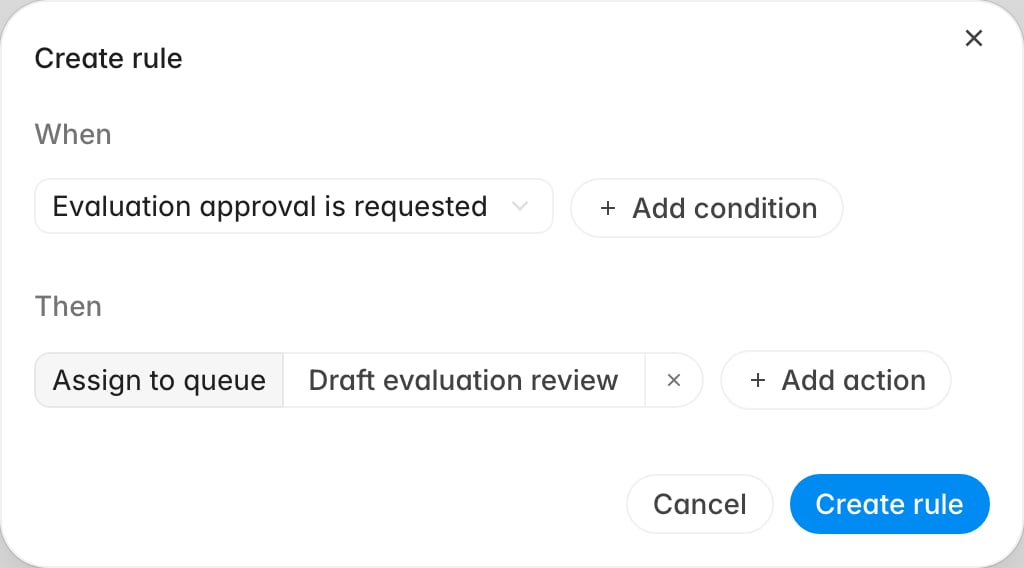
A rule only ever sees the one event it names, set in the rule's **When** section.
Open your rule, read what **When** is set to, and check it against the list below.
Each trigger fires at a different moment.
 | Trigger | Fires when |
| ------------------------------------ | -------------------------------------------------- |
| **Ticket is evaluated** | AI QA finishes scoring a ticket |
| **Evaluation approval is requested** | Someone submits a manual evaluation for validation |
| **Ticket changes status** | The ticket moves to a new status in your help desk |
| **Evaluation is contested** | An agent disputes an evaluation result |
| **Complaint is created** | A complaint record is raised |
Submitting a manual evaluation
for review raises **Evaluation approval is requested**. A rule built on **Ticket is
evaluated** will never see it, however well its conditions fit.
A rule also cannot fire on an event that never happened. If AI QA never scored the
ticket, no evaluated event was raised, and no rule tuning will route it. That is a
[different problem](/guides/troubleshooting/why-wasnt-my-ticket-evaluated) with a
different fix.
## Conditions must all hold, and some cannot hold at all
Conditions are joined with `and`, so every one has to be satisfied and each
condition you add is another chance for the rule to be skipped. Common silent
misses:
* **Blank data fails a condition, including a negative one.** A ticket with no
channel recorded does not match `Channel includes Email`, and it does not match
`Channel does not include Call` either. The same holds for **Group**,
**Partner**, **Workspace**, and **Ticket status**: no value on the ticket means
no match, in either direction.
* **Failed criteria means scored zero.** The condition matches criteria that
scored 0 on the evaluation. A criterion that came back partial does not count
as failed here, even though the ticket looks like a failure to a reader.
* **Customer sentiment never matches.** The field cannot be added from the rule
editor under any of the five triggers, and a rule still carrying one from an
earlier version does not resolve it against a ticket, so that rule will never
fire. Use a QA score condition instead.
When a rule with several conditions is not firing, strip it back to just the
trigger. Save it, confirm it fires, then add conditions back one at a time. Much
faster than reasoning about which combination excluded the ticket.
## The rule fired, but nothing appeared to happen
Sometimes the rule matched and the action ran without changing anything. From
outside this looks identical to a rule that never fired, but the causes differ,
and every one still consumes the event, so the rules below stay skipped.
| Action | Quietly does nothing when |
| ------------------------------------------------------------- | ------------------------------------------------------------------------------------------------------------------ |
| **Assign to queue**, **Assign to role**, **Assign to member** | The ticket already has an assignee and is still unresolved. Existing work is not reassigned out from under someone |
| **Assign to role** | Nobody in your organization currently holds that role |
| **Resolve** | The ticket is not in the unresolved state |
| **Send a notification** by email | The trigger is anything other than **Complaint is created**. Email notifications are only supported for complaints |
| **Send a notification** to Slack | There is no Slack connection behind the channel you picked |
Assignment also picks *one* person at random. If a rule assigns to a role or a set
of members, selecting five people spreads tickets across them one at a time rather
than notifying all five, so "my rule didn't fire" sometimes turns out to be "it
fired and picked someone else". Add a notification action alongside the assignment
when everyone needs to see the ticket.
## There is no on/off switch
A rule's row menu offers **Edit** and **Delete**, and nothing else. Rules cannot
be paused, and there is no enabled column.
That makes ordering your only non-destructive lever. To take a rule out of play
without losing it, drag it to the bottom of the list, or edit it so its conditions
no longer match. To take it out permanently, delete it, and check what was sitting
below it first, because those rules will start firing on traffic the deleted rule
used to absorb.
## Confirm the fix on the next event
Rules apply going forward only. Fixing the order or loosening a condition does not
reach back and route tickets that already went through the trigger, so the ticket
in front of you needs assigning by hand.
To prove the fix, raise the trigger again on a real ticket and check three things:
the ticket lands where you expected, the assignee is someone you intended, and a
ticket you meant to exclude was in fact left alone. If the ticket still isn't
routed, go back to the top of the list. A rule above yours matching first remains
the most likely answer.
## Related
* [Create a routing rule](/guides/quality-assurance/create-routing-rules)
* [Why wasn't my ticket evaluated?](/guides/troubleshooting/why-wasnt-my-ticket-evaluated)
* [Perform a manual evaluation](/guides/quality-assurance/perform-a-manual-evaluation)
* [Roles and permissions](/guides/roles-and-permissions)
| Trigger | Fires when |
| ------------------------------------ | -------------------------------------------------- |
| **Ticket is evaluated** | AI QA finishes scoring a ticket |
| **Evaluation approval is requested** | Someone submits a manual evaluation for validation |
| **Ticket changes status** | The ticket moves to a new status in your help desk |
| **Evaluation is contested** | An agent disputes an evaluation result |
| **Complaint is created** | A complaint record is raised |
Submitting a manual evaluation
for review raises **Evaluation approval is requested**. A rule built on **Ticket is
evaluated** will never see it, however well its conditions fit.
A rule also cannot fire on an event that never happened. If AI QA never scored the
ticket, no evaluated event was raised, and no rule tuning will route it. That is a
[different problem](/guides/troubleshooting/why-wasnt-my-ticket-evaluated) with a
different fix.
## Conditions must all hold, and some cannot hold at all
Conditions are joined with `and`, so every one has to be satisfied and each
condition you add is another chance for the rule to be skipped. Common silent
misses:
* **Blank data fails a condition, including a negative one.** A ticket with no
channel recorded does not match `Channel includes Email`, and it does not match
`Channel does not include Call` either. The same holds for **Group**,
**Partner**, **Workspace**, and **Ticket status**: no value on the ticket means
no match, in either direction.
* **Failed criteria means scored zero.** The condition matches criteria that
scored 0 on the evaluation. A criterion that came back partial does not count
as failed here, even though the ticket looks like a failure to a reader.
* **Customer sentiment never matches.** The field cannot be added from the rule
editor under any of the five triggers, and a rule still carrying one from an
earlier version does not resolve it against a ticket, so that rule will never
fire. Use a QA score condition instead.
When a rule with several conditions is not firing, strip it back to just the
trigger. Save it, confirm it fires, then add conditions back one at a time. Much
faster than reasoning about which combination excluded the ticket.
## The rule fired, but nothing appeared to happen
Sometimes the rule matched and the action ran without changing anything. From
outside this looks identical to a rule that never fired, but the causes differ,
and every one still consumes the event, so the rules below stay skipped.
| Action | Quietly does nothing when |
| ------------------------------------------------------------- | ------------------------------------------------------------------------------------------------------------------ |
| **Assign to queue**, **Assign to role**, **Assign to member** | The ticket already has an assignee and is still unresolved. Existing work is not reassigned out from under someone |
| **Assign to role** | Nobody in your organization currently holds that role |
| **Resolve** | The ticket is not in the unresolved state |
| **Send a notification** by email | The trigger is anything other than **Complaint is created**. Email notifications are only supported for complaints |
| **Send a notification** to Slack | There is no Slack connection behind the channel you picked |
Assignment also picks *one* person at random. If a rule assigns to a role or a set
of members, selecting five people spreads tickets across them one at a time rather
than notifying all five, so "my rule didn't fire" sometimes turns out to be "it
fired and picked someone else". Add a notification action alongside the assignment
when everyone needs to see the ticket.
## There is no on/off switch
A rule's row menu offers **Edit** and **Delete**, and nothing else. Rules cannot
be paused, and there is no enabled column.
That makes ordering your only non-destructive lever. To take a rule out of play
without losing it, drag it to the bottom of the list, or edit it so its conditions
no longer match. To take it out permanently, delete it, and check what was sitting
below it first, because those rules will start firing on traffic the deleted rule
used to absorb.
## Confirm the fix on the next event
Rules apply going forward only. Fixing the order or loosening a condition does not
reach back and route tickets that already went through the trigger, so the ticket
in front of you needs assigning by hand.
To prove the fix, raise the trigger again on a real ticket and check three things:
the ticket lands where you expected, the assignee is someone you intended, and a
ticket you meant to exclude was in fact left alone. If the ticket still isn't
routed, go back to the top of the list. A rule above yours matching first remains
the most likely answer.
## Related
* [Create a routing rule](/guides/quality-assurance/create-routing-rules)
* [Why wasn't my ticket evaluated?](/guides/troubleshooting/why-wasnt-my-ticket-evaluated)
* [Perform a manual evaluation](/guides/quality-assurance/perform-a-manual-evaluation)
* [Roles and permissions](/guides/roles-and-permissions)