> ## Documentation Index
> Fetch the complete documentation index at: https://docs.rulebase.co/llms.txt
> Use this file to discover all available pages before exploring further.
# Why is this score different from what I expected?
> Trace an unexpected QA score from the total down to the individual check, and work out whether a cap, a condition, a scoping rule, or an edited scorecard produced it.
An evaluation came back at 62 and you were expecting something in the eighties. Or
a criterion your reviewer would have passed came back as a fail. An unexpected score is a number assembled from many smaller decisions. Take it
apart in the order Rulebase built it: total, then criterion, then check.
If the number that surprised you is a team or agent average, start with [Use team
and agent performance](/guides/insights/team-and-agent-performance) instead. The
usual culprits there are the period, the roster, and how few reviews the average
was built from.
## First, check whether the total is the sum of its parts
Most of the time the overall score is just the criteria added together. A few features can override that, and each leaves a visible mark. Start with
the info icon beside the ticket's QA score. The breakdown behind it lists every evaluator's
score grouped by scorecard, and it is where these show up.
| What happened | What you see | Where it comes from |
| ---------------------------- | ----------------------------------------------------------------------------------------------------------------- | ---------------------------------------------------------------------------------------------------------- |
| **Auto-fail** | `0` with **- Autofail** beside it, even though most criteria passed, and an **Auto-Zero** badge on the evaluation | A criterion where the evaluator chose an **Auto-fail score** option. Auto-fail zeroes the whole evaluation |
| **Score cap** | **- Capped** beside the score, with the reason printed underneath | A **Caps** rule on one criterion, reading `If this criteria is fail, cap overall score at 60` |
| **Dependency rule override** | A normal-looking total, but a check marked failed with a **Dependency rule override** badge | A check that inherits its outcome from another criterion's result |
A capped result looks like a miscalculation until you read the reason line,
which spells out both numbers, for example `Score capped at 60 because
"Verified the customer" failed. Uncapped score: 88.` If the cap is doing more
damage than intended, it lives on the criterion it names, in the **Caps** row of
the scorecard editor.
## Then work down to the check that decided it
Once the total makes sense, open the criterion you disagree with. A scorecard
built from checks puts a count under each criterion result (**4 total checks**)
next to a **View checks** button. Expanding it sorts them into four tabs:
**Failed checks**, **Partial checks**, **Passed checks**, and **Not Applicable
checks**, each carrying its own number.
**A criterion scores as low as its
worst check.** Rulebase does not average them. A criterion with four checks where
three passed and one failed takes the failed check's score, so a criterion worth
10 points can come back at 0 on a single judgement. The inverse is also true: when
no check comes back failed or partial, the criterion is awarded a full pass.
If the criterion score looks disproportionate to the summary, the **Failed
checks** tab usually holds the answer, and the count on each tab tells you how much
of the criterion actually ran.
## The condition sets the score
A check does not carry a score of its own. When a check fails or partially passes,
the evaluator picks one of the **Criteria conditions** sitting under it, and every
condition ends in an outcome (`mark as fail`, or partial or auto-fail where the
criterion offers them). That outcome sets the number.
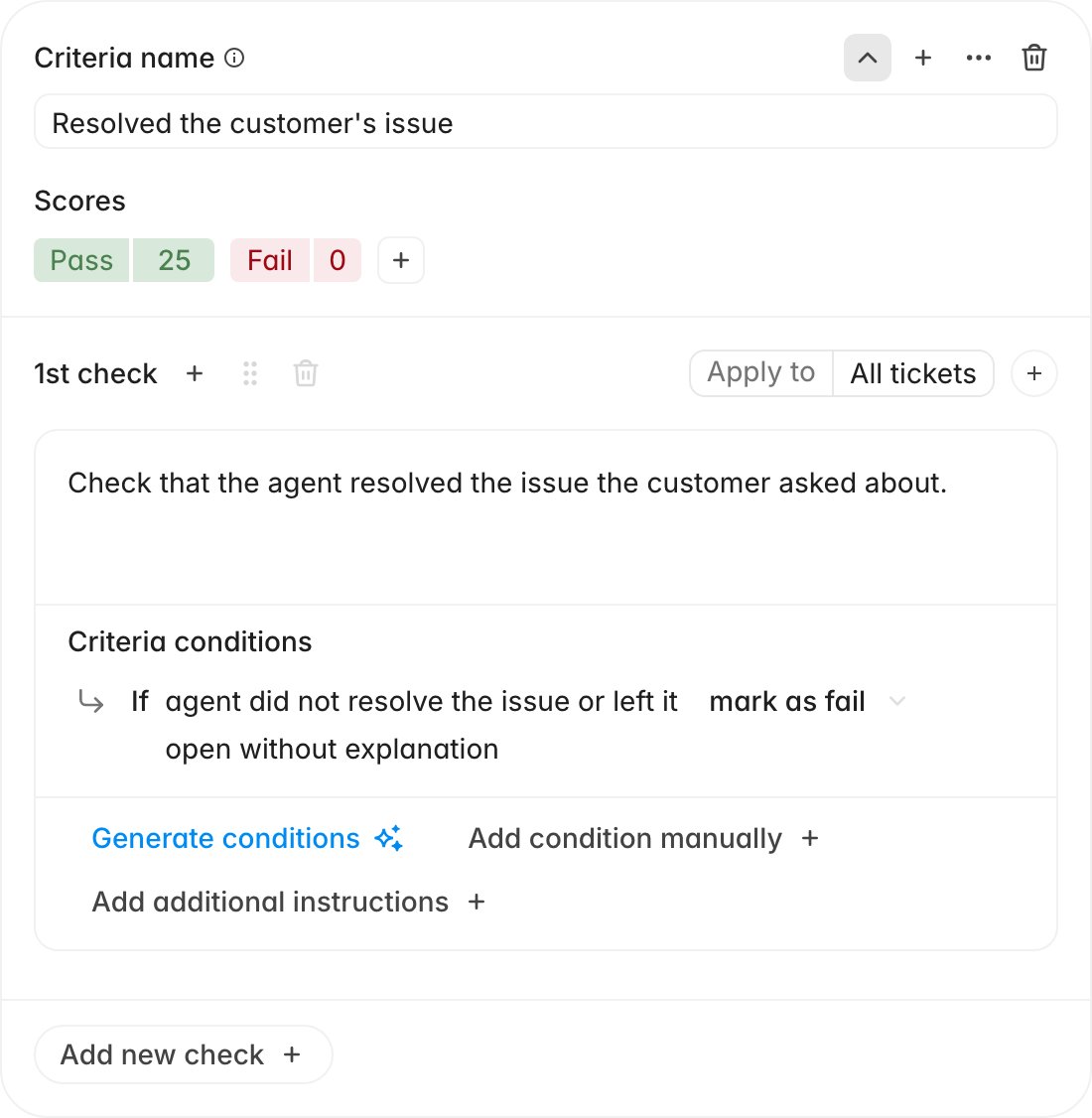 If every condition on a check maps
to **fail**, the check has no way to express "mostly right", and near-misses land
on zero. If you expected partial credit and did not get it, look for a partial
score option on the criterion and a condition attached to it. The condition text
also tells you what the evaluator thought it saw, often more diagnostic than the
summary paragraph.
## A check marked Not Applicable did not cost anything
**Apply to** narrows a check to particular contexts: specific channels, new or
re-assigned tickets, primary or duplicate tickets, SLA breaches, inbound or
outbound calls. Scoped-out checks still appear, under **Not Applicable checks**.
The evaluator sees the check's conditions and decides whether they hold; scoping
does not filter the check out before scoring.
The evaluator also marks a check not applicable on its own judgement when the
required action was never possible: a call that only reached voicemail cannot have
a consent disclosure, and an unanswered message cannot have a back-and-forth.
A not-applicable check contributes nothing to the score. A criterion whose checks
are *all* not applicable is awarded full marks. If a criterion you expected to be
skipped is quietly handing out points, that is why.
## Additional instructions change how a check is judged
**Apply to** decides whether a check runs; additional instructions change how
it is judged when it does. The exception lives on the check, in its
instructions field.
If every condition on a check maps
to **fail**, the check has no way to express "mostly right", and near-misses land
on zero. If you expected partial credit and did not get it, look for a partial
score option on the criterion and a condition attached to it. The condition text
also tells you what the evaluator thought it saw, often more diagnostic than the
summary paragraph.
## A check marked Not Applicable did not cost anything
**Apply to** narrows a check to particular contexts: specific channels, new or
re-assigned tickets, primary or duplicate tickets, SLA breaches, inbound or
outbound calls. Scoped-out checks still appear, under **Not Applicable checks**.
The evaluator sees the check's conditions and decides whether they hold; scoping
does not filter the check out before scoring.
The evaluator also marks a check not applicable on its own judgement when the
required action was never possible: a call that only reached voicemail cannot have
a consent disclosure, and an unanswered message cannot have a back-and-forth.
A not-applicable check contributes nothing to the score. A criterion whose checks
are *all* not applicable is awarded full marks. If a criterion you expected to be
skipped is quietly handing out points, that is why.
## Additional instructions change how a check is judged
**Apply to** decides whether a check runs; additional instructions change how
it is judged when it does. The exception lives on the check, in its
instructions field.
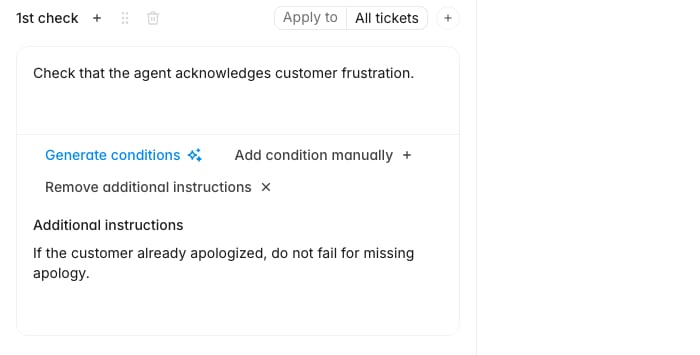 Open the check in the scorecard editor and read the **Additional instructions**
field alongside the description. An instruction like `If the customer already
apologized, do not fail for missing apology` will make the check behave in a way
the description alone never suggests.
When a whole section scores oddly, look one level up. A section's
**Instructions**, set from its **...** menu under **Edit**, reach every criterion
inside it, so a single sentence there can shift several scores at once.
## The rubric may have moved since the ticket was scored
An evaluation keeps the score it was given. The check and criterion text shown
next to that score is read live from the scorecard as it stands today. Edit a
published scorecard and older evaluations start looking self-contradictory: current
wording beside a historical result.
Also confirm which scorecard you are reading. A ticket that
matches more than one published scorecard is scored against each of them
separately, and the evaluation header turns into a scorecard picker when that
happens. If the criteria you were expecting are absent entirely, check the picker
before concluding the result is wrong. You may be looking at the other rubric.
If you are about to change a live rubric, **Duplicate** the scorecard, edit the
copy,
publish it, and move the original to drafts. Old evaluations then keep displaying
the wording they were judged against.
## When the score is wrong
Everything above explains a score. When the explanation does not hold up and the
result is wrong, correct it on the criterion. Thumbs down the criterion, write
what the evaluator missed, and tick **Re-evaluate this criterion after
submitting** to have it scored again with your note in hand. The overall score
updates with the new result, and the correction is retained for later evaluations
of similar tickets.
If the same criterion keeps coming back wrong across different tickets, the fix
belongs in the scorecard instead: usually a condition that is too broad, or an
exception that should have been written as an additional instruction.
## Related
* [Give feedback on AI QA evaluations](/guides/quality-assurance/give-feedback-on-ai-qa)
* [Create a scorecard](/guides/quality-assurance/create-a-scorecard)
* [Add scorecard additional instructions](/guides/quality-assurance/add-scorecard-additional-instructions)
* [Use team and agent performance](/guides/insights/team-and-agent-performance)
* [Why wasn't my ticket evaluated?](/guides/troubleshooting/why-wasnt-my-ticket-evaluated)
Open the check in the scorecard editor and read the **Additional instructions**
field alongside the description. An instruction like `If the customer already
apologized, do not fail for missing apology` will make the check behave in a way
the description alone never suggests.
When a whole section scores oddly, look one level up. A section's
**Instructions**, set from its **...** menu under **Edit**, reach every criterion
inside it, so a single sentence there can shift several scores at once.
## The rubric may have moved since the ticket was scored
An evaluation keeps the score it was given. The check and criterion text shown
next to that score is read live from the scorecard as it stands today. Edit a
published scorecard and older evaluations start looking self-contradictory: current
wording beside a historical result.
Also confirm which scorecard you are reading. A ticket that
matches more than one published scorecard is scored against each of them
separately, and the evaluation header turns into a scorecard picker when that
happens. If the criteria you were expecting are absent entirely, check the picker
before concluding the result is wrong. You may be looking at the other rubric.
If you are about to change a live rubric, **Duplicate** the scorecard, edit the
copy,
publish it, and move the original to drafts. Old evaluations then keep displaying
the wording they were judged against.
## When the score is wrong
Everything above explains a score. When the explanation does not hold up and the
result is wrong, correct it on the criterion. Thumbs down the criterion, write
what the evaluator missed, and tick **Re-evaluate this criterion after
submitting** to have it scored again with your note in hand. The overall score
updates with the new result, and the correction is retained for later evaluations
of similar tickets.
If the same criterion keeps coming back wrong across different tickets, the fix
belongs in the scorecard instead: usually a condition that is too broad, or an
exception that should have been written as an additional instruction.
## Related
* [Give feedback on AI QA evaluations](/guides/quality-assurance/give-feedback-on-ai-qa)
* [Create a scorecard](/guides/quality-assurance/create-a-scorecard)
* [Add scorecard additional instructions](/guides/quality-assurance/add-scorecard-additional-instructions)
* [Use team and agent performance](/guides/insights/team-and-agent-performance)
* [Why wasn't my ticket evaluated?](/guides/troubleshooting/why-wasnt-my-ticket-evaluated)