> ## Documentation Index
> Fetch the complete documentation index at: https://docs.rulebase.co/llms.txt
> Use this file to discover all available pages before exploring further.
# Why wasn't my ticket evaluated?
> Diagnose a missing QA evaluation with the eligibility tester, then work through scorecard scope, agent roster, coverage rules, and timing in the order Rulebase applies them.
A ticket closed, you opened it expecting a score, and there is nothing there. This
is almost never a bug: Rulebase applies a series of gates before it evaluates, and
one said no. It will tell you which. The causes below are in the order the product checks
them.
## What the ticket already tells you
Open the ticket and look at its **Review** tab. It shows one of these states:
* **Evaluation skipped**: Rulebase considered the ticket and decided against it.
The text underneath is the reason. This is the most likely state.
* **Evaluation scheduled**: queued and waiting, usually on your evaluation delay.
**Run now** starts it immediately.
* **Evaluation failed**: something went wrong while running. **Try again** is
safe.
* **No QA evaluations**: no evaluation was ever attempted, which points at a gate
that runs before a request is created. Keep reading.
## Get the full picture with the eligibility tester
The Review tab shows the first reason; the eligibility tester shows every gate at
once, which matters when two things are wrong.
1. Go to [Settings > Evaluations](https://app.rulebase.co/settings/evaluations).
2. Next to **Eligibility instructions**, click **Edit**, then click **Test**.
3. Search for the ticket by ID or subject, and select it.
 The headline tells you whether the ticket is eligible at all. The line underneath
is the first blocking reason. Remaining problems appear as badges grouped into
**Rules**, **Auto QA**, and **Agents**; hovering a badge shows the full
explanation.
Some gates block everything; others
block only **automatic** QA, so the ticket can still be evaluated on request. When
the tester says the ticket is eligible but automatic QA would not have run, it
lists those automatic-only blockers under **Auto QA**, and you can request an
evaluation by hand without changing any settings.
If the ticket does not appear in the tester's search at all, it has not reached
Rulebase yet. That is an ingestion question. Check your help desk connection under
[Settings > Connections](https://app.rulebase.co/settings/connections).
## Most likely: no scorecard applies to the ticket
This is the top cause on new accounts, and the message names it plainly: no
published scorecard applies to this conversation. Two things cause it.
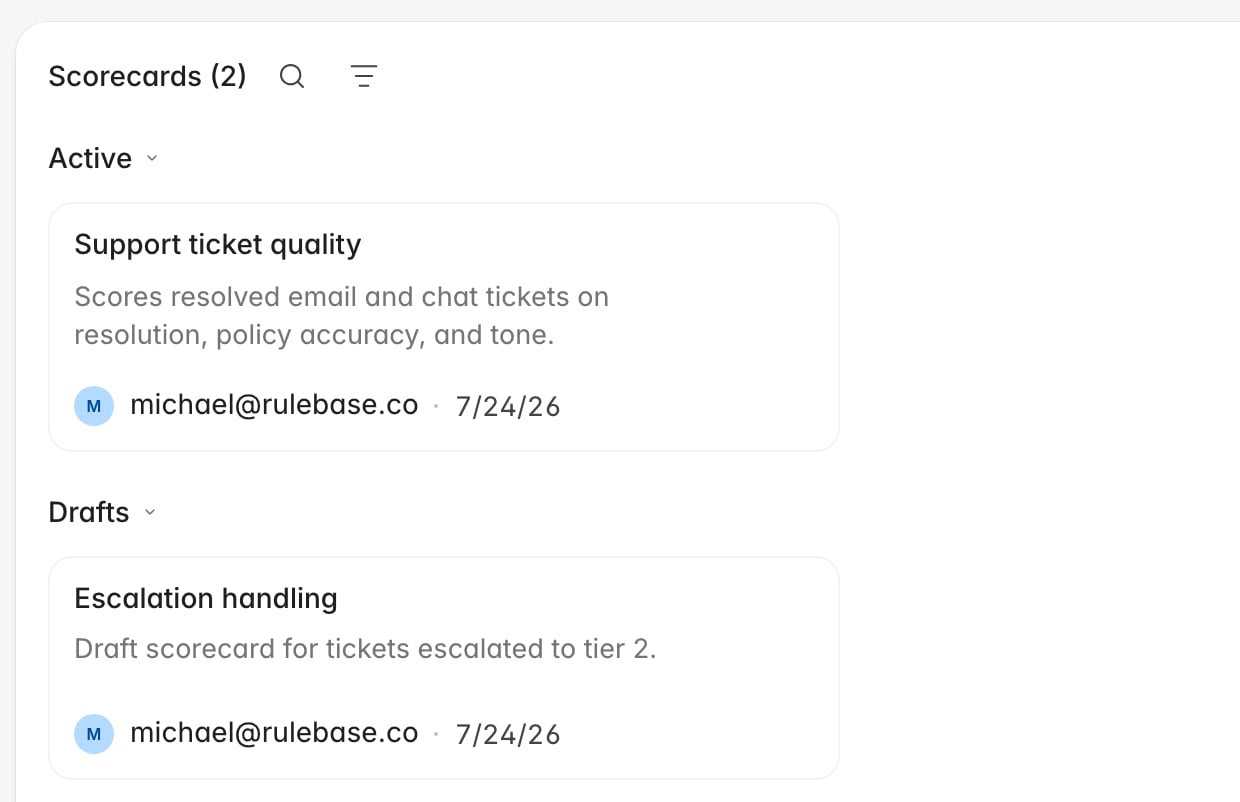
**The scorecard is still a draft.** Only published scorecards evaluate anything; a
draft sits under **Drafts** on
[Knowledge > Scorecards](https://app.rulebase.co/knowledge/scorecards) looking
finished.
The headline tells you whether the ticket is eligible at all. The line underneath
is the first blocking reason. Remaining problems appear as badges grouped into
**Rules**, **Auto QA**, and **Agents**; hovering a badge shows the full
explanation.
Some gates block everything; others
block only **automatic** QA, so the ticket can still be evaluated on request. When
the tester says the ticket is eligible but automatic QA would not have run, it
lists those automatic-only blockers under **Auto QA**, and you can request an
evaluation by hand without changing any settings.
If the ticket does not appear in the tester's search at all, it has not reached
Rulebase yet. That is an ingestion question. Check your help desk connection under
[Settings > Connections](https://app.rulebase.co/settings/connections).
## Most likely: no scorecard applies to the ticket
This is the top cause on new accounts, and the message names it plainly: no
published scorecard applies to this conversation. Two things cause it.
**The scorecard is still a draft.** Only published scorecards evaluate anything; a
draft sits under **Drafts** on
[Knowledge > Scorecards](https://app.rulebase.co/knowledge/scorecards) looking
finished.
 **Its scope excludes the ticket.** Open the scorecard and read the pills next to
**Add scoping**. Every pill narrows what the scorecard covers: one scoped to
**Emails** and **Chats** will never touch a phone call, and one scoped to a single
team ignores everybody else.
**Its scope excludes the ticket.** Open the scorecard and read the pills next to
**Add scoping**. Every pill narrows what the scorecard covers: one scoped to
**Emails** and **Chats** will never touch a phone call, and one scoped to a single
team ignores everybody else.
 One special case: if the customer never replied, Rulebase skips the ticket unless
a published scorecard opts in to internal tickets. Add **Internal tickets** to a
scorecard's **Ticket scope** to score one-sided tickets.
## Then check the agent roster
An agent on the ticket counts only
when all of these are true:
* They are on the QA roster at
[Settings > People > Agents](https://app.rulebase.co/settings/people/employees).
Someone who arrived through a help desk integration but was never added is not
evaluated.
* They are a human agent. Automated replies never produce an evaluation.
* They wrote at least 100 characters of customer-facing messages. A one-line
"sorted, thanks!" handoff is not enough material to score.
* A matching scorecard applies to them. Scorecards scoped to a team or group only
cover agents in it.
When no agent clears all four, the tester reports no eligible agents were found.
Fix it by adding the person to the roster, or widening the scorecard's people
scope. [Manage the QA agent
roster](/guides/quality-assurance/manage-agent-roster) covers both.
## Then check whether coverage rules selected it
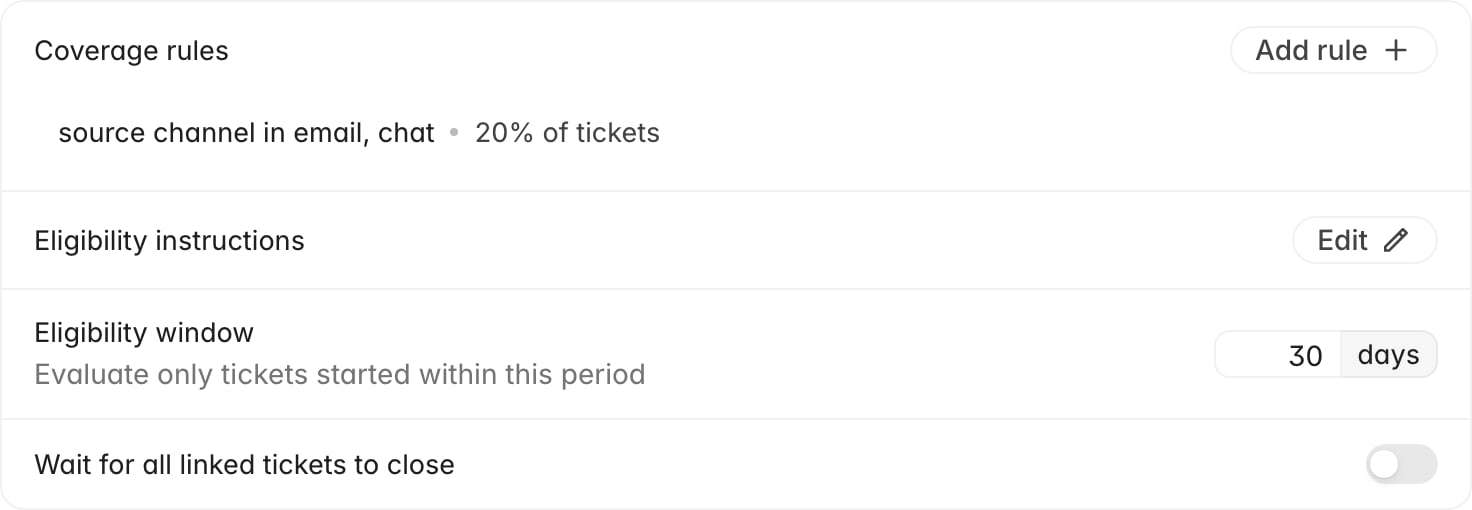
Coverage rules are sampling. If you cover 20% of tickets, the other 80% are
skipped on purpose, and the reason says the conversation was not selected by your
coverage rules. Nothing is broken.
One special case: if the customer never replied, Rulebase skips the ticket unless
a published scorecard opts in to internal tickets. Add **Internal tickets** to a
scorecard's **Ticket scope** to score one-sided tickets.
## Then check the agent roster
An agent on the ticket counts only
when all of these are true:
* They are on the QA roster at
[Settings > People > Agents](https://app.rulebase.co/settings/people/employees).
Someone who arrived through a help desk integration but was never added is not
evaluated.
* They are a human agent. Automated replies never produce an evaluation.
* They wrote at least 100 characters of customer-facing messages. A one-line
"sorted, thanks!" handoff is not enough material to score.
* A matching scorecard applies to them. Scorecards scoped to a team or group only
cover agents in it.
When no agent clears all four, the tester reports no eligible agents were found.
Fix it by adding the person to the roster, or widening the scorecard's people
scope. [Manage the QA agent
roster](/guides/quality-assurance/manage-agent-roster) covers both.
## Then check whether coverage rules selected it
Coverage rules are sampling. If you cover 20% of tickets, the other 80% are
skipped on purpose, and the reason says the conversation was not selected by your
coverage rules. Nothing is broken.
 A subtler version: the ticket can be selected while none of its agents are, which
happens with rules that cover a fixed number of tickets per agent. The reason then
names the agents.
Both are deliberate settings decisions. If a specific ticket needs a score anyway,
request the evaluation by hand: manual requests ignore coverage rules entirely.
## Or it is still waiting
Several gates are about timing. A ticket that trips one may be evaluated later
without you doing anything.
* The ticket is not closed. Automatic QA runs after a ticket is resolved.
* The evaluation delay has not elapsed. The Review tab shows
**Evaluation scheduled**, and the eligibility tester names the time it is
scheduled for.
* An evaluation is already queued or in progress, which blocks a second request
on the same ticket.
* A linked ticket in the thread is still open, and you have
**Wait for all linked tickets to close** turned on.
## Or there was nothing to score
The last group of gates is about the conversation itself. Your eligibility
instructions drive these, and a skip here is usually correct. Either an agent
never sent a customer-facing message, so there is no work to judge; or the AI
eligibility check read the transcript and found no real request and no meaningful
exchange, which is what the default instructions ask it to filter out. If tickets
you care about keep landing here, edit the instructions. See [Configure evaluation
eligibility](/guides/quality-assurance/configure-evaluation-eligibility).
## Every check, and what to do about it
The tester labels each gate. Use this as the lookup table when a badge is not
self-explanatory:
| Check | Why it blocked | Where to fix it |
| ------------------------------------------------------ | -------------------------------------------------------------------- | ------------------------------------------------------------------------------------------------------------------------------------------------ |
| **Ticket closed** | The ticket is still open | Nothing to do. Automatic QA runs after resolution |
| **Agent responded** | No agent sent a customer-facing message | Nothing to fix. There is no agent work to score |
| **Evaluation credits** | The organization ran out of evaluation credits | Nothing on the ticket. Tickets are reconsidered once credits are restored, and current usage sits under **Credits** at the bottom of the sidebar |
| **Evaluation window** | The ticket started before your eligibility window | Widen or clear **Eligibility window** in evaluation settings |
| **Already evaluated** | A completed AI evaluation already exists | Open the existing evaluation, or request a fresh one |
| **No blocking evaluation request** | Another evaluation is queued or running | Wait for it to finish |
| **Linked tickets closed** | A linked ticket in the thread is open | Close the linked ticket, or turn off the linked-tickets setting |
| **Customer responded (or scorecard accepts internal)** | The customer never replied and no scorecard accepts internal tickets | Add **Internal tickets** to a scorecard's ticket scope |
| **Scorecard match** | No published scorecard covers this ticket | Publish a scorecard, or widen its scoping |
| **Eligible agents** | Nobody on the ticket qualified | Add the agent to the roster, or widen the scorecard's people scope |
| **Coverage rules** | Sampling did not select this ticket | Raise coverage, or request the evaluation by hand |
| **Agents match coverage rules** | Sampling selected the ticket but not these agents | Adjust the rule's target or how it splits per agent |
| **AI eligibility** | The transcript did not meet your eligibility instructions | Edit **Eligibility instructions**, then re-test |
## Once you have fixed the cause
Some fixes catch up on their own. When you publish a scorecard, add an agent to the
roster, change coverage rules, close a linked ticket, or top up credits, Rulebase
re-checks tickets skipped for those reasons about once a day. That sweep only
looks at tickets that closed inside the current sampling period (the current day
unless your coverage rules use weekly or monthly targets), so recent tickets
recover automatically and older ones do not.
For the ticket you were investigating, do not wait. Open it and use the button on
the **Review** tab: **Try again** on a skipped or failed evaluation, **Request
evaluation** where none was attempted. Manual requests skip coverage rules and the
AI eligibility filter, so they work while you are still tuning those settings.
For the tickets that come next, confirm the fix the same way you found the
problem. Run the eligibility tester on a ticket that should qualify and check the
result reads **Eligible for QA** with the agents you expect.
A subtler version: the ticket can be selected while none of its agents are, which
happens with rules that cover a fixed number of tickets per agent. The reason then
names the agents.
Both are deliberate settings decisions. If a specific ticket needs a score anyway,
request the evaluation by hand: manual requests ignore coverage rules entirely.
## Or it is still waiting
Several gates are about timing. A ticket that trips one may be evaluated later
without you doing anything.
* The ticket is not closed. Automatic QA runs after a ticket is resolved.
* The evaluation delay has not elapsed. The Review tab shows
**Evaluation scheduled**, and the eligibility tester names the time it is
scheduled for.
* An evaluation is already queued or in progress, which blocks a second request
on the same ticket.
* A linked ticket in the thread is still open, and you have
**Wait for all linked tickets to close** turned on.
## Or there was nothing to score
The last group of gates is about the conversation itself. Your eligibility
instructions drive these, and a skip here is usually correct. Either an agent
never sent a customer-facing message, so there is no work to judge; or the AI
eligibility check read the transcript and found no real request and no meaningful
exchange, which is what the default instructions ask it to filter out. If tickets
you care about keep landing here, edit the instructions. See [Configure evaluation
eligibility](/guides/quality-assurance/configure-evaluation-eligibility).
## Every check, and what to do about it
The tester labels each gate. Use this as the lookup table when a badge is not
self-explanatory:
| Check | Why it blocked | Where to fix it |
| ------------------------------------------------------ | -------------------------------------------------------------------- | ------------------------------------------------------------------------------------------------------------------------------------------------ |
| **Ticket closed** | The ticket is still open | Nothing to do. Automatic QA runs after resolution |
| **Agent responded** | No agent sent a customer-facing message | Nothing to fix. There is no agent work to score |
| **Evaluation credits** | The organization ran out of evaluation credits | Nothing on the ticket. Tickets are reconsidered once credits are restored, and current usage sits under **Credits** at the bottom of the sidebar |
| **Evaluation window** | The ticket started before your eligibility window | Widen or clear **Eligibility window** in evaluation settings |
| **Already evaluated** | A completed AI evaluation already exists | Open the existing evaluation, or request a fresh one |
| **No blocking evaluation request** | Another evaluation is queued or running | Wait for it to finish |
| **Linked tickets closed** | A linked ticket in the thread is open | Close the linked ticket, or turn off the linked-tickets setting |
| **Customer responded (or scorecard accepts internal)** | The customer never replied and no scorecard accepts internal tickets | Add **Internal tickets** to a scorecard's ticket scope |
| **Scorecard match** | No published scorecard covers this ticket | Publish a scorecard, or widen its scoping |
| **Eligible agents** | Nobody on the ticket qualified | Add the agent to the roster, or widen the scorecard's people scope |
| **Coverage rules** | Sampling did not select this ticket | Raise coverage, or request the evaluation by hand |
| **Agents match coverage rules** | Sampling selected the ticket but not these agents | Adjust the rule's target or how it splits per agent |
| **AI eligibility** | The transcript did not meet your eligibility instructions | Edit **Eligibility instructions**, then re-test |
## Once you have fixed the cause
Some fixes catch up on their own. When you publish a scorecard, add an agent to the
roster, change coverage rules, close a linked ticket, or top up credits, Rulebase
re-checks tickets skipped for those reasons about once a day. That sweep only
looks at tickets that closed inside the current sampling period (the current day
unless your coverage rules use weekly or monthly targets), so recent tickets
recover automatically and older ones do not.
For the ticket you were investigating, do not wait. Open it and use the button on
the **Review** tab: **Try again** on a skipped or failed evaluation, **Request
evaluation** where none was attempted. Manual requests skip coverage rules and the
AI eligibility filter, so they work while you are still tuning those settings.
For the tickets that come next, confirm the fix the same way you found the
problem. Run the eligibility tester on a ticket that should qualify and check the
result reads **Eligible for QA** with the agents you expect.
 ## Related
* [Why is this score different from what I expected?](/guides/troubleshooting/why-is-my-score-different),
when the evaluation ran but the number looks wrong
* [My integration stopped syncing](/guides/troubleshooting/integration-stopped-syncing),
when the ticket never reached Rulebase at all
* [An agent is missing from reports](/guides/troubleshooting/agent-missing-from-reports)
* [Configure evaluation eligibility](/guides/quality-assurance/configure-evaluation-eligibility)
* [Create a scorecard](/guides/quality-assurance/create-a-scorecard)
* [Manage the QA agent roster](/guides/quality-assurance/manage-agent-roster)
* [Give feedback on AI QA](/guides/quality-assurance/give-feedback-on-ai-qa)
* [How AI QA works](/guides/concepts/how-ai-qa-works), for the pipeline these
gates sit in and the setting behind each one
## Related
* [Why is this score different from what I expected?](/guides/troubleshooting/why-is-my-score-different),
when the evaluation ran but the number looks wrong
* [My integration stopped syncing](/guides/troubleshooting/integration-stopped-syncing),
when the ticket never reached Rulebase at all
* [An agent is missing from reports](/guides/troubleshooting/agent-missing-from-reports)
* [Configure evaluation eligibility](/guides/quality-assurance/configure-evaluation-eligibility)
* [Create a scorecard](/guides/quality-assurance/create-a-scorecard)
* [Manage the QA agent roster](/guides/quality-assurance/manage-agent-roster)
* [Give feedback on AI QA](/guides/quality-assurance/give-feedback-on-ai-qa)
* [How AI QA works](/guides/concepts/how-ai-qa-works), for the pipeline these
gates sit in and the setting behind each one