

Before you start
Confirm the compliance program has the correct target record type and the test has the intended date range. The Populate test dialog uses those settings for the sample. The program and its tests are created first, in Set up a compliance testing program. If you have no test to open yet, start there.Add a random sample
- Go to Compliance > Testing.
- Open the program and test.
- Click Build sample for an empty sheet or Add to sample for an existing sample.
- Set the available filters for the program’s record type.
- Enter a Sample size from 1 to 500.
- Click Populate.
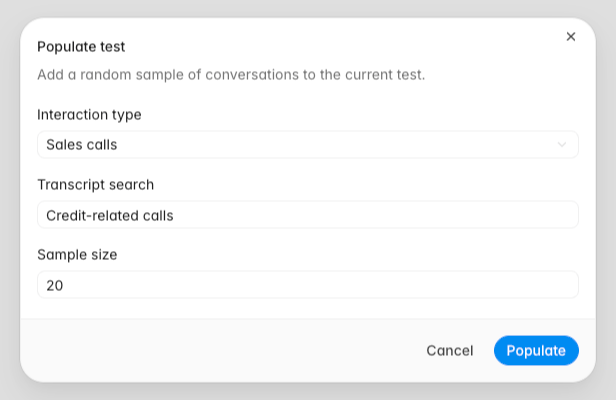
Filter conversation samples
Conversation-based tests provide these filters:- Interaction type: include any interaction, tickets, or sales calls.
- Transcript search: describe relevant language or behavior, such as
customer sounds vulnerable.
Filter other record types
Available filters depend on the compliance program’s target:
Leave an optional filter blank to sample across all eligible values for that field.
Run and monitor the test
After the sample is populated, click Run test to fill the generated cells. A cell can show Queued, Generating, Thinking, Pulling data, or Failed while processing. A cell returns to Queued when Rulebase retries generation. Select a completed generated cell to review its reasoning. Citation links open the supporting conversation message or referenced policy or framework document when that source is available. If a generated cell remains Failed, confirm the source record is still available. After resolving the problem, select the affected range and click Run test again. Do not treat a failed generation as a compliance result. Once every cell has filled, the sheet is complete. Run and analyze a compliance test covers reviewing the answers, marking exceptions, and generating the analysis report.Verify the sample
Before reviewing exceptions, confirm:- The rows fall within the test period.
- The record type matches the compliance program.
- The sample size matches the requested count or the number of eligible remaining records.
- Repeated population did not add records already in the sheet.