

Before you start
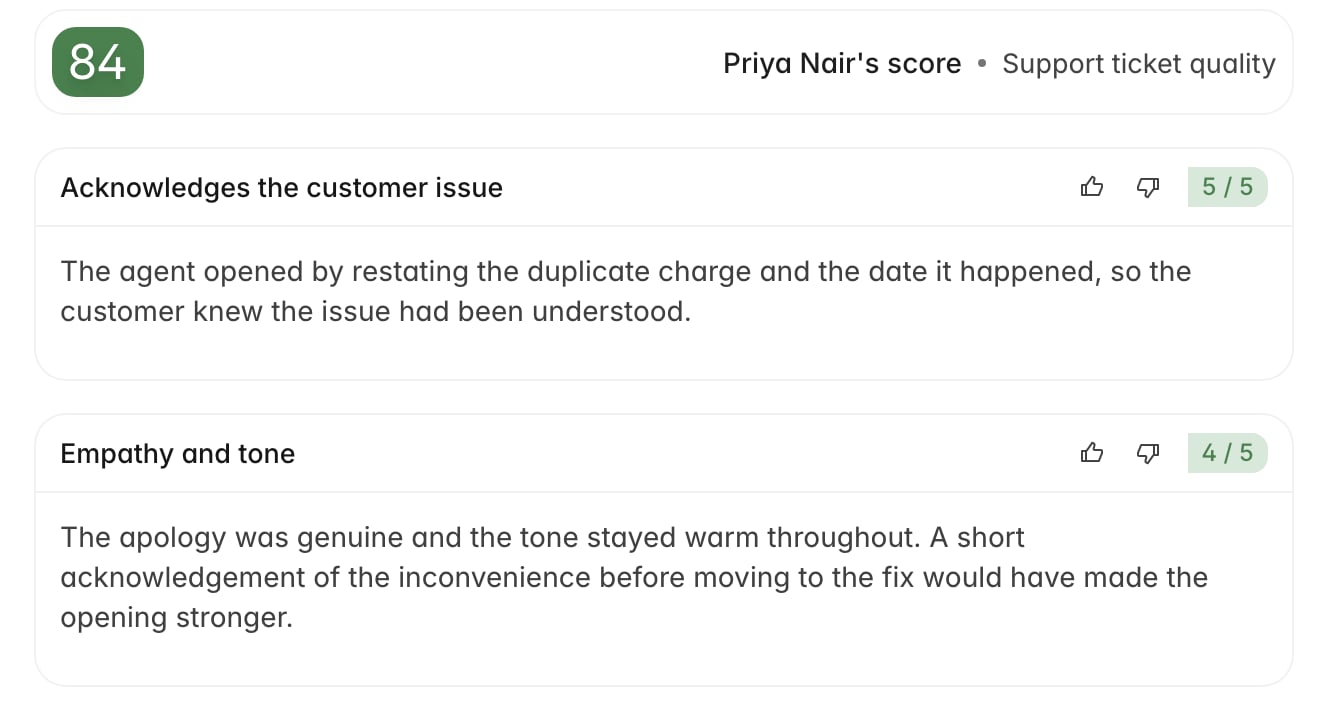
- You need permission to give evaluation feedback and train the model. Without it the thumbs icons don’t appear at all.
- Open a ticket that already has a completed AI QA evaluation. Feedback attaches to a criterion result, so there has to be a result to attach to.
- Know what specifically went wrong before you click. Thumbs down won’t submit without a note.
Leave feedback on a criterion
Feedback attaches to one criterion at a time. There’s no control for rating a whole scorecard at once, so pick out the criterion that was scored wrong.- Open a ticket with an AI QA evaluation and find the criterion in the review.
- Click the thumbs up or thumbs down icon next to its score.
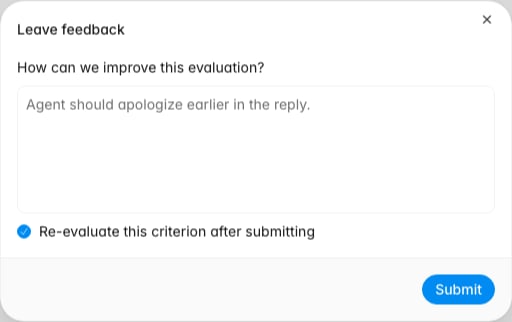
- In the Leave feedback dialog, write your note.
- On thumbs down, tick Re-evaluate this criterion after submitting if you want Rulebase to score it again now.
- Click Submit.
Thumbs up and thumbs down do different jobs
The two directions look symmetrical in the UI, but only one of them changes anything:
Thumbs up records that a human checked this criterion and agreed. It leaves the
score alone and has no effect on how future tickets are scored. Everything else on
this page describes thumbs down.
Re-evaluate a criterion
Ticking Re-evaluate this criterion after submitting asks Rulebase to score that one criterion again, this time with your note, the original reasoning, and the previous score as context. No other criterion is re-scored, though the evaluation’s overall score updates to account for the new result. The result arrives shortly after you submit rather than instantly. You’ll see the criterion move through Applying feedback… and then settle on Feedback applied once the new score is in. Reach for it when the AI missed context you can point out in a sentence or two. Skip it when the criterion is a judgement call you’d rather record than overturn: the note is still saved and still informs later evaluations without changing this ticket’s score.If a re-evaluation fails after Rulebase has exhausted its retries, your feedback
is removed along with it so you can submit again. If a note you left disappears,
that’s why. Re-submitting it is the fix.
What you see after submitting
Once feedback exists on a criterion, the thumbs icons are replaced by a badge reading Feedback submitted, or Feedback applied if a re-evaluation completed. That badge is the entry point for everything you might want to do afterwards. Click it to open a popover showing the note, who wrote it, and when, along with three actions:- Re-evaluate criterion — run the re-score now, for feedback you submitted without ticking the checkbox. Thumbs down only.
- Edit feedback — reopen the dialog and revise the note. Editing regenerates the guidance Rulebase derived from it, so a correction here propagates.
- Delete feedback — remove the note entirely, including from the guidance used by later evaluations. The criterion returns to plain thumbs icons.
How feedback shapes later evaluations
When you thumbs down an AI QA criterion, Rulebase expands your note into a written correction that records the situation on the ticket, what the AI originally concluded, your feedback in your own words, and concrete guidance for scoring a similar case. That correction is stored in your organization’s feedback library, scoped to the scorecard and criterion it came from, and later evaluations retrieve it when they hit a comparable situation. It’s private to your organization. Specific notes are worth more than general ones: retrieval works by matching situations, and a note with no situation in it has nothing to match on. Breadth helps too: correcting the same criterion across different tickets covers more ground than repeating one correction on near-duplicate tickets.Verify your feedback landed
Before moving on to the next ticket, confirm:- The criterion shows a Feedback submitted or Feedback applied badge rather than plain thumbs icons.
- If you asked for a re-evaluation, the criterion’s score reflects the new result and the badge reads Feedback applied. A badge still reading Applying feedback… after a while means the job hasn’t finished.
- Opening the badge shows your note as you wrote it, with your name against it.
- You left the feedback on the criterion you meant to. Feedback sits on one criterion, and moving it means deleting and re-adding.
Related
- Perform a manual evaluation, for a full manual override
- Add scorecard additional instructions, for changing how a criterion is scored everywhere rather than on one ticket
- Run a coaching session
- Roles and permissions
- How AI QA works, for where criterion feedback sits in the evaluation pipeline