

First, check whether the total is the sum of its parts
Most of the time the overall score is just the criteria added together. A few features can override that, and each leaves a visible mark. Start with the info icon beside the ticket’s QA score. The breakdown behind it lists every evaluator’s score grouped by scorecard, and it is where these show up.
A capped result looks like a miscalculation until you read the reason line,
which spells out both numbers, for example
Score capped at 60 because "Verified the customer" failed. Uncapped score: 88. If the cap is doing more
damage than intended, it lives on the criterion it names, in the Caps row of
the scorecard editor.
Then work down to the check that decided it
Once the total makes sense, open the criterion you disagree with. A scorecard built from checks puts a count under each criterion result (4 total checks) next to a View checks button. Expanding it sorts them into four tabs: Failed checks, Partial checks, Passed checks, and Not Applicable checks, each carrying its own number. A criterion scores as low as its worst check. Rulebase does not average them. A criterion with four checks where three passed and one failed takes the failed check’s score, so a criterion worth 10 points can come back at 0 on a single judgement. The inverse is also true: when no check comes back failed or partial, the criterion is awarded a full pass. If the criterion score looks disproportionate to the summary, the Failed checks tab usually holds the answer, and the count on each tab tells you how much of the criterion actually ran.The condition sets the score
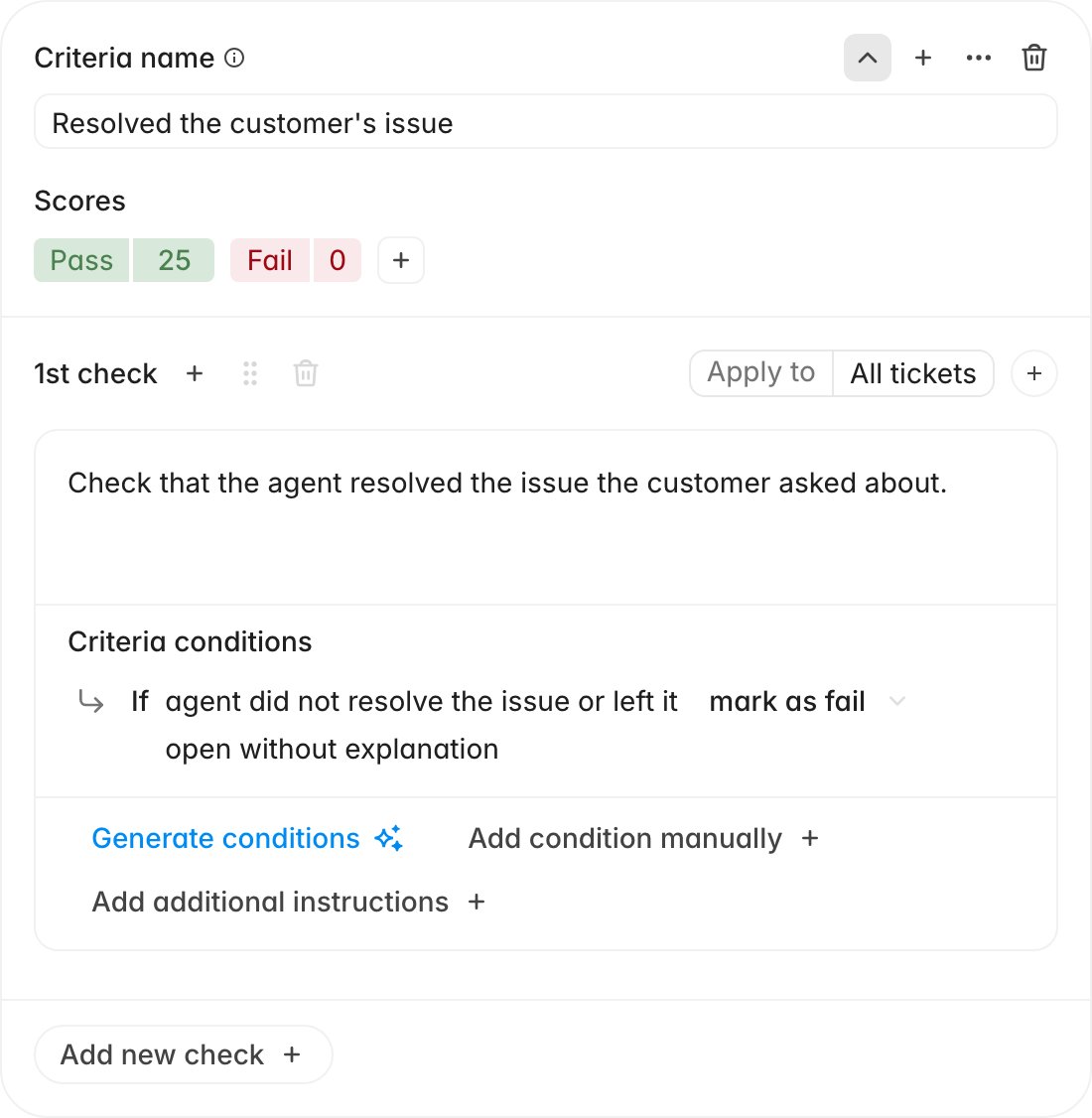
A check does not carry a score of its own. When a check fails or partially passes, the evaluator picks one of the Criteria conditions sitting under it, and every condition ends in an outcome (mark as fail, or partial or auto-fail where the
criterion offers them). That outcome sets the number.
A check marked Not Applicable did not cost anything
Apply to narrows a check to particular contexts: specific channels, new or re-assigned tickets, primary or duplicate tickets, SLA breaches, inbound or outbound calls. Scoped-out checks still appear, under Not Applicable checks. The evaluator sees the check’s conditions and decides whether they hold; scoping does not filter the check out before scoring. The evaluator also marks a check not applicable on its own judgement when the required action was never possible: a call that only reached voicemail cannot have a consent disclosure, and an unanswered message cannot have a back-and-forth.A not-applicable check contributes nothing to the score. A criterion whose checks
are all not applicable is awarded full marks. If a criterion you expected to be
skipped is quietly handing out points, that is why.
Additional instructions change how a check is judged
Apply to decides whether a check runs; additional instructions change how it is judged when it does. The exception lives on the check, in its instructions field.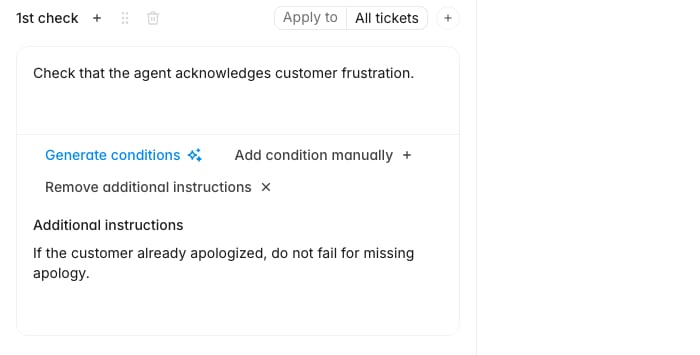
If the customer already apologized, do not fail for missing apology will make the check behave in a way
the description alone never suggests.
When a whole section scores oddly, look one level up. A section’s
Instructions, set from its … menu under Edit, reach every criterion
inside it, so a single sentence there can shift several scores at once.