

Where the filters live
Both QA lists put filters in the same place: the pill row at the top of the list, with a + at the end and a filter icon in the toolbar. The menu that opens has a search box at the top, so typingbrand is faster than hunting through submenus.
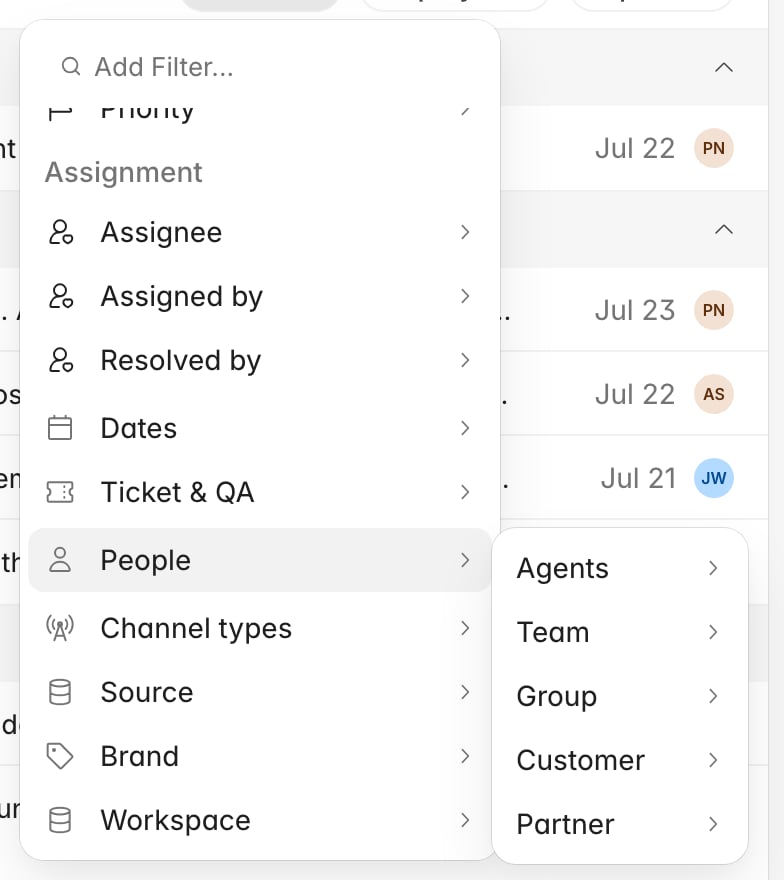
Team, Partner, Brand, and Channel
Team
A Rulebase concept. You build teams on the agent roster and assign agents to them, so a ticket matches a team filter when at least one agent who worked it belongs to that team. A ticket handled by two people from different teams therefore matches both. The catch is that the link between a ticket and a team is only recorded for agents marked eligible for QA evaluation. If someone touched the ticket but is not on the roster as evaluable, their team will not pull that ticket into a team filter.Partner
Also a Rulebase concept, and also carried by the agent rather than the ticket: each agent belongs to at most one partner, and a ticket matches when one of its agents does. This is the dimension for outsourced or BPO work, and the way to compare an outsourcer against your in-house team: a partner is a property of who did the work, not of where the ticket came from. Unlike Team, the partner link is recorded for every agent on the ticket regardless of QA eligibility.Brand
A property of the ticket, and specific to Zendesk. Brand only appears in the filter menu when your organization has a Zendesk connection, and it selects the Zendesk brand the ticket arrived under. Use it when one help desk serves several customer-facing brands and the standards or scorecards differ between them.Channel
The medium the conversation happened on: Call, Email, or Chat. A conversation can carry more than one (a chat that turned into a call has both), and the filter matches on any of them. Selecting Call returns every conversation that contained a call, not only the ones that were purely calls.Group means different things on the two lists. On the Tickets list it means
the group the ticket sits in on your help desk, a Zendesk or Intercom group
synced across with the ticket. On the Evaluations list, the same label means the group of the
agent being scored. Both trace back to your help desk rather than to Rulebase, but
one is a property of the ticket and the other a property of the person, so the same
filter answers a different question on each list. Team, by contrast, is always a
Rulebase concept, and it lines up with Group only if you set it up to.
Source and Workspace
Source is the integration type: Zendesk, Intercom, Freshdesk. Filter by Source when you want everything from one product. Workspace is a specific connection. It only appears when your organization has more than one customer interaction integration connected, and it is what you need when you have two Zendesk accounts and want one of them. It also offers No workspace, for interactions that are not tied to a connection at all.Filtering the Evaluations list
The Evaluations list has its own filter menu, organized around the fact that a row here is one agent’s score rather than one ticket.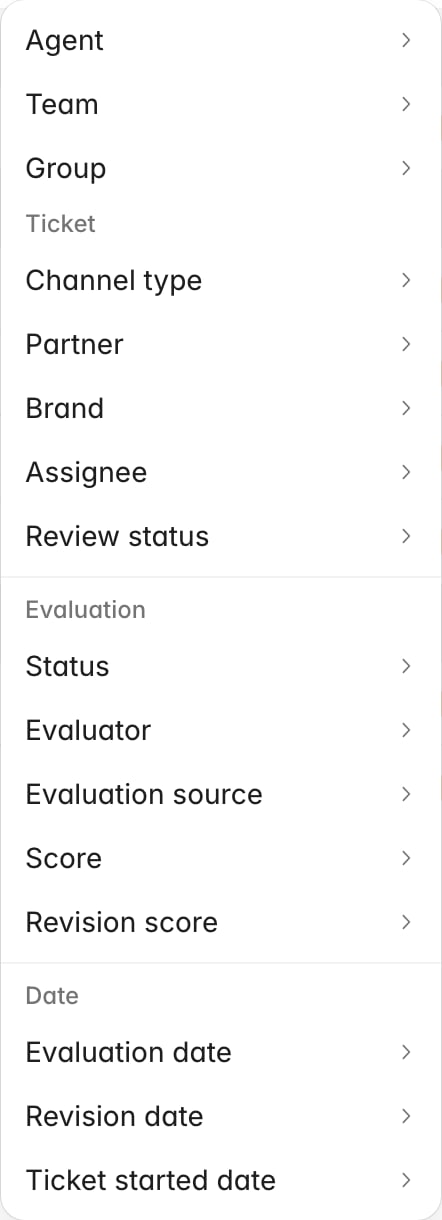
- Evaluator narrows to a named reviewer, or to AI. Evaluation source is the blunter version of the same idea, AI or Human.
- Score and Revision score filter on the number, with the revision score being the value after a contest changed it.
- Status is Approved or Pending, and it is about the approval state of the evaluation rather than the review state of the ticket.
When a filter returns less than you expect
Common causes:- The date filter you did not set. Both lists arrive with a date range already applied, and on Tickets that range is on the evaluated date rather than when the ticket came in. A ticket that arrived in the window but was scored outside it will not be there.
- A ticket that was never evaluated. The built-in Tickets view only shows tickets that have a QA evaluation, so an unevaluated one is invisible no matter what else you select. Why wasn’t my ticket evaluated? explains the reasons.
- Team where you meant Partner, or Group where you meant Team. Re-read the definitions above; a wrong-but-valid filter returns a plausible-looking list rather than an error.
Related
- Find tickets and evaluations
- Create and manage teams, for how the Team dimension gets populated
- Manage the agent roster, for agent eligibility and partner assignment
- Export QA evaluation data, for taking a filtered list out of Rulebase
- Rulebase glossary